

Service accounts require an Enterprise License Key.
Overview
Service accounts provide machine-to-machine authentication for automated access to the Lightdash API. Unlike personal access tokens which are tied to individual users, service accounts are organization-level entities designed for applications, CI/CD pipelines, and automated workflows. Service accounts allow you to:- Authenticate API requests without using personal user credentials
- Grant specific permission scopes (read, edit, or admin)
- Set expiration dates for tokens
Enabling service accounts (self-hosted only)
If you’re self-hosting Lightdash, you will need to add the following environment variable to your configuration:Creating a Service Account
- Navigate to General Settings → Service Accounts
-
Click Add Service Account
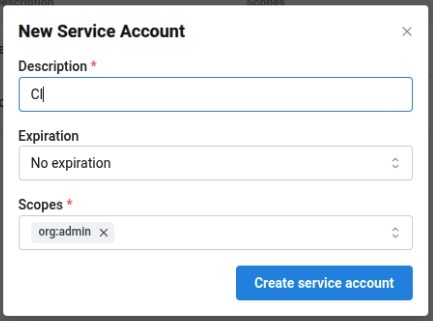
- Enter a Description and optional Expiry
- Select one or more Scopes to grant
- Click Create service account
-
Copy the generated token. This is the only time it will be shown. All service account tokens will be prefixed with
ldsvc_
Scopes
Scopes are hierarchical - granting a higher-level scope (e.g.org:admin) automatically includes all lower-level permissions (e.g. org:edit, org:view).
| Scope | Description |
|---|---|
org:view | Read-only access to Lightdash content. |
org:edit | Can create/modify Lightdash content (charts and dashboards), and all org:view permissions. |
org:admin | Full organization-level control. Includes deploy, preview, download/upload, user-management, and all org:edit & org:view permissions. |
Using service accounts
With Lightdash CLI
You can use service account tokens to authenticate with the Lightdash CLI:With the API
Service account tokens use theAuthorization header:
Example Use cases
CI/CD automation
Use service accounts to automatically deploy dbt changes to Lightdash in your CI/CD pipeline. See deploying with GitHub Actions for implementation details.Instance initialization
When setting up a new self-hosted instance, configureLD_SETUP_SERVICE_ACCOUNT_TOKEN to initialize with a service account. See the environment variables guide for details.