Organize saved charts and dashboards into spaces, and manage who can access each one
Spaces are kind of like folders. All saved charts and dashboards exist in a Space and can only be in one Space at a time.
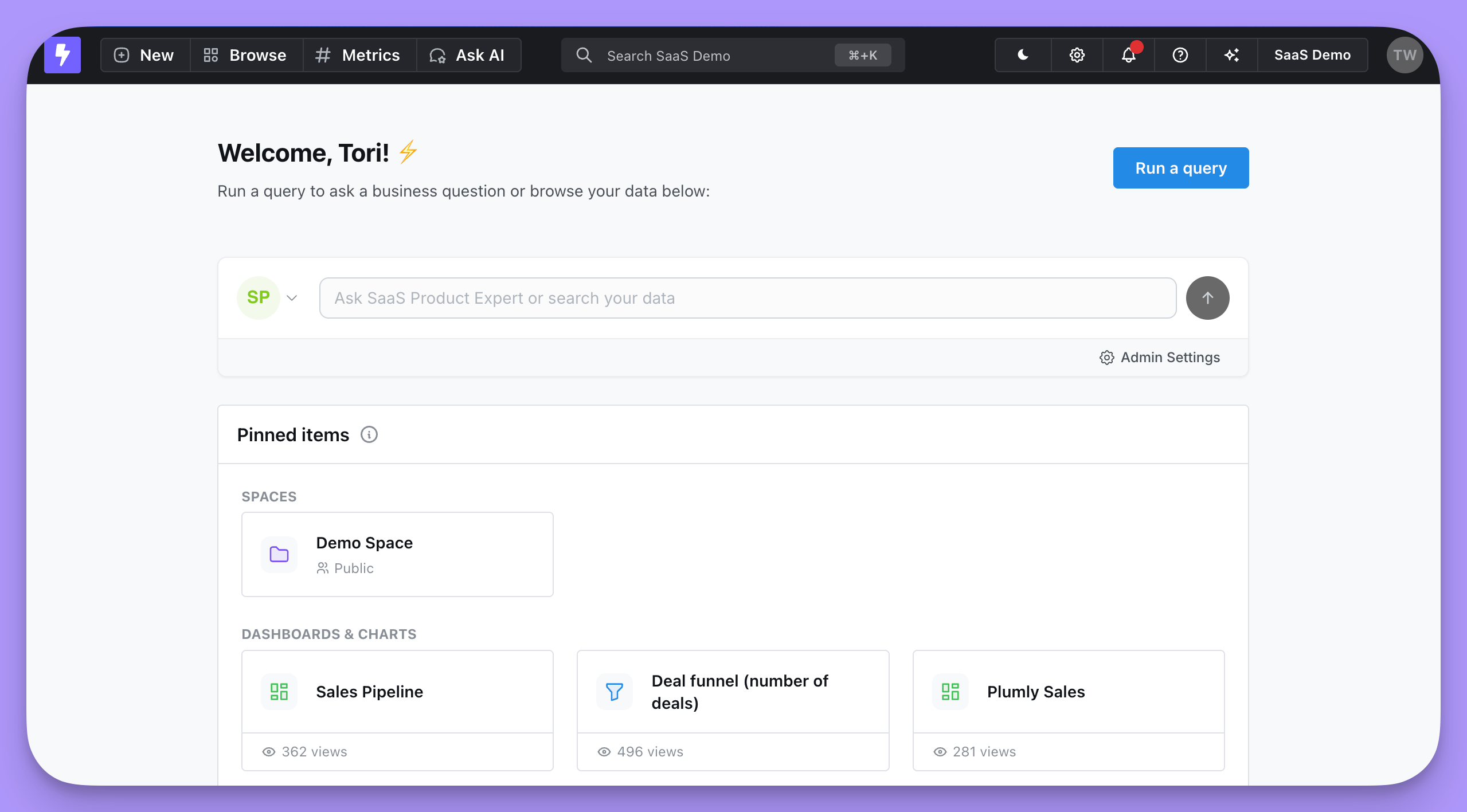
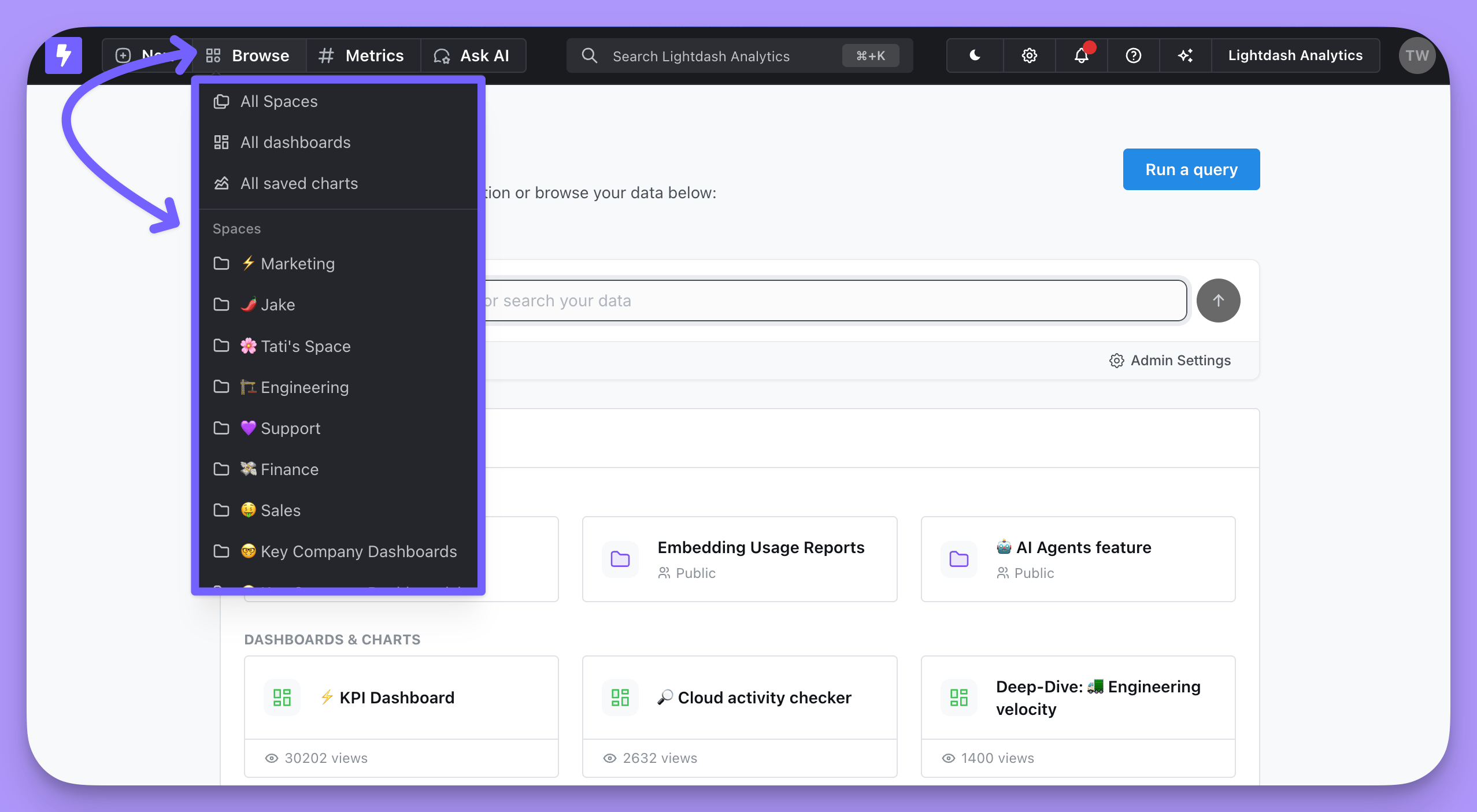
To access Spaces, you can either select a Space from the drop-down list in Browse or you can click on the Lightdash icon and select your Space from the homepage.To build subfolders, nest Spaces inside each other, for example a Marketing Space with Campaigns and Paid social Spaces inside it. All saved charts, All dashboards and All data apps in Browse list content from every Space you can access in one flat list, with a Space column showing where each item lives. Use them to find content, and Spaces to organize it.
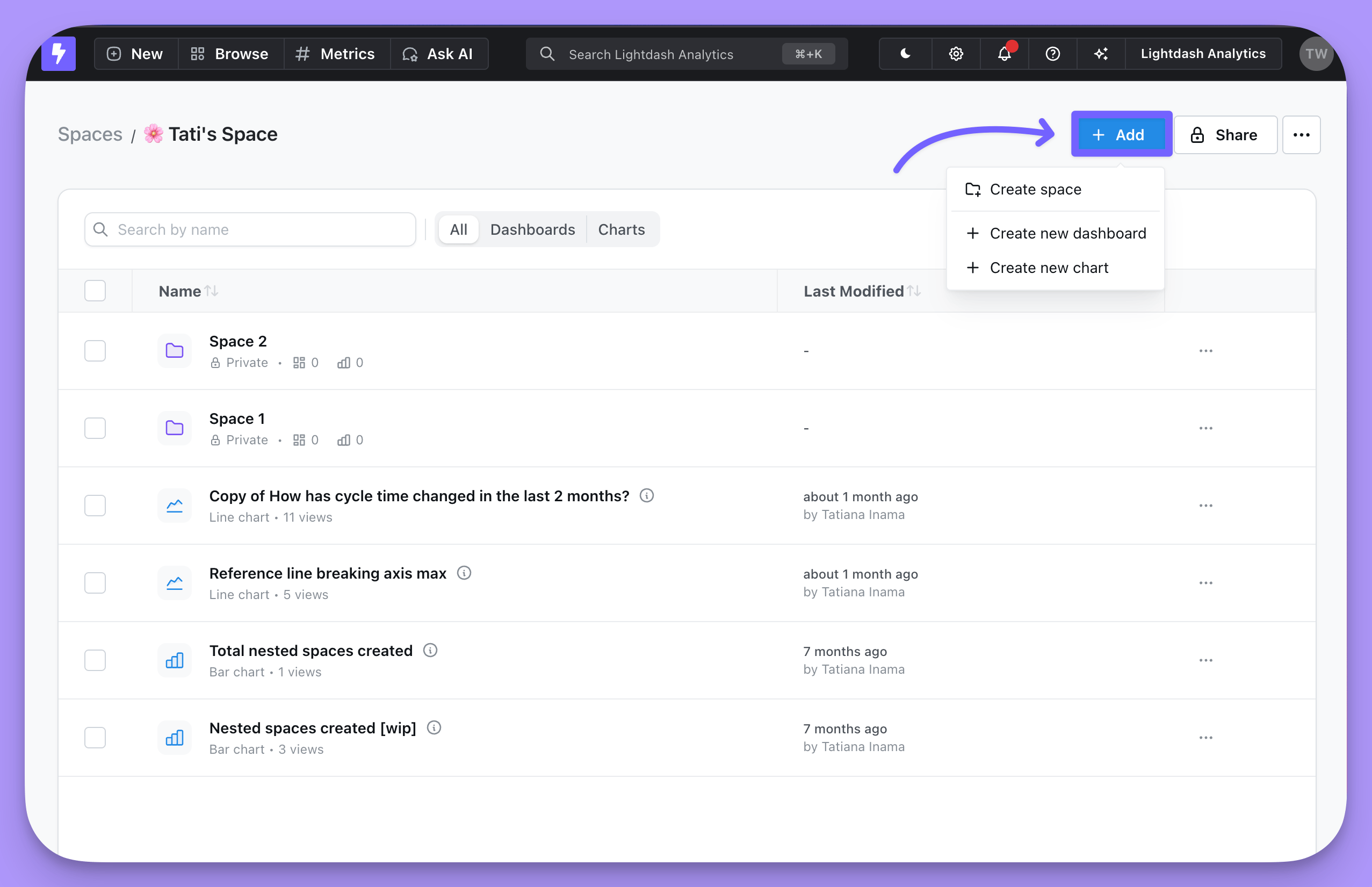
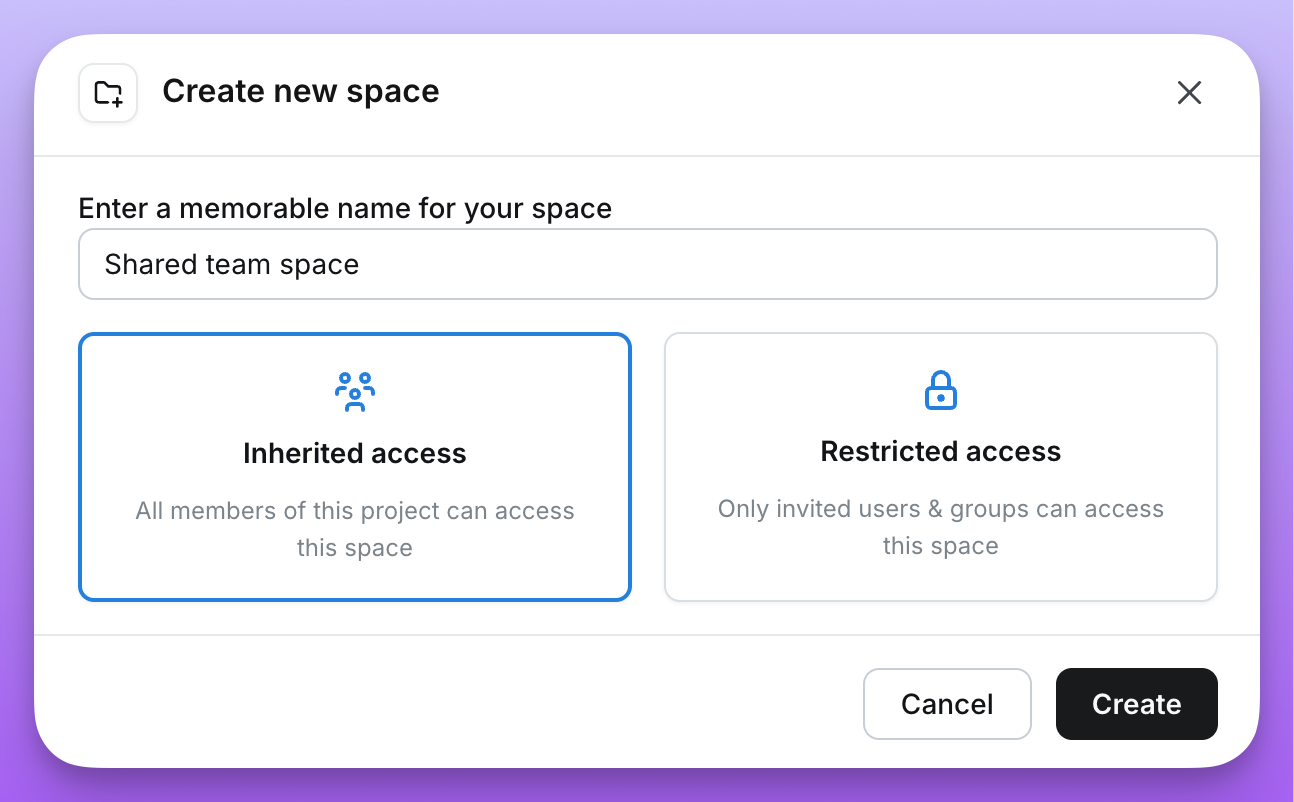
Editors and above can create Spaces. Click Add on the All spaces page, or pick Space from the + New menu in the navigation bar, then give the Space a name. Root-level Spaces also ask you to pick an access mode as you create them: Inherited access (everyone in the project, the default) or Restricted access (only invited users and groups) — see managing access for what each means.To create a nested Space, open the parent Space and pick Create space from its Add menu. A nested Space always starts with the same access as its parent; you can change that after creating it. Either way, you become an admin of the Space you created, and it appears in Browse and on the All spaces page alongside the rest. This is a direct Full Access grant on the Space, so it stays if your project role changes later and when the Space switches between Inherited and Restricted Access. To change it, update that user’s role in the Space’s Share dialog.
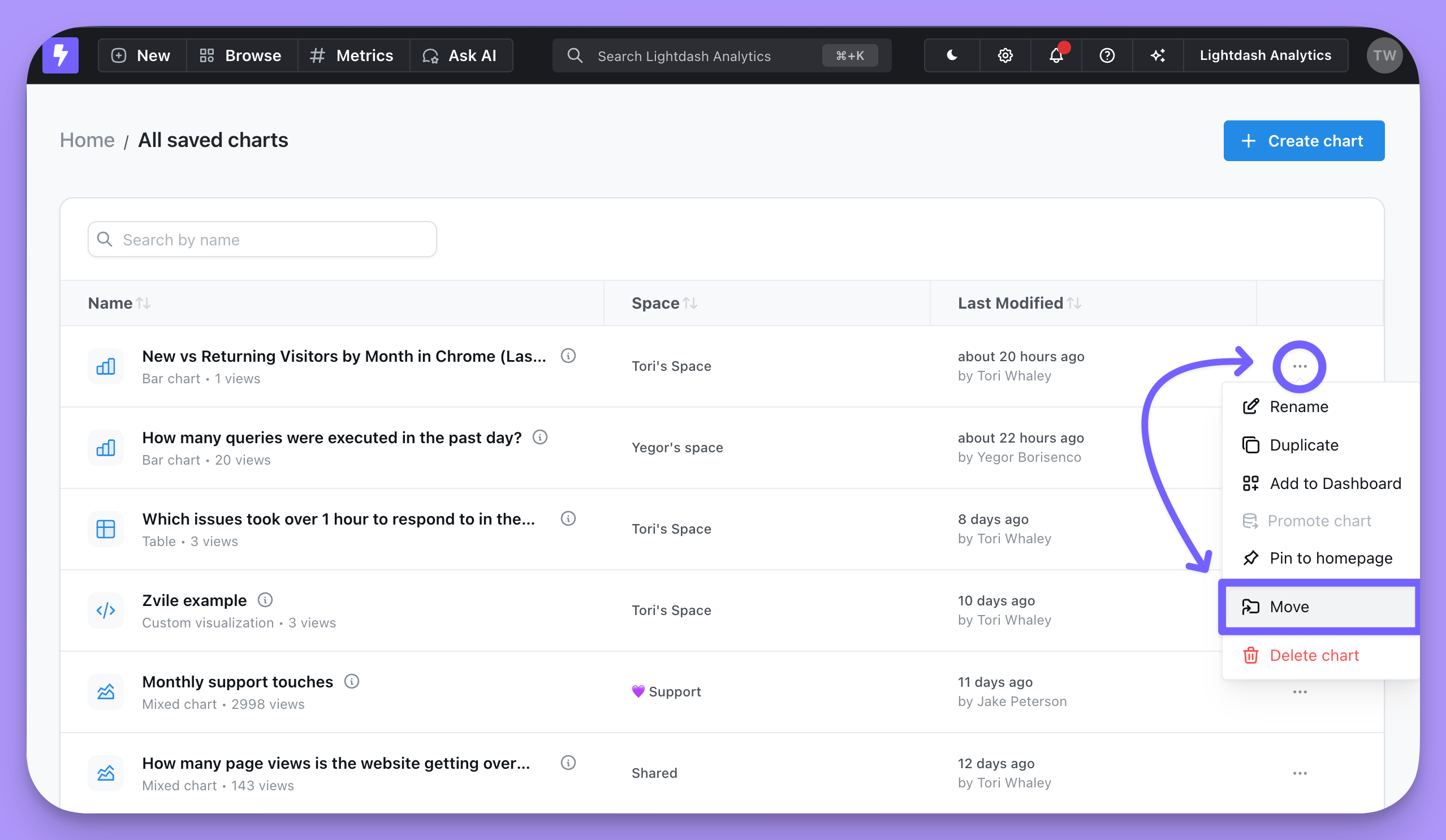
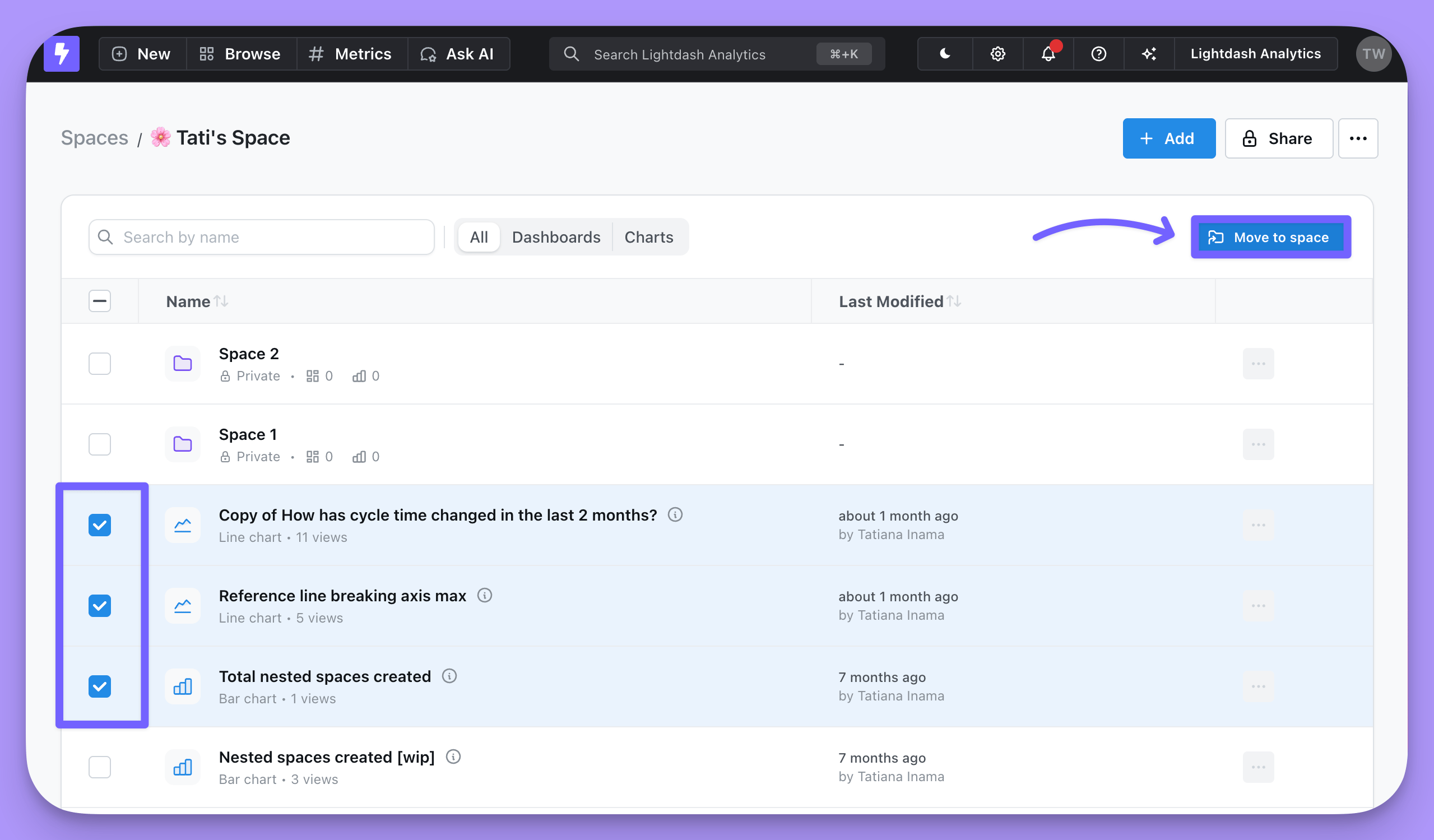
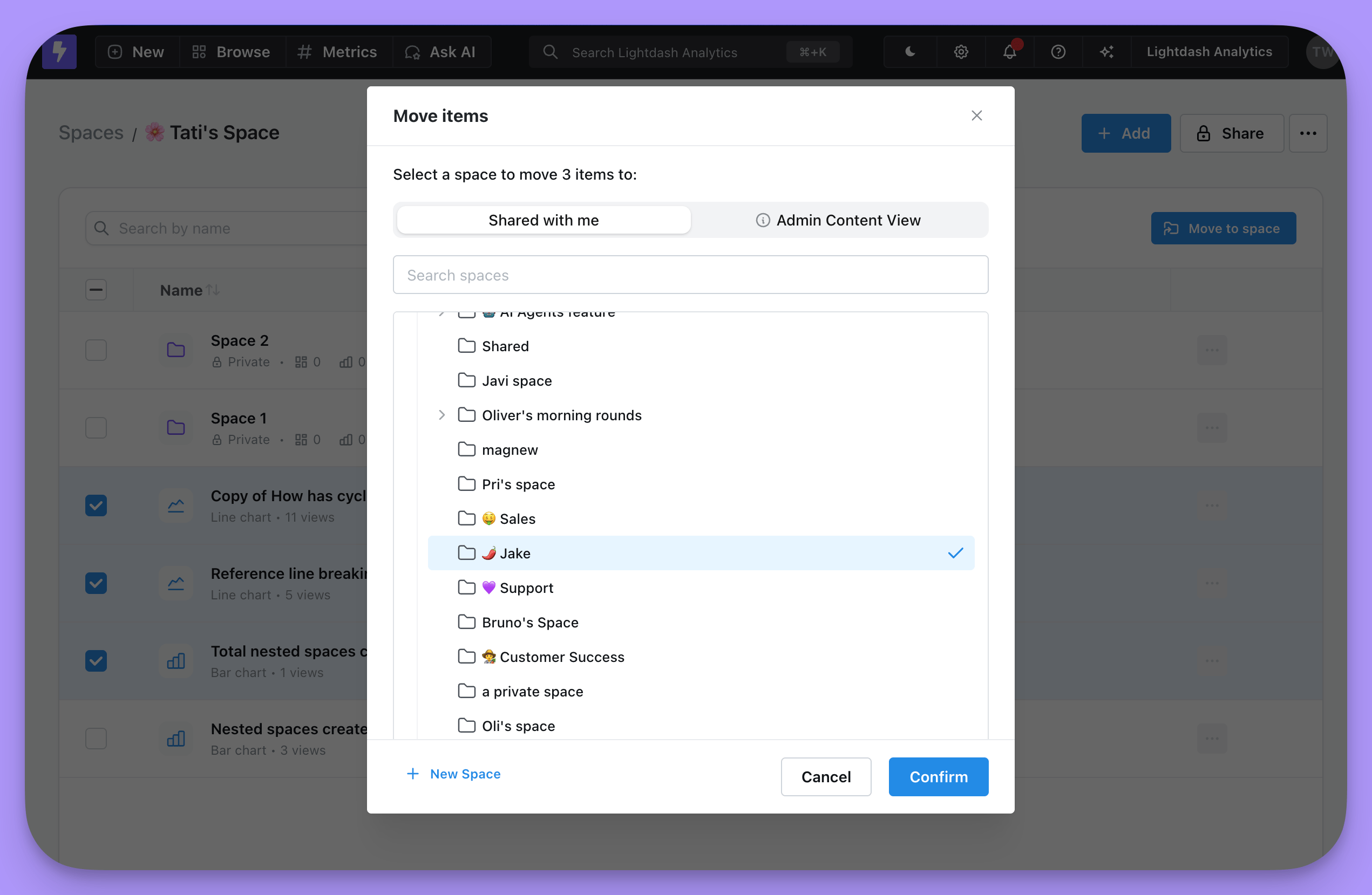
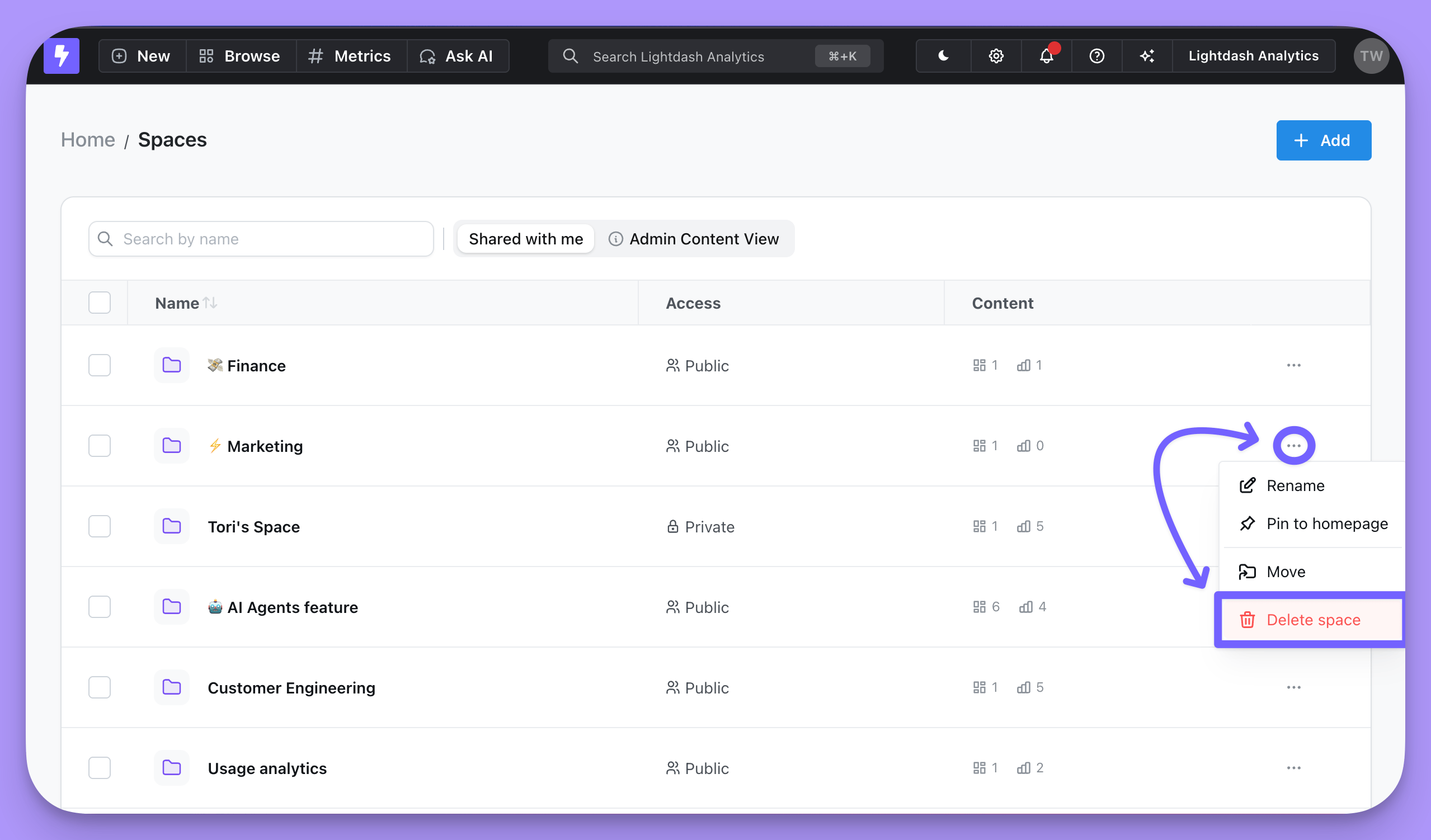
To move a saved chart, dashboard or space between Spaces, you can click on the three dot menu (...) to the right of the item and pick the Move action. Or select items using checkboxes on the left and click Move to Space.
Moving a dashboard doesn’t move the saved charts on it. A saved chart can appear on several dashboards, so it stays in its own space. To see a tile, a user needs access to the chart as well as the dashboard, so when you move a dashboard to share it more widely, move its saved charts to a space those users can access too. Charts created inside the dashboard belong to it and move with it.You can also add items to a Space from within the Space. Just click on the Add button on the space page.
By default, when you create a Space, it has Inherited Access—inheriting permissions from the project (for root-level spaces) or from the parent space (for nested spaces). You can change a space to Restricted Access to limit it to only invited users and admins.
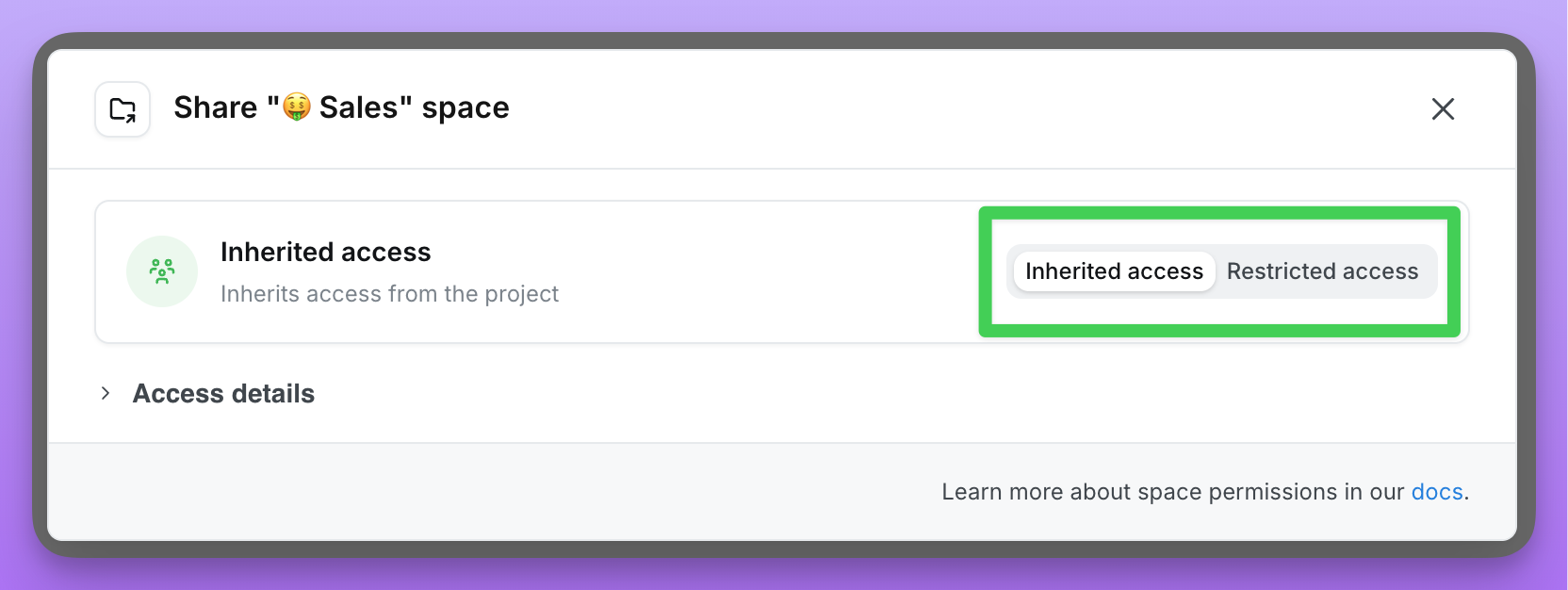
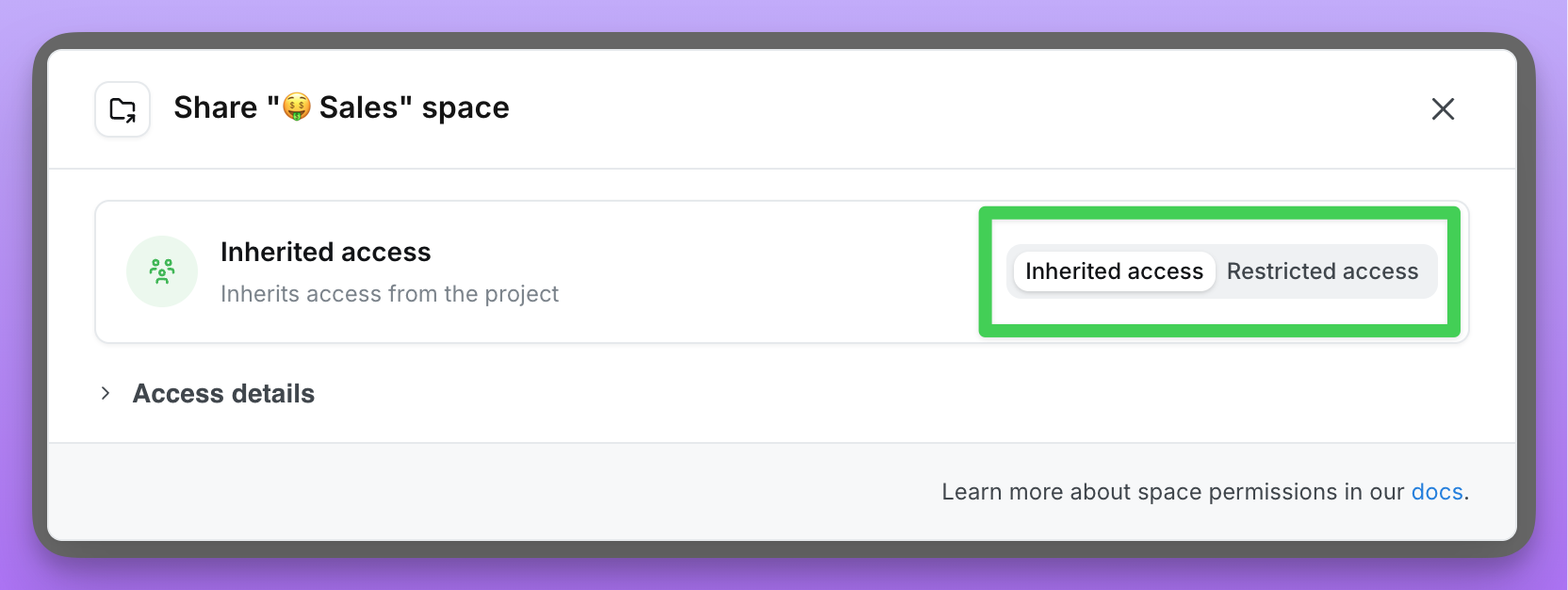
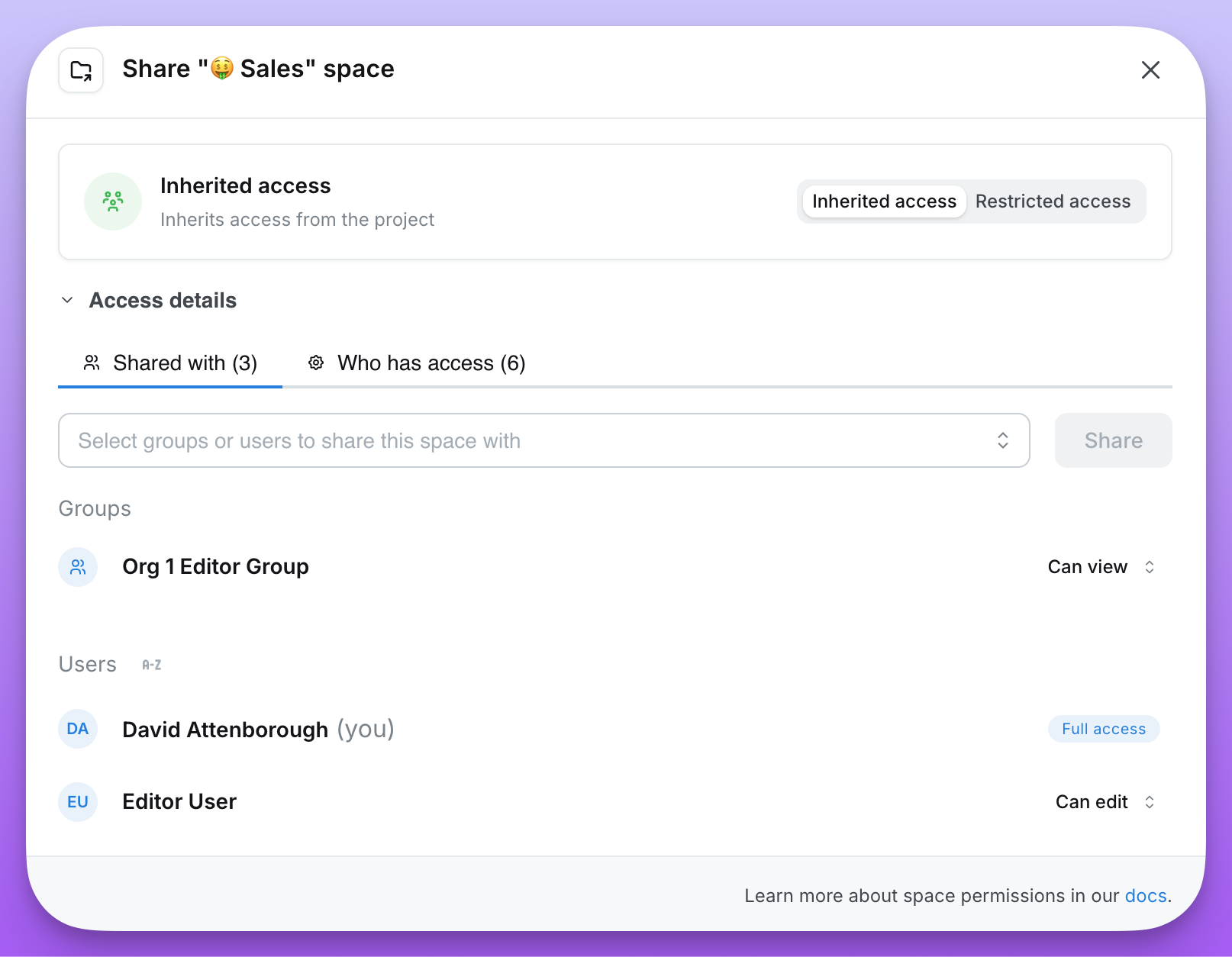
To edit access to a Space, navigate into the Space, then click the three-dot menu (...) and select Share. From there, you can choose between Inherited Access and Restricted Access.
By default, in spaces with Inherited Access, a user’s space permissions are inherited from their project permissions (for root-level spaces) or parent space (for nested spaces). For example, if I’m a project viewer, I will get Can View access to a Space.For what each space role can do, see the space roles table.
Only admins and members that are invited to a Space with Restricted Access have access to it.For example, here I have a Space with Restricted Access. Only admins and the invited members have access to this Space. Katie, Filipe and Marshall have inherited Full Access because they are organization admins. Priyanka was invited to the space, so she has Can View access to the space. Individual items can also be shared through Direct access, which does not grant access to browse this Space.Only users with Full Access permissions to a Restricted Access Space can invite other users to that Space.
To let everyone in a project view a Space while allowing only selected people to edit it:
Set the Space to Restricted Access.
Review the Space’s direct grants and remove or reduce any unwanted Can Edit or Full Access entries.
Add All project members with Can View.
Give selected users or groups Can Edit or Full Access.
Restricted Access stops permissions from parent Spaces from continuing to flow into this Space. When you change an existing Space from Inherited Access to Restricted Access, Lightdash copies its current inherited permissions into direct grants so users do not suddenly lose access. Review those copied grants before relying on the Space as view-only.Nested spaces inherit access from Restricted Access spaces by default. When you create a space inside a Restricted Access space, the nested space automatically uses Inherited Access, meaning it inherits the same restricted permissions from its parent. This makes it easy to organize content within a restricted area while maintaining consistent access control.
Everyone who has access to your project (or parent space) has access to a space with Inherited Access.For example, here I have a Space with Inherited Access. Everyone who has access to my Project, “Lightdash analytics”, will get access to the content in my space.
By default, you inherit your space permissions in an Inherited Access space from your project permissions (for root-level spaces) or parent space permissions (for nested spaces).So, if someone is an editor or developer in my project, they will have Can Edit permissions in my Space. If someone is a viewer or interactive viewer in my project, they will have Can View permissions in my Space. Project admins get Full Access. For more details about actions you can take in a Space based on your role, check out this table.
Adding All project members with Can View to an Inherited Access Space does not make the Space view-only. More permissive user or group grants from the Space or its ancestors still apply.
Users with Full Access can change a user’s Space permissions. Users cannot be removed from Inherited Access Spaces. To give a user No access, change the Space from Inherited Access to Restricted Access.
Spaces can be nested inside other spaces to create a hierarchy. Nested spaces have flexible permission options that allow you to either inherit permissions from their parent or define custom access.
When creating or editing a space, you can choose between two access modes:
Inherited Access: The space inherits permissions from its parent. For nested spaces, this means inheriting from the parent space. For root-level spaces, this means inheriting from the project. This is the more open option—users with access to the parent automatically have the same access to the space.
Restricted Access: The space defines its own permissions, which its children inherit. Only users and groups explicitly invited to this space (plus admins) can access it. This is the more restricted option.
Inheritance chain: Permissions flow down through the space hierarchy. If Space A contains Space B, and Space B contains Space C, then Space C can inherit permissions all the way from Space A (if both B and C use Inherited Access).
Breaking inheritance: When you switch a space from Inherited Access to Restricted Access, the current inherited permissions are copied as direct access entries. This ensures users don’t suddenly lose access when you restrict permissions.
Effective access: Lightdash collects direct user, group, and All project members grants from the Space and every active ancestor in its inheritance chain. The highest applicable Space role wins. A lower role on a child Space does not revoke a higher role inherited from an ancestor. If the chain contains no applicable Space grants, access is derived from the user’s organization and project permissions.
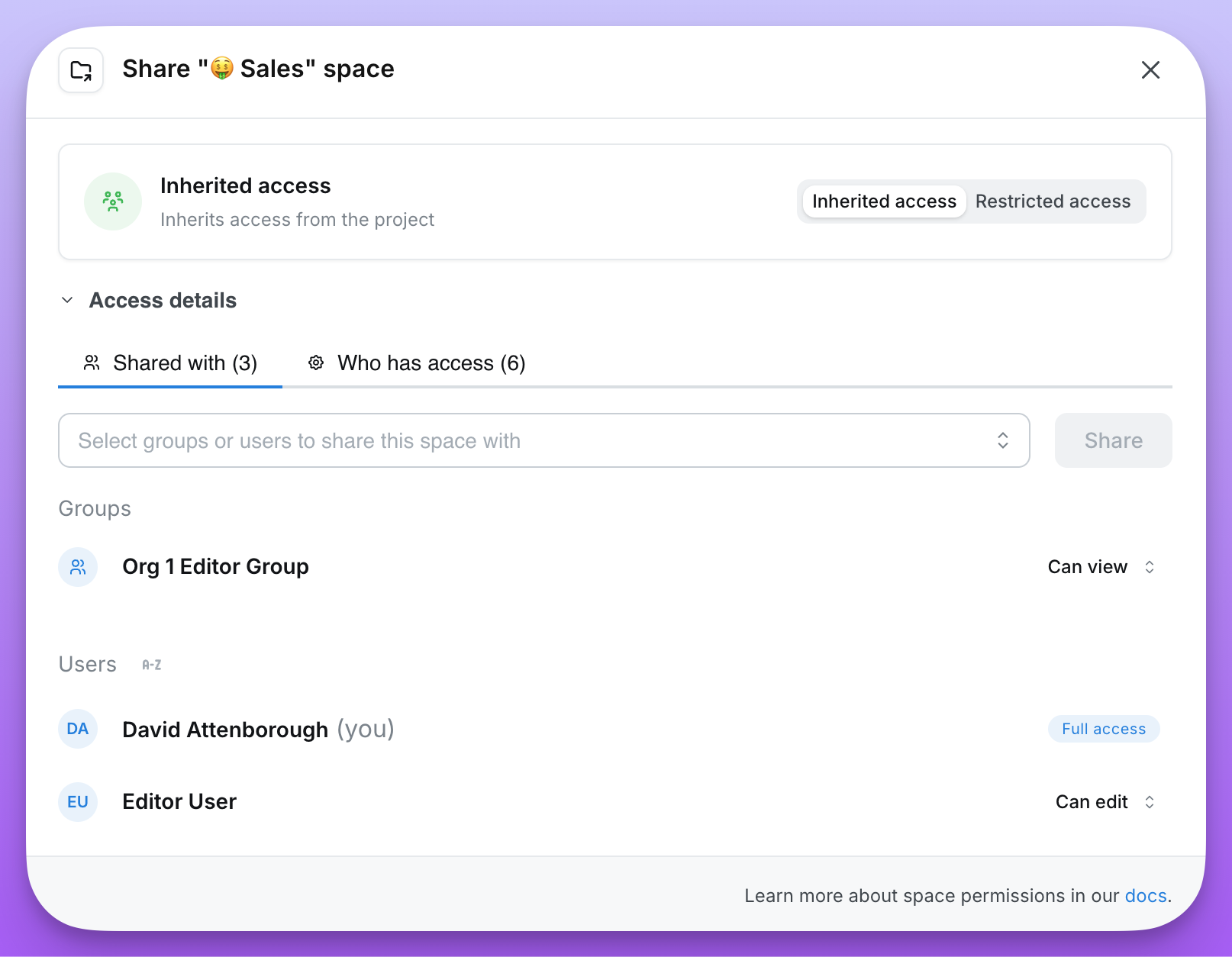
Access sources: In the Share modal, Shared with shows the configured grants, while Who has access shows each user’s effective access and where it comes from:
Direct access: Explicitly granted to this space
Parent space: Inherited from a parent space
Project: Inherited from project-level permissions
Organization: Inherited from organization-level permissions
Check Who has access when verifying that a Space is view-only.
Use groups over individual users: When sharing spaces, prefer adding groups rather than individual users. This makes permission management easier as your team grows.
Plan your hierarchy: Consider how permissions should flow before creating deeply nested structures.
Use Inherited Access when possible: Inheriting permissions simplifies management and ensures consistent access across related content.
{"docsConfig":{"theme":"mint","$schema":"https://mintlify.com/docs.json","name":"Lightdash","colors":{"primary":"#8072ff","light":"#8072ff","dark":"#8072ff"},"logo":{"light":"https://mintcdn.com/lightdash/NAoHiyWrKI0dLTGZ/logo/light.svg?fit=max\u0026auto=format\u0026n=NAoHiyWrKI0dLTGZ\u0026q=85\u0026s=4b91c8292b732e3daca7558549cf018c","dark":"https://mintcdn.com/lightdash/NAoHiyWrKI0dLTGZ/logo/dark.svg?fit=max\u0026auto=format\u0026n=NAoHiyWrKI0dLTGZ\u0026q=85\u0026s=c15813eedf4ff7a28709d8c163765fd1","href":"https://lightdash.com/"},"favicon":"https://mintcdn.com/lightdash/fPTXVBgl8dEzSm3L/favicon.png?fit=max\u0026auto=format\u0026n=fPTXVBgl8dEzSm3L\u0026q=85\u0026s=ab889bc3b46d3db2eb20c3ff381c098a","api":{"playground":{"display":"simple"}},"appearance":{"default":"light"},"background":{"decoration":"gradient"},"navbar":{"links":[{"href":"https://www.lightdash.com/#","label":"Book a demo"},{"href":"https://app.lightdash.cloud/login","label":"Login"}],"primary":{"type":"button","label":"Start for free","href":"https://www.lightdash.com/start?utm_source=docs\u0026utm_medium=internal_cta\u0026utm_campaign=get_started"}},"footer":{"socials":{"github":"https://github.com/lightdash/lightdash","slack":"https://join.slack.com/t/lightdash-community/shared_invite/zt-3pbwqmq5e-vhTc7HHcS787w618ngoPHA","linkedin":"https://www.linkedin.com/company/lightdash","x":"https://x.com/lightdash_devs"},"links":[{"header":"Lightdash","items":[{"label":"About us","href":"https://www.lightdash.com/about"},{"label":"Community","href":"https://join.slack.com/t/lightdash-community/shared_invite/zt-3pbwqmq5e-vhTc7HHcS787w618ngoPHA"},{"label":"Blog","href":"https://www.lightdash.com/blog"}]}]},"seo":{"indexing":"all"},"fonts":{"heading":{"family":"Space Grotesk","weight":600,"source":"https://fonts.gstatic.com/s/spacegrotesk/v16/V8mDoQDjQSkFtoMM3T6r8E7mPbF4Cw.woff2","format":"woff2"}},"icons":{"library":"tabler"},"styling":{"latex":false},"navigation":{"pages":[]}},"deployment":{"deploymentMetadataValue":{"subdomain":"lightdash","hasAudioNarration":false,"actualSubdomain":"lightdash","customDomains":["docs.lightdash.com"],"gitSource":{"type":"github","owner":"lightdash","repo":"mintlify-docs","deployBranch":"main","contentDirectory":"","isPrivate":false,"mountPath":"","label":""},"chroma":{"liveDeploymentHistoryId":"6aea0a2922dab27fc6c11a84","collectionId":"eb06cc5a-4c19-4f5f-ac9e-402144cdefe3","schemaVersion":"v3","latestBuiltDeploymentHistoryId":"6aea0a2922dab27fc6c11a84"},"feedback":{"issues":true,"thumbs":true},"entitlements":{"AI_CHAT":{"status":"ENABLED"},"WEB_MCP":{"status":"ENABLED"},"NARRATION":{"status":"ENABLED"}},"buildId":"6aea0a2922dab27fc6c11a84","clientVersion":"0.0.4045","searchFilterCounts":[{"language":"default","tag":"API","count":875},{"language":"default","tag":"Reference","count":871},{"language":"default","tag":"Docs","count":206},{"language":"default","tag":"API Reference","count":194},{"language":"default","tag":"Projects","count":141},{"language":"default","tag":"v2","count":127},{"language":"default","tag":"Organizations","count":76},{"language":"default","tag":"Integrations","count":40},{"language":"default","tag":"Explore","count":34},{"language":"default","tag":"Self-host","count":31}],"searchSettings":{"maxResults":10}},"assistantConfig":{"enableAskAiButton":true,"enableAskAiSearchBar":true,"deflection":{"enabled":true,"email":"support@lightdash.com","showHelpButton":false}},"basePath":"","hasChatPermissions":true,"hasWebMcpPermissions":true,"toggles":[{"name":"kill-isr","enabled":true,"variant":{"name":"disabled","enabled":false,"feature_enabled":true},"impressionData":false},{"name":"agent-mintlify-slack","enabled":true,"variant":{"name":"disabled","enabled":false,"feature_enabled":true},"impressionData":false},{"name":"agent-integrations-settings","enabled":true,"variant":{"name":"disabled","enabled":false,"feature_enabled":true},"impressionData":false},{"name":"automations-pr-grouping","enabled":true,"variant":{"name":"disabled","enabled":false,"feature_enabled":true},"impressionData":false},{"name":"custom-prefix","enabled":true,"variant":{"name":"disabled","enabled":false,"feature_enabled":true},"impressionData":false},{"name":"analytics-v7","enabled":true,"variant":{"name":"disabled","enabled":false,"feature_enabled":true},"impressionData":false},{"name":"user-flows-analytics","enabled":true,"variant":{"name":"disabled","enabled":false,"feature_enabled":true},"impressionData":false},{"name":"no-publish-flow","enabled":true,"variant":{"name":"disabled","enabled":false,"feature_enabled":true},"impressionData":false},{"name":"workos-onboarding","enabled":true,"variant":{"name":"disabled","enabled":false,"feature_enabled":true},"impressionData":false},{"name":"llms-txt-v2","enabled":true,"variant":{"name":"disabled","enabled":false,"feature_enabled":true},"impressionData":false},{"name":"snapshot-serving-live","enabled":true,"variant":{"name":"disabled","enabled":false,"feature_enabled":true},"impressionData":false},{"name":"stripTemperatureMiddleware","enabled":true,"variant":{"name":"disabled","enabled":false,"feature_enabled":true},"impressionData":false},{"name":"support-platform-pylon-zendesk","enabled":true,"variant":{"name":"disabled","enabled":false,"feature_enabled":true},"impressionData":false},{"name":"snapshot-serving","enabled":true,"variant":{"name":"disabled","enabled":false,"feature_enabled":true},"impressionData":false},{"name":"instant-rollback","enabled":true,"variant":{"name":"disabled","enabled":false,"feature_enabled":true},"impressionData":false},{"name":"granular-notifications-server","enabled":true,"variant":{"name":"disabled","enabled":false,"feature_enabled":true},"impressionData":false},{"name":"granular-notifications","enabled":true,"variant":{"name":"disabled","enabled":false,"feature_enabled":true},"impressionData":false},{"name":"automations-fable","enabled":true,"variant":{"name":"disabled","enabled":false,"feature_enabled":true},"impressionData":false},{"name":"fixed-ai-action-pricing","enabled":true,"variant":{"name":"disabled","enabled":false,"feature_enabled":true},"impressionData":false},{"name":"automation-resolve-merge-conflict","enabled":true,"variant":{"name":"disabled","enabled":false,"feature_enabled":true},"impressionData":false},{"name":"scoped-publishing","enabled":true,"variant":{"name":"disabled","enabled":false,"feature_enabled":true},"impressionData":false},{"name":"mintql","enabled":true,"variant":{"name":"disabled","enabled":false,"feature_enabled":true},"impressionData":false},{"name":"page-level-analytics","enabled":true,"variant":{"name":"disabled","enabled":false,"feature_enabled":true},"impressionData":false},{"name":"editor-version-history-v2","enabled":true,"variant":{"name":"disabled","enabled":false,"feature_enabled":true},"impressionData":false},{"name":"billing-page-v2","enabled":true,"variant":{"name":"disabled","enabled":false,"feature_enabled":true},"impressionData":false},{"name":"full-page-search","enabled":true,"variant":{"name":"disabled","enabled":false,"feature_enabled":true},"impressionData":false},{"name":"workspace-projects","enabled":true,"variant":{"name":"disabled","enabled":false,"feature_enabled":true},"impressionData":false},{"name":"assistant-v5","enabled":true,"variant":{"name":"disabled","enabled":false,"feature_enabled":true},"impressionData":false},{"name":"byok-sep-25","enabled":true,"variant":{"name":"disabled","enabled":false,"feature_enabled":true},"impressionData":false},{"name":"fork-pr-previews","enabled":true,"variant":{"name":"disabled","enabled":false,"feature_enabled":true},"impressionData":false},{"name":"revalidation-jwt","enabled":true,"variant":{"name":"disabled","enabled":false,"feature_enabled":true},"impressionData":false},{"name":"vite-origin","enabled":true,"variant":{"name":"disabled","enabled":false,"feature_enabled":true},"impressionData":false},{"name":"billing-updated-9-15","enabled":true,"variant":{"name":"disabled","enabled":false,"feature_enabled":true},"impressionData":false},{"name":"workos-sso-scim","enabled":true,"variant":{"name":"disabled","enabled":false,"feature_enabled":true},"impressionData":false},{"name":"hobby-abuse-scan","enabled":true,"variant":{"name":"disabled","enabled":false,"feature_enabled":true},"impressionData":false},{"name":"dashboard-inbox","enabled":true,"variant":{"name":"disabled","enabled":false,"feature_enabled":true},"impressionData":false},{"name":"workos-signup","enabled":true,"variant":{"name":"disabled","enabled":false,"feature_enabled":true},"impressionData":false},{"name":"turbopuffer-dual-write","enabled":true,"variant":{"name":"disabled","enabled":false,"feature_enabled":true},"impressionData":false},{"name":"workos-enabled","enabled":true,"variant":{"name":"disabled","enabled":false,"feature_enabled":true},"impressionData":false},{"name":"approve-review-flow","enabled":true,"variant":{"name":"disabled","enabled":false,"feature_enabled":true},"impressionData":false},{"name":"sso-setup-deadline-banner","enabled":true,"variant":{"name":"disabled","enabled":false,"feature_enabled":true},"impressionData":false}],"googleFontsInlined":false},"customCss":[{"filePath":"styles.css","content":"#navigation-items>ul.sidebar-group{margin-top:12px}.feature-badges{display:flex;flex-wrap:wrap;align-items:center;gap:.375rem;margin:1rem 0;font-size:.8125rem}#content>.callout:first-child,.feature-badges:first-child{margin-top:0}.feature-badge-link{display:inline-flex;align-items:center;vertical-align:middle;border:0;border-radius:9999px;text-decoration:none!important;background-image:none!important}.feature-badge-link:hover [data-badge]{background-color:color-mix(in srgb,var(--color-text) 20%,transparent);box-shadow:0 0 0 1px var(--color-text)}.feature-badge-link:active [data-badge]{background-color:color-mix(in srgb,var(--color-text) 35%,transparent);box-shadow:inset 0 0 0 2px var(--color-text);transform:translateY(1px)}.feature-badge-link:focus-visible{outline:2px solid currentColor;outline-offset:3px}.sticky-first-col{overflow-x:auto;position:relative;max-width:100%}.sticky-first-col table{width:max-content;min-width:100%;border-collapse:separate;border-spacing:0}.sticky-first-col table td:first-child,.sticky-first-col table th:first-child{position:sticky;left:0;z-index:1;min-width:260px;max-width:320px;white-space:normal;background-color:#fff;box-shadow:inset -1px 0 0 0 rgba(0,0,0,.08)}.sticky-first-col table thead th:first-child{z-index:2}html.dark .sticky-first-col table td:first-child,html.dark .sticky-first-col table th:first-child{background-color:#0b0b0f;box-shadow:inset -1px 0 0 0 rgba(255,255,255,.1)}svg.matrix-no{background-color:#d9d5f0}html.dark svg.matrix-no{background-color:#2e2947}.copy-prompt{margin:1.5rem 0}.copy-prompt-btn{display:inline-flex;align-items:center;gap:.75rem;padding:.75rem 1.375rem;border:0;border-radius:9999px;background-color:#8072ff;color:#fff;font-size:.875rem;font-weight:500;line-height:1.25rem;cursor:pointer;box-shadow:0 1px 2px rgba(0,0,0,.08);transition:background-color 150ms ease}.copy-prompt-btn:hover{background-color:#6c5df2}.copy-prompt-btn:focus-visible{outline:2px solid #8072ff;outline-offset:2px}.copy-prompt-label{font-family:ui-monospace,SFMono-Regular,Menlo,Consolas,monospace}.copy-prompt-icons{display:inline-flex;align-items:center;gap:.3125rem}.copy-prompt-icons svg{width:1.25rem;height:1.25rem;flex:none;transition:transform 300ms ease-out}.copy-prompt-icons svg:nth-child(1){transform:rotate(-6deg)}.copy-prompt-icons svg:nth-child(4){transform:rotate(6deg)}.copy-prompt-btn:hover .copy-prompt-icons svg:nth-child(1){transform:translateX(-4px) rotate(-12deg)}.copy-prompt-btn:hover .copy-prompt-icons svg:nth-child(2){transform:translate(-1px,-1px) rotate(6deg) scale(1.1)}.copy-prompt-btn:hover .copy-prompt-icons svg:nth-child(3){transform:translate(1px,2px) rotate(-6deg) scale(1.1)}.copy-prompt-btn:hover .copy-prompt-icons svg:nth-child(4){transform:translateX(4px) rotate(12deg)}.copy-prompt-preview{margin:.625rem 0 0 .25rem;font-family:ui-monospace,SFMono-Regular,Menlo,Consolas,monospace;font-size:.8125rem;color:#9ca3af;opacity:0;transform:translateY(4px);transition:opacity 200ms ease,transform 200ms ease}html.dark .copy-prompt-preview{color:#6b7280}.copy-prompt-preview.is-copied{color:#5747cf}html.dark .copy-prompt-preview.is-copied{color:#cfc9ff}.copy-prompt-preview.is-copied,.copy-prompt:has(.copy-prompt-btn:focus-visible) .copy-prompt-preview,.copy-prompt:hover .copy-prompt-preview{opacity:1;transform:none}.copy-prompt-sr-status{position:absolute;width:1px;height:1px;padding:0;margin:-1px;overflow:hidden;clip:rect(0,0,0,0);white-space:nowrap;border:0}@media (prefers-reduced-motion:reduce){.copy-prompt-icons svg,.copy-prompt-preview{transition:none}.copy-prompt-preview{transform:none}}.setup-path{--setup-path-line:#e2e2e8;--setup-path-surface:#f5f5f7;--setup-path-ground:#ffffff;--setup-path-ink:#16151d;--setup-path-muted:#5d5c69;--setup-path-faint:#8b8a97;--setup-path-accent:#8072ff;display:grid;gap:1rem;justify-items:start;margin:1.5rem 0;color:var(--setup-path-ink);font-size:1rem;line-height:1.55}html.dark .setup-path{--setup-path-line:#2d2d38;--setup-path-surface:#1b1b22;--setup-path-ground:#0f0f14;--setup-path-ink:#efeff3;--setup-path-muted:#a5a5b2;--setup-path-faint:#777784}.setup-path p{margin:0}.setup-path ol{list-style:none;margin:0;padding:0}.setup-path svg{display:block;flex:none}.setup-path button{font-family:inherit;color:inherit;cursor:pointer}.setup-path-trunk{display:grid;width:100%}.setup-path-trunk>li{position:relative;display:grid;grid-template-columns:2.375rem minmax(0,1fr);gap:1rem;padding:0 0 1.5rem;margin:0}.setup-path-trunk>li::before{content:\"\";position:absolute;left:calc(1.1875rem - 1px);top:2.375rem;bottom:0;width:2px;background:var(--setup-path-line)}.setup-path-trunk>li.is-done::before{background:var(--setup-path-accent)}.setup-path-trunk>li.is-last{padding-bottom:0}.setup-path-trunk>li.is-last::before{display:none}.setup-path-tile{position:relative;z-index:1;display:grid;place-items:center;width:2.375rem;height:2.375rem;flex:none;border-radius:.625rem;background:var(--setup-path-surface);transition:transform 180ms ease}.setup-path-tile.is-dark{background:#16151d}.setup-path-trunk>li.is-current>.setup-path-tile{background:var(--setup-path-ink);color:var(--setup-path-ground)}.setup-path-trunk>li.is-pending>.setup-path-tile{background:0 0;border:2px dashed var(--setup-path-line);color:var(--setup-path-faint)}.setup-path-node{display:grid;gap:.75rem;min-width:0}.setup-path-answer,.setup-path-question{display:flex;align-items:center;min-height:2.375rem}.setup-path-question{font-size:1.125rem;font-weight:600;line-height:1.3}.setup-path-answer{justify-content:space-between;gap:1rem}.setup-path-answer p{display:grid;min-width:0;line-height:1.3}.setup-path-answer p span{font-size:.8125rem;color:var(--setup-path-muted)}.setup-path-answer p strong{font-weight:600}.setup-path-change{flex:none;padding:.25rem .625rem;border:1px solid transparent;border-radius:.5rem;background:0 0;font-size:.875rem;font-weight:500;color:var(--setup-path-muted)!important}.setup-path-change:hover{border-color:var(--setup-path-line);color:var(--setup-path-ink)!important}.setup-path-leaves{display:flex;flex-wrap:wrap;gap:.375rem;margin-top:-.25rem}.setup-path-leaves a{display:inline-flex;align-items:center;gap:.375rem;padding:.1875rem .625rem;border-radius:.5rem;background:var(--setup-path-surface);font-size:.8125rem;color:inherit;text-decoration:none}.setup-path-leaves a:hover{text-decoration:underline}.setup-path-chevron,.setup-path-leaves svg{color:var(--setup-path-faint)}.setup-path-note,.setup-path-pending{font-size:.8125rem;color:var(--setup-path-muted)}.setup-path-note a,.setup-path-step-body a{color:var(--setup-path-ink);font-weight:600;text-decoration:underline;text-underline-offset:3px}.setup-path-pending{display:flex;align-items:center;min-height:2.375rem;font-size:.9375rem;line-height:1.4}.setup-path-options{display:grid;grid-template-columns:repeat(var(--setup-path-columns),minmax(0,1fr));gap:.625rem}.setup-path-option{display:flex;align-items:center;gap:.75rem;min-width:0;padding:.75rem .875rem;border:1px solid var(--setup-path-line);border-radius:.75rem;background:var(--setup-path-ground);text-align:left;transition:border-color 150ms ease,background 150ms ease}.setup-path-option:hover{border-color:var(--setup-path-faint)}.setup-path-option:hover .setup-path-tile{transform:scale(1.06)}.setup-path-change:focus-visible,.setup-path-ghost:focus-visible,.setup-path-option:focus-visible,.setup-path-phase li>button:focus-visible{outline:2px solid var(--setup-path-accent);outline-offset:2px}.setup-path-option[aria-checked=true]{border-color:var(--setup-path-ink);background:var(--setup-path-surface)}.setup-path-option[aria-checked=true] .setup-path-tile:not(.is-dark){background:var(--setup-path-ground)}.setup-path-option-text{display:grid;flex:1;gap:1px;min-width:0}.setup-path-option-title{display:flex;flex-wrap:wrap;align-items:center;gap:.1875rem .5rem;font-size:.9375rem;font-weight:600;line-height:1.3}.setup-path-option-hint{font-size:.8125rem;line-height:1.4;color:var(--setup-path-muted)}.setup-path-tag{padding:1px .4375rem;border:1px solid var(--setup-path-line);border-radius:99px;font-size:.6875rem;font-weight:600;color:var(--setup-path-muted);white-space:nowrap}.setup-path-radio{display:grid;place-items:center;width:1.125rem;height:1.125rem;flex:none;border:1.5px solid var(--setup-path-line);border-radius:50%;color:transparent;transition:background 150ms ease,border-color 150ms ease}.setup-path-option[aria-checked=true] .setup-path-radio{border-color:var(--setup-path-ink);background:var(--setup-path-ink);color:var(--setup-path-ground)}.setup-path-options.is-compact .setup-path-option{padding:.5625rem .75rem}.setup-path-options.is-compact .setup-path-radio{display:none}.setup-path-options.is-compact .setup-path-option-title{display:block;overflow:hidden;text-overflow:ellipsis;white-space:nowrap}.setup-path-ghost,.setup-path-phase li>button{align-items:center;border-radius:.5rem;background:0 0}.setup-path-ghost{display:inline-flex;gap:.375rem;padding:.375rem .75rem;border:1px solid var(--setup-path-line);font-size:.875rem;font-weight:500}.setup-path-ghost:hover{border-color:var(--setup-path-ink)}.setup-path-result{display:grid;gap:1rem;min-width:0}.setup-path-result-head{display:flex;flex-wrap:wrap;align-items:center;justify-content:space-between;gap:.5rem 1rem;min-height:2.375rem}.setup-path-result-title{font-size:1.125rem;font-weight:600}.setup-path-result-title span{margin-left:.5rem;font-size:.875rem;font-weight:500;color:var(--setup-path-muted)}.setup-path-phases{display:grid;border-top:1px solid var(--setup-path-line)}.setup-path-phase{display:grid;grid-template-columns:8rem minmax(0,1fr);gap:0 1rem;padding:.75rem 0;border-bottom:1px solid var(--setup-path-line)}.setup-path-phase-name{display:flex;align-items:center;align-self:start;gap:.5rem;padding:.4375rem 0;font-size:.9375rem;font-weight:600}.setup-path-phase-name svg{color:var(--setup-path-muted)}.setup-path-phase li{margin:0;padding:0}.setup-path-phase li>button{display:flex;gap:.75rem;width:100%;min-width:0;padding:.4375rem .5rem;border:0;text-align:left}.setup-path-phase li>button:hover{background:var(--setup-path-surface)}.setup-path-step-number{width:1.25rem;flex:none;font-size:.8125rem;font-weight:600;font-variant-numeric:tabular-nums;color:var(--setup-path-faint)}.setup-path-step-title{flex:1;min-width:0;font-size:.9375rem;font-weight:500}.setup-path-chevron{transition:transform 150ms ease}.setup-path-phase li.is-open .setup-path-chevron{transform:rotate(90deg)}.setup-path-step-body{display:grid;gap:.375rem;justify-items:start;padding:0 .5rem .625rem 2.5rem;font-size:.875rem;color:var(--setup-path-muted)}.setup-path-step-body a{display:inline-flex;align-items:center;gap:.3125rem}.setup-path-step-body>span{font-size:.8125rem;color:var(--setup-path-faint)}@media (max-width:640px){.setup-path-options,.setup-path-phase{grid-template-columns:1fr}.setup-path-options.is-compact{grid-template-columns:repeat(2,minmax(0,1fr))}.setup-path-phase{gap:.25rem}}@media (prefers-reduced-motion:reduce){.setup-path-chevron,.setup-path-option,.setup-path-radio,.setup-path-tile{transition:none}}"},{"filePath":"sidebar-filter.css","content":".nav-filter{--filter-ink:rgb(var(--gray-700));--filter-muted:rgb(var(--gray-500));--filter-breadcrumb:rgb(var(--gray-600) / 0.8);--filter-border:rgb(var(--gray-200));--filter-surface:rgb(var(--background-light));--filter-hover:rgb(var(--gray-600) / 0.05);color:var(--filter-ink);margin-bottom:1rem;font-size:.875rem;line-height:1.5}html.dark .nav-filter{--filter-ink:rgb(var(--gray-300));--filter-muted:rgb(var(--gray-400));--filter-breadcrumb:rgb(var(--gray-400) / 0.8);--filter-border:rgb(var(--gray-800));--filter-surface:rgb(var(--background-dark));--filter-hover:rgb(var(--gray-200) / 0.05)}.nav-filter-field{display:flex;align-items:center;gap:.5rem;min-height:2.25rem;padding:0 .625rem;border:1px solid var(--filter-border);border-radius:.75rem;background:var(--filter-surface);transition:border-color 150ms ease,box-shadow 150ms ease}.nav-filter-field:focus-within{border-color:rgb(var(--primary));box-shadow:0 0 0 3px rgb(var(--primary)/.12)}.nav-filter svg{width:1rem;height:1rem;flex:none;color:var(--filter-muted)}.nav-filter input{width:100%;min-width:0;padding:.5rem 0;font:inherit;color:inherit;background:0 0;border:0;outline:0}.nav-filter input::placeholder{color:var(--filter-muted)}.nav-filter button{display:grid;place-items:center;width:1.75rem;height:1.75rem;flex:none;border-radius:.5rem;cursor:pointer}.nav-filter button:hover,.nav-filter-results a:hover{background:var(--filter-hover)}.nav-filter button:focus-visible,.nav-filter-results a:focus-visible{outline:2px solid rgb(var(--primary));outline-offset:2px}.nav-filter-status{padding:.625rem .75rem 0;color:var(--filter-muted);font-size:.75rem}.nav-filter-status:empty{display:none}.nav-filter-results{margin-top:.5rem}.nav-filter-results ul{list-style:none;padding:0;margin:0}.nav-filter-results a{display:grid;gap:.125rem;padding:.5rem .75rem;border-radius:.75rem;color:inherit;text-decoration:none}.nav-filter-results small{color:var(--filter-breadcrumb);font-size:.75rem}.nav-filter-results small svg{display:inline;width:.625rem;height:.625rem;margin:0 .125rem;vertical-align:-.0625rem;color:inherit}.nav-filter-results a[aria-current=page]{background:rgb(var(--primary)/.1);color:rgb(var(--primary))}.nav-filter-empty{padding:.75rem;color:var(--filter-muted)}#navigation-items[hidden],.nav-filter [hidden]{display:none}#mobile-nav #navigation-items[data-nav-filter-active]>:not(.nav-filter):not([data-nav-filter-controls]){display:none}@media (max-width:1023px){.nav-filter input{font-size:1rem}.nav-filter-field{min-height:2.75rem}}@media (prefers-reduced-motion:reduce){.nav-filter-field{transition:none}}"}],"page":{"pagePath":"explore/spaces","slug":"/explore/spaces","pageMetadata":{"title":"Spaces","description":"Organize saved charts and dashboards into spaces, and manage who can access each one","doc-type":"reference","href":"/explore/spaces"},"description":{"compiledSource":"\"use strict\";\nconst {jsx: _jsx} = arguments[0];\nconst {useMDXComponents: _provideComponents} = arguments[0];\nfunction _createMdxContent(props) {\n const _components = {\n p: \"p\",\n ..._provideComponents(),\n ...props.components\n };\n return _jsx(_components.p, {\n children: \"Organize saved charts and dashboards into spaces, and manage who can access each one\"\n });\n}\nfunction MDXContent(props = {}) {\n const {wrapper: MDXLayout} = {\n ..._provideComponents(),\n ...props.components\n };\n return MDXLayout ? _jsx(MDXLayout, {\n ...props,\n children: _jsx(_createMdxContent, {\n ...props\n })\n }) : _createMdxContent(props);\n}\nreturn {\n default: MDXContent\n};\n","frontmatter":{},"scope":{}},"pageType":"default","mdx":{"mdxSource":{"compiledSource":"\"use strict\";const{Fragment:_Fragment,jsx:_jsx,jsxs:_jsxs}=arguments[0];const{useMDXComponents:_provideComponents}=arguments[0];function _createMdxContent(props){const _components={a:`a`,code:`code`,li:`li`,ol:`ol`,p:`p`,strong:`strong`,ul:`ul`,..._provideComponents(),...props.components},{Frame,Heading,OptimizedImage,Warning}=_components;if(!Frame)_missingMdxReference(`Frame`,true);if(!Heading)_missingMdxReference(`Heading`,true);if(!OptimizedImage)_missingMdxReference(`OptimizedImage`,true);if(!Warning)_missingMdxReference(`Warning`,true);return _jsxs(_Fragment,{children:[_jsx(_components.p,{children:`Spaces are kind of like folders. All saved charts and dashboards exist in a Space and can only be in one Space at a time.`}),`\n`,_jsx(Frame,{children:_jsx(OptimizedImage,{src:`https://mintcdn.com/lightdash/PptB0out6mCmbYM1/images/explore/spaces/view-spaces.png?fit=max\u0026auto=format\u0026n=PptB0out6mCmbYM1\u0026q=85\u0026s=cf9ac22e77eff22265e67d2ccf729f79`,alt:`The Browse drop-down open in the navigation bar, listing the project's spaces`,\"data-og-width\":`2559`,width:`2559`,\"data-og-height\":`1417`,height:`1417`,\"data-path\":`images/explore/spaces/view-spaces.png`,\"data-optimize\":`true`,\"data-opv\":`3`,srcset:`https://mintcdn.com/lightdash/PptB0out6mCmbYM1/images/explore/spaces/view-spaces.png?w=280\u0026fit=max\u0026auto=format\u0026n=PptB0out6mCmbYM1\u0026q=85\u0026s=11cdaab8d7a7cef6e134e27a32320be4 280w, https://mintcdn.com/lightdash/PptB0out6mCmbYM1/images/explore/spaces/view-spaces.png?w=560\u0026fit=max\u0026auto=format\u0026n=PptB0out6mCmbYM1\u0026q=85\u0026s=6596d1f39eb09f7ece2674cb07ebca0d 560w, https://mintcdn.com/lightdash/PptB0out6mCmbYM1/images/explore/spaces/view-spaces.png?w=840\u0026fit=max\u0026auto=format\u0026n=PptB0out6mCmbYM1\u0026q=85\u0026s=434c55b2ade55df97a16455a45822b66 840w, https://mintcdn.com/lightdash/PptB0out6mCmbYM1/images/explore/spaces/view-spaces.png?w=1100\u0026fit=max\u0026auto=format\u0026n=PptB0out6mCmbYM1\u0026q=85\u0026s=4583146d3129c1f336242c9d88dd62d1 1100w, https://mintcdn.com/lightdash/PptB0out6mCmbYM1/images/explore/spaces/view-spaces.png?w=1650\u0026fit=max\u0026auto=format\u0026n=PptB0out6mCmbYM1\u0026q=85\u0026s=c1e677e5bcc057d74438e371e321e29a 1650w, https://mintcdn.com/lightdash/PptB0out6mCmbYM1/images/explore/spaces/view-spaces.png?w=2500\u0026fit=max\u0026auto=format\u0026n=PptB0out6mCmbYM1\u0026q=85\u0026s=8e97b4cd8a41fc00e7be321f4560ccc7 2500w`})}),`\n`,_jsxs(_components.p,{children:[`To access Spaces, you can either select a Space from the drop-down list in `,_jsx(_components.code,{children:`Browse`}),` or you can click on the Lightdash icon and select your Space from the homepage.`]}),`\n`,_jsxs(_components.p,{children:[`To build subfolders, `,_jsx(_components.a,{href:`#nested-space-permissions`,children:`nest Spaces`}),` inside each other, for example a `,_jsx(_components.code,{children:`Marketing`}),` Space with `,_jsx(_components.code,{children:`Campaigns`}),` and `,_jsx(_components.code,{children:`Paid social`}),` Spaces inside it. `,_jsx(_components.strong,{children:`All saved charts`}),`, `,_jsx(_components.strong,{children:`All dashboards`}),` and `,_jsx(_components.strong,{children:`All data apps`}),` in `,_jsx(_components.code,{children:`Browse`}),` list content from every Space you can access in one flat list, with a `,_jsx(_components.strong,{children:`Space`}),` column showing where each item lives. Use them to find content, and Spaces to organize it.`]}),`\n`,_jsx(Frame,{children:_jsx(OptimizedImage,{src:`https://mintcdn.com/lightdash/PptB0out6mCmbYM1/images/explore/spaces/view-all-spaces.png?fit=max\u0026auto=format\u0026n=PptB0out6mCmbYM1\u0026q=85\u0026s=7bbd9c5cdfaee99ba5da0646aaea0704`,alt:`The All spaces view, with a row per space showing its name and access level`,\"data-og-width\":`2555`,width:`2555`,\"data-og-height\":`1405`,height:`1405`,\"data-path\":`images/explore/spaces/view-all-spaces.png`,\"data-optimize\":`true`,\"data-opv\":`3`,srcset:`https://mintcdn.com/lightdash/PptB0out6mCmbYM1/images/explore/spaces/view-all-spaces.png?w=280\u0026fit=max\u0026auto=format\u0026n=PptB0out6mCmbYM1\u0026q=85\u0026s=f3a006eb4ad49b1bb58cdf1939160049 280w, https://mintcdn.com/lightdash/PptB0out6mCmbYM1/images/explore/spaces/view-all-spaces.png?w=560\u0026fit=max\u0026auto=format\u0026n=PptB0out6mCmbYM1\u0026q=85\u0026s=5d779a6c8a9bf0ae6faa74b0666fbe14 560w, https://mintcdn.com/lightdash/PptB0out6mCmbYM1/images/explore/spaces/view-all-spaces.png?w=840\u0026fit=max\u0026auto=format\u0026n=PptB0out6mCmbYM1\u0026q=85\u0026s=3e1e16e5bc9cc631a037512a5fba7c03 840w, https://mintcdn.com/lightdash/PptB0out6mCmbYM1/images/explore/spaces/view-all-spaces.png?w=1100\u0026fit=max\u0026auto=format\u0026n=PptB0out6mCmbYM1\u0026q=85\u0026s=8b755f991310a7bd4f5e5ad29472ace1 1100w, https://mintcdn.com/lightdash/PptB0out6mCmbYM1/images/explore/spaces/view-all-spaces.png?w=1650\u0026fit=max\u0026auto=format\u0026n=PptB0out6mCmbYM1\u0026q=85\u0026s=3ffdecea2c3f4f9445558f7522700dfc 1650w, https://mintcdn.com/lightdash/PptB0out6mCmbYM1/images/explore/spaces/view-all-spaces.png?w=2500\u0026fit=max\u0026auto=format\u0026n=PptB0out6mCmbYM1\u0026q=85\u0026s=a41ddf40504d416339adaf66e9ef8072 2500w`})}),`\n`,_jsx(Heading,{level:`2`,id:`creating-a-space`,children:`Creating a Space`}),`\n`,_jsxs(_components.p,{children:[`Editors and above can create Spaces. Click `,_jsx(_components.code,{children:`Add`}),` on the `,_jsx(_components.code,{children:`All spaces`}),` page, or pick `,_jsx(_components.code,{children:`Space`}),` from the `,_jsx(_components.code,{children:`+ New`}),` menu in the navigation bar, then give the Space a name. Root-level Spaces also ask you to pick an access mode as you create them: `,_jsx(_components.code,{children:`Inherited access`}),` (everyone in the project, the default) or `,_jsx(_components.code,{children:`Restricted access`}),` (only invited users and groups) — see `,_jsx(_components.a,{href:`#managing-access-to-a-space`,children:`managing access`}),` for what each means.`]}),`\n`,_jsxs(_components.p,{children:[`To create a nested Space, open the parent Space and pick `,_jsx(_components.code,{children:`Create space`}),` from its `,_jsx(_components.code,{children:`Add`}),` menu. A nested Space always starts with the same access as its parent; you can change that after creating it. Either way, you become an admin of the Space you created, and it appears in `,_jsx(_components.code,{children:`Browse`}),` and on the `,_jsx(_components.code,{children:`All spaces`}),` page alongside the rest. This is a direct `,_jsx(_components.strong,{children:`Full Access`}),` grant on the Space, so it stays if your project role changes later and when the Space switches between Inherited and Restricted Access. To change it, update that user’s role in the Space’s `,_jsx(_components.strong,{children:`Share`}),` dialog.`]}),`\n`,_jsx(Heading,{level:`2`,id:`moving-items-between-spaces`,children:`Moving items between Spaces`}),`\n`,_jsxs(_components.p,{children:[`To move a saved chart, dashboard or space between Spaces, you can click on the three dot menu (`,_jsx(_components.code,{children:`...`}),`) to the right of the item and pick the `,_jsx(_components.code,{children:`Move`}),` action. Or select items using checkboxes on the left and click `,_jsx(_components.code,{children:`Move to Space`}),`.`]}),`\n`,_jsx(Frame,{children:_jsx(OptimizedImage,{src:`https://mintcdn.com/lightdash/PptB0out6mCmbYM1/images/explore/spaces/transfer-to-space.png?fit=max\u0026auto=format\u0026n=PptB0out6mCmbYM1\u0026q=85\u0026s=3c209e7ed7edf0401d95d8eaf2f7f446`,alt:`The three-dot menu open beside a saved chart, with the Move action in the list`,\"data-og-width\":`2557`,width:`2557`,\"data-og-height\":`1486`,height:`1486`,\"data-path\":`images/explore/spaces/transfer-to-space.png`,\"data-optimize\":`true`,\"data-opv\":`3`,srcset:`https://mintcdn.com/lightdash/PptB0out6mCmbYM1/images/explore/spaces/transfer-to-space.png?w=280\u0026fit=max\u0026auto=format\u0026n=PptB0out6mCmbYM1\u0026q=85\u0026s=a4ae40dc5f89f1237aa45afdf743ea0d 280w, https://mintcdn.com/lightdash/PptB0out6mCmbYM1/images/explore/spaces/transfer-to-space.png?w=560\u0026fit=max\u0026auto=format\u0026n=PptB0out6mCmbYM1\u0026q=85\u0026s=57f21d3f37d0175f4a59dcafc0aaf38e 560w, https://mintcdn.com/lightdash/PptB0out6mCmbYM1/images/explore/spaces/transfer-to-space.png?w=840\u0026fit=max\u0026auto=format\u0026n=PptB0out6mCmbYM1\u0026q=85\u0026s=8c7985ff01261e959e500a103d23b567 840w, https://mintcdn.com/lightdash/PptB0out6mCmbYM1/images/explore/spaces/transfer-to-space.png?w=1100\u0026fit=max\u0026auto=format\u0026n=PptB0out6mCmbYM1\u0026q=85\u0026s=5687822ec30ffd5b27f5d9b643641895 1100w, https://mintcdn.com/lightdash/PptB0out6mCmbYM1/images/explore/spaces/transfer-to-space.png?w=1650\u0026fit=max\u0026auto=format\u0026n=PptB0out6mCmbYM1\u0026q=85\u0026s=1db12e6ea1c92c263942edd7ffb7d050 1650w, https://mintcdn.com/lightdash/PptB0out6mCmbYM1/images/explore/spaces/transfer-to-space.png?w=2500\u0026fit=max\u0026auto=format\u0026n=PptB0out6mCmbYM1\u0026q=85\u0026s=d3ba8ffbf108b724e9be00fc2c35e3b7 2500w`})}),`\n`,_jsx(`br`,{}),`\n`,_jsx(Frame,{children:_jsx(OptimizedImage,{src:`https://mintcdn.com/lightdash/PptB0out6mCmbYM1/images/explore/spaces/transfer-to-space-bulk.png?fit=max\u0026auto=format\u0026n=PptB0out6mCmbYM1\u0026q=85\u0026s=0785d7dd197563a2db2de855d726d3f8`,alt:`Several items selected by their left-hand checkboxes, with a Move to Space button in the toolbar above`,\"data-og-width\":`2559`,width:`2559`,\"data-og-height\":`1499`,height:`1499`,\"data-path\":`images/explore/spaces/transfer-to-space-bulk.png`,\"data-optimize\":`true`,\"data-opv\":`3`,srcset:`https://mintcdn.com/lightdash/PptB0out6mCmbYM1/images/explore/spaces/transfer-to-space-bulk.png?w=280\u0026fit=max\u0026auto=format\u0026n=PptB0out6mCmbYM1\u0026q=85\u0026s=6222ee0dd85132a571556034efdfeae2 280w, https://mintcdn.com/lightdash/PptB0out6mCmbYM1/images/explore/spaces/transfer-to-space-bulk.png?w=560\u0026fit=max\u0026auto=format\u0026n=PptB0out6mCmbYM1\u0026q=85\u0026s=5e6996b309edb1b1dbcfa07ede3a5073 560w, https://mintcdn.com/lightdash/PptB0out6mCmbYM1/images/explore/spaces/transfer-to-space-bulk.png?w=840\u0026fit=max\u0026auto=format\u0026n=PptB0out6mCmbYM1\u0026q=85\u0026s=c499db1407e8ea0f859cb7582e175ab3 840w, https://mintcdn.com/lightdash/PptB0out6mCmbYM1/images/explore/spaces/transfer-to-space-bulk.png?w=1100\u0026fit=max\u0026auto=format\u0026n=PptB0out6mCmbYM1\u0026q=85\u0026s=baa02153d0ee77505d6435bf65eccf71 1100w, https://mintcdn.com/lightdash/PptB0out6mCmbYM1/images/explore/spaces/transfer-to-space-bulk.png?w=1650\u0026fit=max\u0026auto=format\u0026n=PptB0out6mCmbYM1\u0026q=85\u0026s=c3814b199c319db0746888d8ed3b32a5 1650w, https://mintcdn.com/lightdash/PptB0out6mCmbYM1/images/explore/spaces/transfer-to-space-bulk.png?w=2500\u0026fit=max\u0026auto=format\u0026n=PptB0out6mCmbYM1\u0026q=85\u0026s=8d2477e0c84cb5ed35d658553395ea6c 2500w`})}),`\n`,_jsx(`br`,{}),`\n`,_jsx(Frame,{children:_jsx(OptimizedImage,{src:`https://mintcdn.com/lightdash/PptB0out6mCmbYM1/images/explore/spaces/transfer-to-space-bulk-2.png?fit=max\u0026auto=format\u0026n=PptB0out6mCmbYM1\u0026q=85\u0026s=d505db8adbfebcc9abec293bde922008`,alt:`The Move to Space dialog with a picker for the destination space and the selected items listed`,\"data-og-width\":`2542`,width:`2542`,\"data-og-height\":`1659`,height:`1659`,\"data-path\":`images/explore/spaces/transfer-to-space-bulk-2.png`,\"data-optimize\":`true`,\"data-opv\":`3`,srcset:`https://mintcdn.com/lightdash/PptB0out6mCmbYM1/images/explore/spaces/transfer-to-space-bulk-2.png?w=280\u0026fit=max\u0026auto=format\u0026n=PptB0out6mCmbYM1\u0026q=85\u0026s=773a068862640607cef7722e56aa5995 280w, https://mintcdn.com/lightdash/PptB0out6mCmbYM1/images/explore/spaces/transfer-to-space-bulk-2.png?w=560\u0026fit=max\u0026auto=format\u0026n=PptB0out6mCmbYM1\u0026q=85\u0026s=12d42afca3a42062a13d956b04769509 560w, https://mintcdn.com/lightdash/PptB0out6mCmbYM1/images/explore/spaces/transfer-to-space-bulk-2.png?w=840\u0026fit=max\u0026auto=format\u0026n=PptB0out6mCmbYM1\u0026q=85\u0026s=b2ae85c32af40d74ea29fe676395e4a4 840w, https://mintcdn.com/lightdash/PptB0out6mCmbYM1/images/explore/spaces/transfer-to-space-bulk-2.png?w=1100\u0026fit=max\u0026auto=format\u0026n=PptB0out6mCmbYM1\u0026q=85\u0026s=8bbe0300abd1294aacab8769d5092818 1100w, https://mintcdn.com/lightdash/PptB0out6mCmbYM1/images/explore/spaces/transfer-to-space-bulk-2.png?w=1650\u0026fit=max\u0026auto=format\u0026n=PptB0out6mCmbYM1\u0026q=85\u0026s=0f2ecff72cc51747d62ea993ef70f80b 1650w, https://mintcdn.com/lightdash/PptB0out6mCmbYM1/images/explore/spaces/transfer-to-space-bulk-2.png?w=2500\u0026fit=max\u0026auto=format\u0026n=PptB0out6mCmbYM1\u0026q=85\u0026s=a60c449d1442507a107f46bc1c84c48d 2500w`})}),`\n`,_jsxs(_components.p,{children:[`Moving a dashboard doesn’t move the saved charts on it. A saved chart can appear on several dashboards, so it stays in its own space. To see a tile, a user needs access to the chart as well as the dashboard, so when you move a dashboard to share it more widely, move its saved charts to a space those users can access too. Charts `,_jsx(_components.a,{href:`/explore/dashboards#create-a-new-chart`,children:`created inside the dashboard`}),` belong to it and move with it.`]}),`\n`,_jsxs(_components.p,{children:[`You can also add items to a Space from within the Space. Just click on the `,_jsx(_components.code,{children:`Add`}),` button on the space page.`]}),`\n`,_jsx(Frame,{children:_jsx(OptimizedImage,{src:`https://mintcdn.com/lightdash/PptB0out6mCmbYM1/images/explore/spaces/add-to-space.png?fit=max\u0026auto=format\u0026n=PptB0out6mCmbYM1\u0026q=85\u0026s=640851e416e5c882d2121edec2cfd5f7`,alt:`The Add button on a space page, offering to add existing charts and dashboards to that space`,\"data-og-width\":`2554`,width:`2554`,\"data-og-height\":`1651`,height:`1651`,\"data-path\":`images/explore/spaces/add-to-space.png`,\"data-optimize\":`true`,\"data-opv\":`3`,srcset:`https://mintcdn.com/lightdash/PptB0out6mCmbYM1/images/explore/spaces/add-to-space.png?w=280\u0026fit=max\u0026auto=format\u0026n=PptB0out6mCmbYM1\u0026q=85\u0026s=2dab51a6a92cdb5375bf296bd706d12b 280w, https://mintcdn.com/lightdash/PptB0out6mCmbYM1/images/explore/spaces/add-to-space.png?w=560\u0026fit=max\u0026auto=format\u0026n=PptB0out6mCmbYM1\u0026q=85\u0026s=23541ba8ebe53d283c58fc799e24c6bd 560w, https://mintcdn.com/lightdash/PptB0out6mCmbYM1/images/explore/spaces/add-to-space.png?w=840\u0026fit=max\u0026auto=format\u0026n=PptB0out6mCmbYM1\u0026q=85\u0026s=3250cac39a57b202b5090cf4ad4d5ff2 840w, https://mintcdn.com/lightdash/PptB0out6mCmbYM1/images/explore/spaces/add-to-space.png?w=1100\u0026fit=max\u0026auto=format\u0026n=PptB0out6mCmbYM1\u0026q=85\u0026s=6b5396042635a9bec7170ab0f23f587d 1100w, https://mintcdn.com/lightdash/PptB0out6mCmbYM1/images/explore/spaces/add-to-space.png?w=1650\u0026fit=max\u0026auto=format\u0026n=PptB0out6mCmbYM1\u0026q=85\u0026s=0ba1d3bb77168c2da11e8d01794b9551 1650w, https://mintcdn.com/lightdash/PptB0out6mCmbYM1/images/explore/spaces/add-to-space.png?w=2500\u0026fit=max\u0026auto=format\u0026n=PptB0out6mCmbYM1\u0026q=85\u0026s=e2a8ff93da1d9997ef8fdfff6bb70ba7 2500w`})}),`\n`,_jsx(Heading,{level:`2`,id:`updating-and-deleting-spaces`,children:`Updating and deleting Spaces`}),`\n`,_jsxs(_components.p,{children:[`You can rename or delete your Space from All Spaces view or on the homescreen by clicking on the three-dot menu (`,_jsx(_components.code,{children:`...`}),`) for the Space.`]}),`\n`,_jsx(Frame,{children:_jsx(OptimizedImage,{src:`https://mintcdn.com/lightdash/PptB0out6mCmbYM1/images/explore/spaces/edit-delete-space.png?fit=max\u0026auto=format\u0026n=PptB0out6mCmbYM1\u0026q=85\u0026s=acfdacda9c0c6e0f4432033c6188fc20`,alt:`The three-dot menu open beside a space in the All spaces view, with rename and delete options`,\"data-og-width\":`2558`,width:`2558`,\"data-og-height\":`1502`,height:`1502`,\"data-path\":`images/explore/spaces/edit-delete-space.png`,\"data-optimize\":`true`,\"data-opv\":`3`,srcset:`https://mintcdn.com/lightdash/PptB0out6mCmbYM1/images/explore/spaces/edit-delete-space.png?w=280\u0026fit=max\u0026auto=format\u0026n=PptB0out6mCmbYM1\u0026q=85\u0026s=3de626ee1c9bb94813a895cbcfa44c34 280w, https://mintcdn.com/lightdash/PptB0out6mCmbYM1/images/explore/spaces/edit-delete-space.png?w=560\u0026fit=max\u0026auto=format\u0026n=PptB0out6mCmbYM1\u0026q=85\u0026s=946aec98fcace19dd854b3362312e666 560w, https://mintcdn.com/lightdash/PptB0out6mCmbYM1/images/explore/spaces/edit-delete-space.png?w=840\u0026fit=max\u0026auto=format\u0026n=PptB0out6mCmbYM1\u0026q=85\u0026s=9b612d6b66f588f74834f4b3169e3590 840w, https://mintcdn.com/lightdash/PptB0out6mCmbYM1/images/explore/spaces/edit-delete-space.png?w=1100\u0026fit=max\u0026auto=format\u0026n=PptB0out6mCmbYM1\u0026q=85\u0026s=1edc94543753e562c2413d92f4ef21ca 1100w, https://mintcdn.com/lightdash/PptB0out6mCmbYM1/images/explore/spaces/edit-delete-space.png?w=1650\u0026fit=max\u0026auto=format\u0026n=PptB0out6mCmbYM1\u0026q=85\u0026s=ec934270972da510819d10a699cdef8b 1650w, https://mintcdn.com/lightdash/PptB0out6mCmbYM1/images/explore/spaces/edit-delete-space.png?w=2500\u0026fit=max\u0026auto=format\u0026n=PptB0out6mCmbYM1\u0026q=85\u0026s=159c1532c06bd190fc298e64be1aad34 2500w`})}),`\n`,_jsx(Warning,{children:_jsx(_components.p,{children:`Deleting a Space will delete all of the content in that Space.`})}),`\n`,_jsx(Heading,{level:`2`,id:`managing-access-to-a-space`,children:`Managing access to a Space`}),`\n`,_jsx(_components.p,{children:`By default, when you create a Space, it has Inherited Access—inheriting permissions from the project (for root-level spaces) or from the parent space (for nested spaces). You can change a space to Restricted Access to limit it to only invited users and admins.`}),`\n`,_jsx(Frame,{children:_jsx(OptimizedImage,{src:`https://mintcdn.com/lightdash/SLNTWrKoyVE8TrRr/images/CleanShot2026-02-26at12.23.08@2x.png?fit=max\u0026auto=format\u0026n=SLNTWrKoyVE8TrRr\u0026q=85\u0026s=7b46cbd44d5912e2fe24152dda6e4c05`,alt:`Clean Shot2026 02 26at12 23 08@2x`,\"data-og-width\":`1294`,width:`1294`,\"data-og-height\":`802`,height:`802`,\"data-path\":`images/CleanShot2026-02-26at12.23.08@2x.png`,\"data-optimize\":`true`,\"data-opv\":`3`,srcset:`https://mintcdn.com/lightdash/SLNTWrKoyVE8TrRr/images/CleanShot2026-02-26at12.23.08@2x.png?w=280\u0026fit=max\u0026auto=format\u0026n=SLNTWrKoyVE8TrRr\u0026q=85\u0026s=78558b31c9801635aabc96aa80177f26 280w, https://mintcdn.com/lightdash/SLNTWrKoyVE8TrRr/images/CleanShot2026-02-26at12.23.08@2x.png?w=560\u0026fit=max\u0026auto=format\u0026n=SLNTWrKoyVE8TrRr\u0026q=85\u0026s=5d7251aeac6a7b724bba4b8c5376e735 560w, https://mintcdn.com/lightdash/SLNTWrKoyVE8TrRr/images/CleanShot2026-02-26at12.23.08@2x.png?w=840\u0026fit=max\u0026auto=format\u0026n=SLNTWrKoyVE8TrRr\u0026q=85\u0026s=ba2508d4297ecbf952ce575f5154075d 840w, https://mintcdn.com/lightdash/SLNTWrKoyVE8TrRr/images/CleanShot2026-02-26at12.23.08@2x.png?w=1100\u0026fit=max\u0026auto=format\u0026n=SLNTWrKoyVE8TrRr\u0026q=85\u0026s=c796254361829ef206e499b9d76f929b 1100w, https://mintcdn.com/lightdash/SLNTWrKoyVE8TrRr/images/CleanShot2026-02-26at12.23.08@2x.png?w=1650\u0026fit=max\u0026auto=format\u0026n=SLNTWrKoyVE8TrRr\u0026q=85\u0026s=6a9693f21cbf9c094cd0d16ce4620dfd 1650w, https://mintcdn.com/lightdash/SLNTWrKoyVE8TrRr/images/CleanShot2026-02-26at12.23.08@2x.png?w=2500\u0026fit=max\u0026auto=format\u0026n=SLNTWrKoyVE8TrRr\u0026q=85\u0026s=4516c227ee9053e238233b9b617087e1 2500w`})}),`\n`,_jsxs(_components.p,{children:[`To edit access to a Space, navigate into the Space, then click the three-dot menu (`,_jsx(_components.code,{children:`...`}),`) and select `,_jsx(_components.code,{children:`Share`}),`. From there, you can choose between `,_jsx(_components.code,{children:`Inherited Access`}),` and `,_jsx(_components.code,{children:`Restricted Access`}),`.`]}),`\n`,_jsxs(Frame,{children:[_jsx(OptimizedImage,{src:`https://mintcdn.com/lightdash/SLNTWrKoyVE8TrRr/images/CleanShot2026-02-26at15.48.52@2x-1.png?fit=max\u0026auto=format\u0026n=SLNTWrKoyVE8TrRr\u0026q=85\u0026s=c8aad56d0d5f2e4a6969512678de4331`,alt:`The Share dialog for a space, with Inherited Access and Restricted Access as the two options`,className:`mint-hidden dark:mint-block`,\"data-og-width\":`1664`,width:`1664`,\"data-og-height\":`626`,height:`626`,\"data-path\":`images/CleanShot2026-02-26at15.48.52@2x-1.png`,\"data-optimize\":`true`,\"data-opv\":`3`,srcset:`https://mintcdn.com/lightdash/SLNTWrKoyVE8TrRr/images/CleanShot2026-02-26at15.48.52@2x-1.png?w=280\u0026fit=max\u0026auto=format\u0026n=SLNTWrKoyVE8TrRr\u0026q=85\u0026s=76e5315806daaef5c3d9b00f2380618f 280w, https://mintcdn.com/lightdash/SLNTWrKoyVE8TrRr/images/CleanShot2026-02-26at15.48.52@2x-1.png?w=560\u0026fit=max\u0026auto=format\u0026n=SLNTWrKoyVE8TrRr\u0026q=85\u0026s=b5377e9c0921f59236868b7757b3e71d 560w, https://mintcdn.com/lightdash/SLNTWrKoyVE8TrRr/images/CleanShot2026-02-26at15.48.52@2x-1.png?w=840\u0026fit=max\u0026auto=format\u0026n=SLNTWrKoyVE8TrRr\u0026q=85\u0026s=b56d894aa3e35de58a28f3bdaa33d022 840w, https://mintcdn.com/lightdash/SLNTWrKoyVE8TrRr/images/CleanShot2026-02-26at15.48.52@2x-1.png?w=1100\u0026fit=max\u0026auto=format\u0026n=SLNTWrKoyVE8TrRr\u0026q=85\u0026s=3368596dd1d0d273811bd80a834056c2 1100w, https://mintcdn.com/lightdash/SLNTWrKoyVE8TrRr/images/CleanShot2026-02-26at15.48.52@2x-1.png?w=1650\u0026fit=max\u0026auto=format\u0026n=SLNTWrKoyVE8TrRr\u0026q=85\u0026s=9599c39178053719bde7852accb2e8a8 1650w, https://mintcdn.com/lightdash/SLNTWrKoyVE8TrRr/images/CleanShot2026-02-26at15.48.52@2x-1.png?w=2500\u0026fit=max\u0026auto=format\u0026n=SLNTWrKoyVE8TrRr\u0026q=85\u0026s=3ed419cf5e68f7f483aaf3f1dcd5d03f 2500w`}),_jsx(OptimizedImage,{src:`https://mintcdn.com/lightdash/SLNTWrKoyVE8TrRr/images/CleanShot2026-02-26at15.48.52@2x.png?fit=max\u0026auto=format\u0026n=SLNTWrKoyVE8TrRr\u0026q=85\u0026s=d32655b90f6d90302454d043531e8fec`,alt:`The Share dialog for a space, with Inherited Access and Restricted Access as the two options`,className:`dark:mint-hidden`,\"data-og-width\":`1664`,width:`1664`,\"data-og-height\":`626`,height:`626`,\"data-path\":`images/CleanShot2026-02-26at15.48.52@2x.png`,\"data-optimize\":`true`,\"data-opv\":`3`,srcset:`https://mintcdn.com/lightdash/SLNTWrKoyVE8TrRr/images/CleanShot2026-02-26at15.48.52@2x.png?w=280\u0026fit=max\u0026auto=format\u0026n=SLNTWrKoyVE8TrRr\u0026q=85\u0026s=d5534c724bfc754d83be6013afc1fd4b 280w, https://mintcdn.com/lightdash/SLNTWrKoyVE8TrRr/images/CleanShot2026-02-26at15.48.52@2x.png?w=560\u0026fit=max\u0026auto=format\u0026n=SLNTWrKoyVE8TrRr\u0026q=85\u0026s=41afd7b7d34c1267f71a31b47a1d40c0 560w, https://mintcdn.com/lightdash/SLNTWrKoyVE8TrRr/images/CleanShot2026-02-26at15.48.52@2x.png?w=840\u0026fit=max\u0026auto=format\u0026n=SLNTWrKoyVE8TrRr\u0026q=85\u0026s=76c809d82c9888fa2013182bb803fa78 840w, https://mintcdn.com/lightdash/SLNTWrKoyVE8TrRr/images/CleanShot2026-02-26at15.48.52@2x.png?w=1100\u0026fit=max\u0026auto=format\u0026n=SLNTWrKoyVE8TrRr\u0026q=85\u0026s=a808765de77faac9a5a82bca5e6b065b 1100w, https://mintcdn.com/lightdash/SLNTWrKoyVE8TrRr/images/CleanShot2026-02-26at15.48.52@2x.png?w=1650\u0026fit=max\u0026auto=format\u0026n=SLNTWrKoyVE8TrRr\u0026q=85\u0026s=9cac14fd4fb838917cdfe266298462d3 1650w, https://mintcdn.com/lightdash/SLNTWrKoyVE8TrRr/images/CleanShot2026-02-26at15.48.52@2x.png?w=2500\u0026fit=max\u0026auto=format\u0026n=SLNTWrKoyVE8TrRr\u0026q=85\u0026s=2c4defc8d4bdba656957cad408d54977 2500w`})]}),`\n`,_jsxs(_components.p,{children:[`By default, in spaces with Inherited Access, a user’s space permissions are inherited from their project permissions (for root-level spaces) or parent space (for nested spaces). For example, if I’m a project viewer, I will get `,_jsx(_components.code,{children:`Can View`}),` access to a Space.`]}),`\n`,_jsxs(_components.p,{children:[`For what each space role can do, see `,_jsx(_components.a,{href:`/workspace-admin/roles#space-roles`,children:`the space roles table`}),`.`]}),`\n`,_jsx(Heading,{level:`3`,id:`restricted-access-spaces`,children:`Restricted Access spaces`}),`\n`,_jsx(_components.p,{children:_jsx(_components.strong,{children:`Only admins and members that are invited to a Space with Restricted Access have access to it.`})}),`\n`,_jsxs(_components.p,{children:[`For example, here I have a Space with Restricted Access. Only admins and the invited members have access to this Space. Katie, Filipe and Marshall have inherited `,_jsx(_components.code,{children:`Full Access`}),` because they are organization admins. Priyanka was invited to the space, so she has `,_jsx(_components.code,{children:`Can View`}),` access to the space. Individual items can also be shared through `,_jsx(_components.a,{href:`/workspace-admin/direct-access`,children:`Direct access`}),`, which does not grant access to browse this Space.`]}),`\n`,_jsxs(_components.p,{children:[`Only users with `,_jsx(_components.code,{children:`Full Access`}),` permissions to a Restricted Access Space can invite other users to that Space.`]}),`\n`,_jsx(Heading,{level:`4`,id:`give-all-project-members-view-access`,children:`Give all project members view access`}),`\n`,_jsx(_components.p,{children:`To let everyone in a project view a Space while allowing only selected people to edit it:`}),`\n`,_jsxs(_components.ol,{children:[`\n`,_jsxs(_components.li,{children:[`Set the Space to `,_jsx(_components.strong,{children:`Restricted Access`}),`.`]}),`\n`,_jsxs(_components.li,{children:[`Review the Space’s direct grants and remove or reduce any unwanted `,_jsx(_components.strong,{children:`Can Edit`}),` or `,_jsx(_components.strong,{children:`Full Access`}),` entries.`]}),`\n`,_jsxs(_components.li,{children:[`Add `,_jsx(_components.strong,{children:`All project members`}),` with `,_jsx(_components.strong,{children:`Can View`}),`.`]}),`\n`,_jsxs(_components.li,{children:[`Give selected users or groups `,_jsx(_components.strong,{children:`Can Edit`}),` or `,_jsx(_components.strong,{children:`Full Access`}),`.`]}),`\n`]}),`\n`,_jsx(_components.p,{children:`Restricted Access stops permissions from parent Spaces from continuing to flow into this Space. When you change an existing Space from Inherited Access to Restricted Access, Lightdash copies its current inherited permissions into direct grants so users do not suddenly lose access. Review those copied grants before relying on the Space as view-only.`}),`\n`,_jsxs(_components.p,{children:[_jsx(_components.strong,{children:`Nested spaces inherit access from Restricted Access spaces by default.`}),` When you create a space inside a Restricted Access space, the nested space automatically uses Inherited Access, meaning it inherits the same restricted permissions from its parent. This makes it easy to organize content within a restricted area while maintaining consistent access control.`]}),`\n`,_jsx(Heading,{level:`3`,id:`inherited-access-spaces`,children:`Inherited Access spaces`}),`\n`,_jsx(_components.p,{children:_jsx(_components.strong,{children:`Everyone who has access to your project (or parent space) has access to a space with Inherited Access.`})}),`\n`,_jsx(_components.p,{children:`For example, here I have a Space with Inherited Access. Everyone who has access to my Project, “Lightdash analytics”, will get access to the content in my space.`}),`\n`,_jsxs(Frame,{children:[_jsx(OptimizedImage,{src:`https://mintcdn.com/lightdash/SLNTWrKoyVE8TrRr/images/CleanShot2026-02-26at15.53.06@2x-1.png?fit=max\u0026auto=format\u0026n=SLNTWrKoyVE8TrRr\u0026q=85\u0026s=b8c1a7ea2fc5552608c724bae29a6089`,alt:`The Share dialog for a space set to Inherited Access, noting that everyone with access to the Lightdash analytics project can reach it`,className:`mint-hidden dark:mint-block`,\"data-og-width\":`1614`,width:`1614`,\"data-og-height\":`1254`,height:`1254`,\"data-path\":`images/CleanShot2026-02-26at15.53.06@2x-1.png`,\"data-optimize\":`true`,\"data-opv\":`3`,srcset:`https://mintcdn.com/lightdash/SLNTWrKoyVE8TrRr/images/CleanShot2026-02-26at15.53.06@2x-1.png?w=280\u0026fit=max\u0026auto=format\u0026n=SLNTWrKoyVE8TrRr\u0026q=85\u0026s=a70162a3213abe4f74bd58bde5aca9b9 280w, https://mintcdn.com/lightdash/SLNTWrKoyVE8TrRr/images/CleanShot2026-02-26at15.53.06@2x-1.png?w=560\u0026fit=max\u0026auto=format\u0026n=SLNTWrKoyVE8TrRr\u0026q=85\u0026s=42a0003d1827ba469103c9e96a7e8431 560w, https://mintcdn.com/lightdash/SLNTWrKoyVE8TrRr/images/CleanShot2026-02-26at15.53.06@2x-1.png?w=840\u0026fit=max\u0026auto=format\u0026n=SLNTWrKoyVE8TrRr\u0026q=85\u0026s=bc07f45fdc5217a44d2e944b76e0f62f 840w, https://mintcdn.com/lightdash/SLNTWrKoyVE8TrRr/images/CleanShot2026-02-26at15.53.06@2x-1.png?w=1100\u0026fit=max\u0026auto=format\u0026n=SLNTWrKoyVE8TrRr\u0026q=85\u0026s=507d99f9e889f1b1681debecfd6a61b3 1100w, https://mintcdn.com/lightdash/SLNTWrKoyVE8TrRr/images/CleanShot2026-02-26at15.53.06@2x-1.png?w=1650\u0026fit=max\u0026auto=format\u0026n=SLNTWrKoyVE8TrRr\u0026q=85\u0026s=0b60b4e96a968760213321e9a044047b 1650w, https://mintcdn.com/lightdash/SLNTWrKoyVE8TrRr/images/CleanShot2026-02-26at15.53.06@2x-1.png?w=2500\u0026fit=max\u0026auto=format\u0026n=SLNTWrKoyVE8TrRr\u0026q=85\u0026s=70368d96a9cf027942e5f1c0adbf65e7 2500w`}),_jsx(OptimizedImage,{src:`https://mintcdn.com/lightdash/SLNTWrKoyVE8TrRr/images/CleanShot2026-02-26at15.53.06@2x.png?fit=max\u0026auto=format\u0026n=SLNTWrKoyVE8TrRr\u0026q=85\u0026s=c02b3912f36e712e737501ec5c339137`,alt:`The Share dialog for a space set to Inherited Access, noting that everyone with access to the Lightdash analytics project can reach it`,className:`dark:mint-hidden`,\"data-og-width\":`1614`,width:`1614`,\"data-og-height\":`1254`,height:`1254`,\"data-path\":`images/CleanShot2026-02-26at15.53.06@2x.png`,\"data-optimize\":`true`,\"data-opv\":`3`,srcset:`https://mintcdn.com/lightdash/SLNTWrKoyVE8TrRr/images/CleanShot2026-02-26at15.53.06@2x.png?w=280\u0026fit=max\u0026auto=format\u0026n=SLNTWrKoyVE8TrRr\u0026q=85\u0026s=a8d74cec4d0580198808b24236681a3c 280w, https://mintcdn.com/lightdash/SLNTWrKoyVE8TrRr/images/CleanShot2026-02-26at15.53.06@2x.png?w=560\u0026fit=max\u0026auto=format\u0026n=SLNTWrKoyVE8TrRr\u0026q=85\u0026s=1c623e216d517acf6f04f0e2cf79a98d 560w, https://mintcdn.com/lightdash/SLNTWrKoyVE8TrRr/images/CleanShot2026-02-26at15.53.06@2x.png?w=840\u0026fit=max\u0026auto=format\u0026n=SLNTWrKoyVE8TrRr\u0026q=85\u0026s=b3f52f319a1fd5a0bc1e7f27fe7f376e 840w, https://mintcdn.com/lightdash/SLNTWrKoyVE8TrRr/images/CleanShot2026-02-26at15.53.06@2x.png?w=1100\u0026fit=max\u0026auto=format\u0026n=SLNTWrKoyVE8TrRr\u0026q=85\u0026s=14cab90b251d6e77f9ad127e319ae92a 1100w, https://mintcdn.com/lightdash/SLNTWrKoyVE8TrRr/images/CleanShot2026-02-26at15.53.06@2x.png?w=1650\u0026fit=max\u0026auto=format\u0026n=SLNTWrKoyVE8TrRr\u0026q=85\u0026s=a943e7764bf50ab30e902b525e9b4a1b 1650w, https://mintcdn.com/lightdash/SLNTWrKoyVE8TrRr/images/CleanShot2026-02-26at15.53.06@2x.png?w=2500\u0026fit=max\u0026auto=format\u0026n=SLNTWrKoyVE8TrRr\u0026q=85\u0026s=ace732d8e2c5412aa5e014f1d5de9a77 2500w`})]}),`\n`,_jsx(_components.p,{children:_jsx(_components.strong,{children:`By default, you inherit your space permissions in an Inherited Access space from your project permissions (for root-level spaces) or parent space permissions (for nested spaces).`})}),`\n`,_jsxs(_components.p,{children:[`So, if someone is an `,_jsx(_components.code,{children:`editor`}),` or `,_jsx(_components.code,{children:`developer`}),` in my project, they will have `,_jsx(_components.code,{children:`Can Edit`}),` permissions in my Space. If someone is a `,_jsx(_components.code,{children:`viewer`}),` or `,_jsx(_components.code,{children:`interactive viewer`}),` in my project, they will have `,_jsx(_components.code,{children:`Can View`}),` permissions in my Space. Project admins get `,_jsx(_components.code,{children:`Full Access`}),`. For more details about actions you can take in a Space based on your role, `,_jsx(_components.a,{href:`/workspace-admin/roles#space-roles`,children:`check out this table`}),`.`]}),`\n`,_jsx(Warning,{children:_jsxs(_components.p,{children:[`Adding `,_jsx(_components.strong,{children:`All project members`}),` with `,_jsx(_components.strong,{children:`Can View`}),` to an Inherited Access Space does not make the Space view-only. More permissive user or group grants from the Space or its ancestors still apply.`]})}),`\n`,_jsxs(_components.p,{children:[`Users with `,_jsx(_components.strong,{children:`Full Access`}),` can change a user’s Space permissions. Users cannot be removed from Inherited Access Spaces. To give a user `,_jsx(_components.strong,{children:`No access`}),`, change the Space from Inherited Access to Restricted Access.`]}),`\n`,_jsx(Heading,{level:`2`,id:`nested-space-permissions`,children:`Nested space permissions`}),`\n`,_jsx(_components.p,{children:`Spaces can be nested inside other spaces to create a hierarchy. Nested spaces have flexible permission options that allow you to either inherit permissions from their parent or define custom access.`}),`\n`,_jsx(Heading,{level:`3`,id:`permission-inheritance-options`,children:`Permission inheritance options`}),`\n`,_jsx(_components.p,{children:`When creating or editing a space, you can choose between two access modes:`}),`\n`,_jsxs(_components.ul,{children:[`\n`,_jsxs(_components.li,{children:[_jsx(_components.strong,{children:`Inherited Access`}),`: The space inherits permissions from its parent. For nested spaces, this means inheriting from the parent space. For root-level spaces, this means inheriting from the project. This is the more open option—users with access to the parent automatically have the same access to the space.`]}),`\n`,_jsxs(_components.li,{children:[_jsx(_components.strong,{children:`Restricted Access`}),`: The space defines its own permissions, which its children inherit. Only users and groups explicitly invited to this space (plus admins) can access it. This is the more restricted option.`]}),`\n`]}),`\n`,_jsx(Heading,{level:`3`,id:`how-permission-inheritance-works`,children:`How permission inheritance works`}),`\n`,_jsx(_components.p,{children:`When a nested space uses Inherited Access:`}),`\n`,_jsxs(_components.ol,{children:[`\n`,_jsxs(_components.li,{children:[_jsx(_components.strong,{children:`Inheritance chain`}),`: Permissions flow down through the space hierarchy. If Space A contains Space B, and Space B contains Space C, then Space C can inherit permissions all the way from Space A (if both B and C use Inherited Access).`]}),`\n`,_jsxs(_components.li,{children:[_jsx(_components.strong,{children:`Breaking inheritance`}),`: When you switch a space from Inherited Access to Restricted Access, the current inherited permissions are copied as direct access entries. This ensures users don’t suddenly lose access when you restrict permissions.`]}),`\n`,_jsxs(_components.li,{children:[_jsx(_components.strong,{children:`Effective access`}),`: Lightdash collects direct user, group, and `,_jsx(_components.strong,{children:`All project members`}),` grants from the Space and every active ancestor in its inheritance chain. The highest applicable Space role wins. A lower role on a child Space does not revoke a higher role inherited from an ancestor. If the chain contains no applicable Space grants, access is derived from the user’s organization and project permissions.`]}),`\n`,_jsxs(_components.li,{children:[_jsx(_components.strong,{children:`Access sources`}),`: In the Share modal, `,_jsx(_components.strong,{children:`Shared with`}),` shows the configured grants, while `,_jsx(_components.strong,{children:`Who has access`}),` shows each user’s effective access and where it comes from:`,`\n`,_jsxs(_components.ul,{children:[`\n`,_jsxs(_components.li,{children:[_jsx(_components.strong,{children:`Direct access`}),`: Explicitly granted to this space`]}),`\n`,_jsxs(_components.li,{children:[_jsx(_components.strong,{children:`Parent space`}),`: Inherited from a parent space`]}),`\n`,_jsxs(_components.li,{children:[_jsx(_components.strong,{children:`Project`}),`: Inherited from project-level permissions`]}),`\n`,_jsxs(_components.li,{children:[_jsx(_components.strong,{children:`Organization`}),`: Inherited from organization-level permissions`]}),`\n`]}),`\n`]}),`\n`]}),`\n`,_jsxs(_components.p,{children:[`Check `,_jsx(_components.strong,{children:`Who has access`}),` when verifying that a Space is view-only.`]}),`\n`,_jsx(Heading,{level:`3`,id:`managing-nested-space-permissions`,children:`Managing nested space permissions`}),`\n`,_jsx(_components.p,{children:`To change a nested space’s permission mode:`}),`\n`,_jsxs(_components.ol,{children:[`\n`,_jsx(_components.li,{children:`Navigate into the space`}),`\n`,_jsxs(_components.li,{children:[`Click the three-dot menu (`,_jsx(_components.code,{children:`...`}),`) and select `,_jsx(_components.code,{children:`Share`})]}),`\n`,_jsx(_components.li,{children:`Toggle between Inherited Access and Restricted Access`}),`\n`,_jsx(_components.li,{children:`If switching to Restricted Access, you can then add or remove specific users and groups`}),`\n`]}),`\n`,_jsx(_components.p,{children:`When you switch a space to Restricted Access, you automatically receive Full Access to prevent accidentally locking yourself out.`}),`\n`,_jsx(Heading,{level:`3`,id:`best-practices-for-nested-spaces`,children:`Best practices for nested spaces`}),`\n`,_jsxs(_components.ul,{children:[`\n`,_jsxs(_components.li,{children:[_jsx(_components.strong,{children:`Use groups over individual users`}),`: When sharing spaces, prefer adding groups rather than individual users. This makes permission management easier as your team grows.`]}),`\n`,_jsxs(_components.li,{children:[_jsx(_components.strong,{children:`Plan your hierarchy`}),`: Consider how permissions should flow before creating deeply nested structures.`]}),`\n`,_jsxs(_components.li,{children:[_jsx(_components.strong,{children:`Use Inherited Access when possible`}),`: Inheriting permissions simplifies management and ensures consistent access across related content.`]}),`\n`]})]})}function MDXContent(props={}){const{wrapper:MDXLayout}={..._provideComponents(),...props.components};return MDXLayout?_jsx(MDXLayout,{...props,children:_jsx(_createMdxContent,{...props})}):_createMdxContent(props)}return{default:MDXContent};function _missingMdxReference(id,component){throw new Error(`Expected `+(component?`component`:`object`)+\" `\"+id+\"` to be defined: you likely forgot to import, pass, or provide it.\")}","frontmatter":{},"scope":{"config":{},"pageMetadata":{"title":"Spaces","description":"Organize saved charts and dashboards into spaces, and manage who can access each one","doc-type":"reference","href":"/explore/spaces"}}},"mdxSourceWithNoJs":null},"mdxExtracts":{"tableOfContents":[{"title":"Creating a Space","slug":"creating-a-space","depth":2,"children":[]},{"title":"Moving items between Spaces","slug":"moving-items-between-spaces","depth":2,"children":[]},{"title":"Updating and deleting Spaces","slug":"updating-and-deleting-spaces","depth":2,"children":[]},{"title":"Managing access to a Space","slug":"managing-access-to-a-space","depth":2,"children":[{"title":"Restricted Access spaces","slug":"restricted-access-spaces","depth":3,"children":[]},{"title":"Give all project members view access","slug":"give-all-project-members-view-access","depth":4,"children":[]},{"title":"Inherited Access spaces","slug":"inherited-access-spaces","depth":3,"children":[]}]},{"title":"Nested space permissions","slug":"nested-space-permissions","depth":2,"children":[{"title":"Permission inheritance options","slug":"permission-inheritance-options","depth":3,"children":[]},{"title":"How permission inheritance works","slug":"how-permission-inheritance-works","depth":3,"children":[]},{"title":"Managing nested space permissions","slug":"managing-nested-space-permissions","depth":3,"children":[]},{"title":"Best practices for nested spaces","slug":"best-practices-for-nested-spaces","depth":3,"children":[]}]}],"codeExamples":{}},"jsLinks":["/_mintlify/custom/lightdash/d0a9cf4e6619eae5/analytics.js","/_mintlify/custom/lightdash/09fccb112e45cce5/sidebar-filter.js","/_mintlify/custom/lightdash/91602c574612189b/sidebar-navigation.js"],"dynamicCss":".mint-hidden {\n display: none\n}\n.dark\\:mint-block:is(.dark *) {\n display: block\n}\n.dark\\:mint-hidden:is(.dark *) {\n display: none\n}","subdomain":"lightdash","siteName":"Lightdash","title":"Spaces - Lightdash","navMaps":{"firstHrefInVersion":{},"firstHrefInLanguage":{}},"lastModified":"2026-10-30T01:40:09.534Z","originalFileLocation":"explore/spaces.mdx"},"headHtml":"\u003cscript data-mint-head>(function(){var d=document.documentElement,p=null;if(!p){try{p=localStorage.getItem(\"isDarkMode\")}catch(e){}if(p==='true')p='dark';else if(p==='false')p='light';if(p!=='light'\u0026\u0026p!=='dark'\u0026\u0026p!=='system')p=\"light\"}var r=p==='system'?(matchMedia(\"(prefers-color-scheme: dark)\").matches?'dark':'light'):p;d.classList.remove(r==='dark'?'light':'dark');d.classList.add(r);d.setAttribute(\"data-theme-preference\",p)})();\u003c/script>\u003cmeta data-mint-head name=\"description\" content=\"Organize saved charts and dashboards into spaces, and manage who can access each one\">\u003cmeta data-mint-head name=\"application-name\" content=\"Lightdash\">\u003cmeta data-mint-head name=\"generator\" content=\"Mintlify\">\u003clink data-mint-head rel=\"icon\" type=\"image/png\" sizes=\"192x192\" href=\"/mintlify-assets/_mintlify/favicons/lightdash/x1yO_UZNDKcOd4RY/_generated/favicon/android-chrome-192x192.png\" media=\"(prefers-color-scheme: light)\">\u003clink data-mint-head rel=\"apple-touch-icon\" type=\"image/png\" sizes=\"180x180\" href=\"/mintlify-assets/_mintlify/favicons/lightdash/x1yO_UZNDKcOd4RY/_generated/favicon/apple-touch-icon.png\">\u003clink data-mint-head rel=\"icon\" type=\"image/png\" sizes=\"16x16\" href=\"/mintlify-assets/_mintlify/favicons/lightdash/x1yO_UZNDKcOd4RY/_generated/favicon/favicon-16x16.png\" media=\"(prefers-color-scheme: light)\">\u003clink data-mint-head rel=\"icon\" type=\"image/png\" sizes=\"32x32\" href=\"/mintlify-assets/_mintlify/favicons/lightdash/x1yO_UZNDKcOd4RY/_generated/favicon/favicon-32x32.png\" media=\"(prefers-color-scheme: light)\">\u003clink data-mint-head rel=\"shortcut icon\" type=\"image/x-icon\" href=\"/mintlify-assets/_mintlify/favicons/lightdash/x1yO_UZNDKcOd4RY/_generated/favicon/favicon.ico\" media=\"(prefers-color-scheme: light)\">\u003clink data-mint-head rel=\"icon\" type=\"image/png\" sizes=\"192x192\" href=\"/mintlify-assets/_mintlify/favicons/lightdash/x1yO_UZNDKcOd4RY/_generated/favicon-dark/android-chrome-192x192.png\" media=\"(prefers-color-scheme: dark)\">\u003clink data-mint-head rel=\"icon\" type=\"image/png\" sizes=\"16x16\" href=\"/mintlify-assets/_mintlify/favicons/lightdash/x1yO_UZNDKcOd4RY/_generated/favicon-dark/favicon-16x16.png\" media=\"(prefers-color-scheme: dark)\">\u003clink data-mint-head rel=\"icon\" type=\"image/png\" sizes=\"32x32\" href=\"/mintlify-assets/_mintlify/favicons/lightdash/x1yO_UZNDKcOd4RY/_generated/favicon-dark/favicon-32x32.png\" media=\"(prefers-color-scheme: dark)\">\u003clink data-mint-head rel=\"shortcut icon\" type=\"image/x-icon\" href=\"/mintlify-assets/_mintlify/favicons/lightdash/x1yO_UZNDKcOd4RY/_generated/favicon-dark/favicon.ico\" media=\"(prefers-color-scheme: dark)\">\u003cmeta data-mint-head property=\"og:title\" content=\"Spaces - Lightdash\">\u003cmeta data-mint-head property=\"og:description\" content=\"Organize saved charts and dashboards into spaces, and manage who can access each one\">\u003cmeta data-mint-head property=\"og:site_name\" content=\"Lightdash\">\u003cmeta data-mint-head property=\"og:url\" content=\"https://docs.lightdash.com/explore/spaces\">\u003cmeta data-mint-head property=\"og:type\" content=\"website\">\u003cmeta data-mint-head property=\"og:image\" content=\"https://lightdash.mintlify.app/_mintlify/api/og/v2?division=Organize+and+share\u0026amp;title=Spaces\u0026amp;description=Organize+saved+charts+and+dashboards+into+spaces%2C+and+manage+who+can+access+each+one\u0026amp;theme=ec550573033c2195fadd36ad\u0026amp;signature=53dc00bad617010247a06b69d02a99fa3aeb73195c4f72e42a0a289e59f2f129\">\u003cmeta data-mint-head property=\"og:image:width\" content=\"1200\">\u003cmeta data-mint-head property=\"og:image:height\" content=\"630\">\u003cmeta data-mint-head name=\"twitter:card\" content=\"summary_large_image\">\u003cmeta data-mint-head name=\"twitter:title\" content=\"Spaces - Lightdash\">\u003cmeta data-mint-head name=\"twitter:description\" content=\"Organize saved charts and dashboards into spaces, and manage who can access each one\">\u003cmeta data-mint-head name=\"twitter:image\" content=\"https://lightdash.mintlify.app/_mintlify/api/og/v2?division=Organize+and+share\u0026amp;title=Spaces\u0026amp;description=Organize+saved+charts+and+dashboards+into+spaces%2C+and+manage+who+can+access+each+one\u0026amp;theme=ec550573033c2195fadd36ad\u0026amp;signature=53dc00bad617010247a06b69d02a99fa3aeb73195c4f72e42a0a289e59f2f129\">\u003cmeta data-mint-head name=\"twitter:image:width\" content=\"1200\">\u003cmeta data-mint-head name=\"twitter:image:height\" content=\"630\">\u003cmeta data-mint-head name=\"msapplication-config\" content=\"/mintlify-assets/_mintlify/favicons/lightdash/x1yO_UZNDKcOd4RY/_generated/favicon/browserconfig.xml\">\u003cmeta data-mint-head name=\"apple-mobile-web-app-title\" content=\"Lightdash\">\u003cmeta data-mint-head name=\"msapplication-TileColor\" content=\"#8072ff\">\u003clink data-mint-head rel=\"canonical\" href=\"https://docs.lightdash.com/explore/spaces\">\u003clink data-mint-head rel=\"alternate\" type=\"application/xml\" href=\"/sitemap.xml\">\u003clink data-mint-head rel=\"alternate\" type=\"text/markdown\" href=\"/explore/spaces.md\">\u003cscript data-mint-head type=\"application/ld+json\">{\"@context\":\"https://schema.org\",\"@graph\":[{\"@type\":\"Organization\",\"@id\":\"https://docs.lightdash.com/#organization\",\"name\":\"Lightdash\",\"url\":\"https://docs.lightdash.com\",\"logo\":{\"@type\":\"ImageObject\",\"url\":\"https://mintcdn.com/lightdash/NAoHiyWrKI0dLTGZ/logo/light.svg?fit=max\u0026auto=format\u0026n=NAoHiyWrKI0dLTGZ\u0026q=85\u0026s=4b91c8292b732e3daca7558549cf018c\"}},{\"@type\":\"WebSite\",\"@id\":\"https://docs.lightdash.com#website\",\"name\":\"Lightdash\",\"url\":\"https://docs.lightdash.com\",\"publisher\":{\"@id\":\"https://docs.lightdash.com/#organization\"}},{\"@type\":\"WebPage\",\"@id\":\"https://docs.lightdash.com/explore/spaces#webpage\",\"url\":\"https://docs.lightdash.com/explore/spaces\",\"name\":\"Spaces\",\"description\":\"Organize saved charts and dashboards into spaces, and manage who can access each one\",\"dateModified\":\"2026-10-30T01:40:09.534Z\",\"isPartOf\":{\"@id\":\"https://docs.lightdash.com#website\"},\"breadcrumb\":{\"@id\":\"https://docs.lightdash.com/explore/spaces#breadcrumb\"}},{\"@type\":\"BreadcrumbList\",\"@id\":\"https://docs.lightdash.com/explore/spaces#breadcrumb\",\"itemListElement\":[{\"@type\":\"ListItem\",\"position\":1,\"name\":\"Explore\",\"item\":\"https://docs.lightdash.com/explore\"},{\"@type\":\"ListItem\",\"position\":2,\"name\":\"Spaces\",\"item\":\"https://docs.lightdash.com/explore/spaces\"}]},{\"@type\":[\"Article\",\"TechArticle\"],\"@id\":\"https://docs.lightdash.com/explore/spaces#article\",\"headline\":\"Spaces\",\"name\":\"Spaces\",\"description\":\"Organize saved charts and dashboards into spaces, and manage who can access each one\",\"url\":\"https://docs.lightdash.com/explore/spaces\",\"mainEntityOfPage\":{\"@id\":\"https://docs.lightdash.com/explore/spaces#webpage\"},\"dateModified\":\"2026-10-30T01:40:09.534Z\",\"publisher\":{\"@id\":\"https://docs.lightdash.com/#organization\"},\"isPartOf\":{\"@id\":\"https://docs.lightdash.com#website\"}}]}\u003c/script>\u003cscript data-mint-head type=\"application/ld+json\">{\"@context\":\"https://schema.org\",\"@type\":\"WebSite\",\"name\":\"Lightdash\",\"creator\":{\"@type\":\"Organization\",\"name\":\"Mintlify\",\"url\":\"https://mintlify.com\"}}\u003c/script>","siteName":"Lightdash","nav":{"global":null,"tabs":[{"tab":"Docs","pages":[{"title":"Welcome to Lightdash","mode":"wide","href":"/introduction"},{"group":"Get started","icon":"rocket","root":{"title":"Getting started","href":"/get-started"},"directory":"card","pages":[{"title":"Quickstart","href":"/get-started/quickstart"},{"title":"Agentic onboarding with Aurora","sidebarTitle":"Agentic onboarding","tag":"Beta","href":"/get-started/agentic-onboarding"},{"title":"Explore your data","href":"/get-started/explore-your-data"},{"title":"Build your semantic layer","href":"/get-started/build-your-semantic-layer"},{"title":"Migrating from another BI tool","sidebarTitle":"Migrate from another BI tool","href":"/get-started/migrate-from-another-bi-tool"},{"title":"The Lightdash Way","href":"/get-started/lightdash-way"}]},{"group":"Explore","icon":"telescope","root":{"title":"Explore your data","href":"/explore"},"directory":"card","pages":[{"group":"Build charts","pages":[{"title":"Configure your charts","href":"/explore/configure-charts"},{"title":"Custom tooltips","href":"/explore/configure-custom-tooltip"},{"title":"Using custom fields","sidebarTitle":"Custom fields","href":"/explore/create-custom-fields"},{"title":"Formatting your fields","sidebarTitle":"Formatting fields","href":"/explore/formatting-your-fields"},{"title":"Period-over-period comparisons","sidebarTitle":"Period-over-period","href":"/explore/period-over-period"},{"title":"SQL runner","sidebarTitle":"SQL runner","href":"/explore/sql-runner"},{"title":"Merge queries","sidebarTitle":"Merge queries","href":"/explore/merge-queries"},{"title":"External sources","sidebarTitle":"External sources","tag":"Experimental","href":"/explore/external-sources"}]},{"group":"Table calculations","root":{"title":"Table calculations","href":"/explore/table-calculations"},"directory":"card","pages":[{"title":"Formula table calculations","sidebarTitle":"Formula","href":"/explore/table-calculations/formulas"},{"title":"Row functions","href":"/explore/table-calculations/functions/row-functions"},{"title":"Pivot functions","href":"/explore/table-calculations/functions/pivot-functions"},{"title":"Aggregate functions","href":"/explore/table-calculations/functions/aggregate-functions"},{"title":"SQL templates","href":"/explore/table-calculations/sql-templates"}]},{"group":"Dashboards","root":{"title":"Dashboards","href":"/explore/dashboards"},"pages":[{"title":"Interacting with dashboards","href":"/explore/dashboards/interact"},{"title":"Dashboard filters","href":"/explore/dashboards/filter"},{"title":"Date zoom","href":"/explore/dashboards/date-zoom"}]},{"title":"Documents","href":"/explore/documents"},{"group":"Explore view","root":{"title":"The Explore view","href":"/explore/explore-view"},"pages":[{"title":"Filtering in the Explore view","href":"/explore/explore-view/filter"}]},{"title":"Filters reference","href":"/explore/filters-reference"},{"group":"Metrics catalog","root":{"title":"Metrics catalog","href":"/explore/metrics-catalog"},"directory":"card","pages":[{"title":"Catalog","href":"/explore/metrics-catalog/curate-the-catalog"},{"title":"Saved Trees","href":"/explore/metrics-catalog/build-saved-trees"},{"title":"Drivers","href":"/explore/metrics-catalog/drivers"}]},{"title":"Search","href":"/explore/search"},{"title":"Learn","description":"Guided walkthroughs that teach Lightdash features on a sample project you can change freely","tag":"Beta","href":"/explore/learn"},{"group":"Organize and share","pages":[{"title":"Spaces","href":"/explore/spaces"},{"title":"Default user spaces","description":"Give every eligible user a personal space in a project","href":"/explore/default-user-spaces"},{"title":"Review requests","sidebarTitle":"Review requests","href":"/explore/review-requests"},{"title":"Homepage","href":"/explore/homepage"},{"title":"How to promote content","sidebarTitle":"Promoting content","href":"/explore/promote-content"},{"title":"Verified charts and dashboards","sidebarTitle":"Verified content","href":"/explore/verified-content"},{"title":"Version history","sidebarTitle":"Version history","href":"/explore/version-history"},{"title":"Sharing charts","href":"/explore/share-charts"},{"title":"Scheduled deliveries","href":"/explore/create-scheduled-deliveries"},{"title":"Alerts","href":"/explore/create-alerts"}]}]},{"group":"Visualizations","icon":"chart-histogram","root":{"title":"Visualizations","href":"/visualizations"},"directory":"card","pages":[{"group":"Built-in charts","pages":[{"title":"Bar chart","icon":"chart-bar","href":"/visualizations/bar-chart"},{"title":"Line chart","icon":"chart-line","href":"/visualizations/line-chart"},{"title":"Area chart","icon":"chart-area","href":"/visualizations/area-chart"},{"title":"Mixed chart","icon":"chart-area-line","href":"/visualizations/mixed-chart"},{"title":"Scatter chart","icon":"chart-scatter","href":"/visualizations/scatter-chart"},{"title":"Pie chart","icon":"chart-pie","href":"/visualizations/pie-chart"},{"title":"Funnel chart","icon":"chart-funnel","href":"/visualizations/funnel-chart"},{"title":"Treemap chart","icon":"chart-treemap","href":"/visualizations/treemap-chart"},{"title":"Sankey chart","icon":"chart-sankey","tag":"Beta","href":"/visualizations/sankey"},{"title":"Table","icon":"table","href":"/visualizations/table"},{"title":"Big value","icon":"number-123","href":"/visualizations/big-value"},{"title":"Gauge","icon":"gauge","href":"/visualizations/gauge"},{"title":"Map","icon":"world","href":"/visualizations/map"}]},{"group":"Custom charts","root":{"title":"Custom charts","sidebarTitle":"Custom charts","href":"/visualizations/custom-charts"},"pages":[{"title":"Create reusable chart types with Chart Studio","sidebarTitle":"Chart Studio","href":"/visualizations/chart-studio"},{"title":"Install chart types from the chart library","sidebarTitle":"Chart library","href":"/visualizations/chart-library"}]}]},{"group":"Semantic layer","icon":"stack-2","root":{"title":"Lightdash semantic layer","href":"/semantic-layer"},"directory":"card","pages":[{"title":"Tables reference","sidebarTitle":"Tables","href":"/semantic-layer/tables"},{"title":"Dimensions reference","sidebarTitle":"Dimensions","href":"/semantic-layer/dimensions"},{"title":"Metrics reference","sidebarTitle":"Metrics","href":"/semantic-layer/metrics"},{"title":"Joins reference","sidebarTitle":"Joins","href":"/semantic-layer/joins"},{"title":"Nested and repeated columns","href":"/semantic-layer/nested-and-repeated-columns"},{"title":"Explores","sidebarTitle":"Explores","href":"/semantic-layer/explores"},{"title":"How to use parameters","sidebarTitle":"Parameters","href":"/semantic-layer/parameters"},{"title":"SQL variables","href":"/semantic-layer/sql-variables"},{"title":"Virtual views","href":"/semantic-layer/virtual-views"},{"title":"Lightdash YAML","sidebarTitle":"Lightdash YAML","href":"/semantic-layer/yaml"},{"title":"Caching","href":"/semantic-layer/caching"},{"group":"Pre-aggregates","root":{"title":"Pre-aggregates","href":"/semantic-layer/pre-aggregates"},"directory":"card","pages":[{"title":"External pre-aggregates","sidebarTitle":"External","href":"/semantic-layer/pre-aggregates/external"},{"title":"Monitoring and debugging pre-aggregates","sidebarTitle":"Monitoring and debugging","href":"/semantic-layer/pre-aggregates/monitoring"},{"title":"Auditing pre-aggregates from the CLI","sidebarTitle":"CLI audit","href":"/semantic-layer/pre-aggregates/audit-with-cli"}]},{"title":"lightdash.config.yml reference","sidebarTitle":"lightdash.config.yml","href":"/semantic-layer/lightdash-config-yml"},{"title":"Writing useful descriptions in your semantic layer","sidebarTitle":"Writing descriptions","href":"/semantic-layer/writing-descriptions"},{"title":"dbt modeling strategies for Lightdash","sidebarTitle":"Modeling strategies","href":"/semantic-layer/modeling-strategies"}]},{"group":"Workflow","icon":"git-branch","root":{"title":"Workflow","href":"/workflow"},"directory":"card","pages":[{"group":"CLI","root":{"title":"Lightdash CLI","sidebarTitle":"CLI","href":"/workflow/cli"},"directory":"card","pages":[{"title":"How to install the Lightdash CLI","sidebarTitle":"Install the CLI","href":"/workflow/cli/install"},{"title":"Authenticate the CLI","sidebarTitle":"Authenticate","href":"/workflow/cli/authenticate"},{"title":"Generate semantic layer YAML","sidebarTitle":"Generate YAML","href":"/workflow/cli/generate"},{"title":"Deploy changes to production","sidebarTitle":"Deploy changes","href":"/workflow/cli/deploy"},{"title":"Validate content","sidebarTitle":"Validate","href":"/workflow/cli/validate"},{"title":"Lint your code","sidebarTitle":"Lint","href":"/workflow/cli/lint"},{"title":"Compilation","sidebarTitle":"Compilation","href":"/workflow/cli/compile"},{"title":"Lightdash CLI reference","sidebarTitle":"Lightdash CLI","href":"/workflow/cli/reference"}]},{"title":"Preview projects","href":"/workflow/preview-projects"},{"title":"Pull requests","href":"/workflow/pull-requests"},{"title":"Automate with CI/CD","href":"/workflow/set-up-ci-cd"},{"title":"Validating your content","href":"/workflow/validating-your-content"},{"title":"Content as code","href":"/workflow/content-as-code"},{"title":"Migrate dashboards between projects","sidebarTitle":"Migrate dashboards","href":"/workflow/migrate-dashboards-between-projects"},{"title":"Editing dashboards with agents","href":"/workflow/edit-dashboards-with-agents"},{"title":"Agent skills","href":"/workflow/install-agent-skills"},{"title":"Set up VS Code for Lightdash","sidebarTitle":"Set up VS Code","href":"/workflow/set-up-vs-code"},{"title":"Renaming models, metrics, and dimensions","sidebarTitle":"Rename models and fields","href":"/workflow/rename-models-and-fields"},{"title":"Keyboard shortcuts","href":"/workflow/keyboard-shortcuts"}]},{"group":"Agents","icon":"robot","root":{"title":"AI agents","href":"/agents"},"directory":"card","pages":[{"group":"Set up agents","pages":[{"title":"Set up AI agents","sidebarTitle":"Set up agents","href":"/agents/set-up-agents"},{"title":"Agent visibility","sidebarTitle":"Visibility","href":"/agents/visibility"},{"title":"Data access control","href":"/agents/data-access"},{"title":"Agent identity","sidebarTitle":"Agent identity","tag":"Beta","href":"/agents/agent-identity"},{"title":"Agent permissions","sidebarTitle":"Agent permissions","tag":"Beta","href":"/agents/agent-permissions"},{"title":"Agent access to restricted data","sidebarTitle":"Restricted data","href":"/agents/agent-access-to-restricted-data"},{"title":"Thread retention","href":"/agents/thread-retention"},{"title":"Creating and editing content","sidebarTitle":"Content editing","tag":"Beta","href":"/agents/enable-content-tools"},{"title":"AI Router","sidebarTitle":"AI Router","href":"/agents/enable-ai-router"},{"title":"Lightdash MCP server","href":"/agents/lightdash-mcp"},{"title":"Connect external MCP servers","sidebarTitle":"External MCP servers","href":"/agents/connect-external-mcp-servers"},{"title":"AI agents as code","sidebarTitle":"Agents as code","href":"/agents/agents-as-code"},{"title":"AI writeback","href":"/agents/ai-writeback"},{"title":"AI coding agent","tag":"Beta","href":"/agents/ai-coding-agent"}]},{"group":"Work with agents","pages":[{"title":"Using AI agents","href":"/agents/use-ai-agents"},{"title":"Lightdash Desktop","sidebarTitle":"Desktop","tag":"Experimental","href":"/agents/lightdash-desktop"},{"title":"Deep research","sidebarTitle":"Deep research","href":"/agents/deep-research"},{"title":"Autopilot","sidebarTitle":"Autopilot","tag":"Beta","href":"/agents/autopilot"}]},{"group":"Improve answers","pages":[{"title":"Effective analytics with agents","sidebarTitle":"Effective analytics","href":"/agents/effective-analytics-with-agents"},{"title":"Custom agent skills","href":"/agents/custom-agent-skills"},{"title":"Agent context","sidebarTitle":"Agent context","href":"/agents/agent-context"},{"title":"Verified Answers","href":"/agents/verified-answers"},{"title":"Create evaluation suites","href":"/agents/create-evaluation-suites"},{"title":"AI agent issues","sidebarTitle":"Issues","tag":"Beta","href":"/agents/issues"},{"title":"Send issues to Linear and Jira","sidebarTitle":"Linear and Jira","tag":"Beta","href":"/agents/issues-linear-jira"}]}]},{"group":"Data apps","icon":"cube-spark","root":{"title":"Data apps","tag":"Beta","href":"/data-apps"},"tag":"Beta","directory":"card","pages":[{"title":"Customize themes","sidebarTitle":"Themes","href":"/data-apps/customize-themes"},{"title":"External connections","sidebarTitle":"External connections","href":"/data-apps/external-connections"},{"title":"Download data apps as code","sidebarTitle":"Download as code","href":"/data-apps/download-data-apps-as-code"},{"title":"Scheduled deliveries and syncs","sidebarTitle":"Deliveries and syncs","href":"/data-apps/deliveries-and-syncs"},{"title":"Build maps and globes in a data app","sidebarTitle":"Build maps and globes","href":"/data-apps/build-maps-and-globes"},{"title":"AI analysis","sidebarTitle":"AI analysis","tag":"Experimental","href":"/data-apps/ai-analysis"},{"title":"Saved app state","sidebarTitle":"Saved app state","tag":"Experimental","href":"/data-apps/saved-app-state"}]},{"group":"Embed","icon":"image-in-picture","root":{"title":"Embedding","href":"/embed"},"directory":"card","pages":[{"title":"Set up embedding","sidebarTitle":"Set up embedding","href":"/embed/set-up-embedding"},{"title":"How to Embed Dashboards","sidebarTitle":"Dashboards","href":"/embed/embed-dashboards"},{"title":"How to Embed Charts","sidebarTitle":"Charts","href":"/embed/embed-charts"},{"title":"How to embed AI agents","sidebarTitle":"AI agents","href":"/embed/embed-ai-agents"},{"title":"How to embed the metrics catalog","sidebarTitle":"Metrics catalog","href":"/embed/embed-metrics-catalog"},{"title":"How to embed data apps","sidebarTitle":"Data apps","href":"/embed/embed-data-apps"},{"title":"Embedding reference","href":"/embed/reference"},{"title":"Embedding with iframe","sidebarTitle":"iframe","href":"/embed/iframe"},{"title":"Embedding with React SDK","sidebarTitle":"React SDK","href":"/embed/react-sdk"},{"title":"How to translate embedded dashboards","sidebarTitle":"Translating dashboards","href":"/embed/translate-embedded-dashboards"}]},{"group":"Integrations","icon":"plug","root":{"title":"Integrations","href":"/integrations"},"directory":"card","pages":[{"title":"Connect your warehouse and project","sidebarTitle":"Connect your project","href":"/integrations/connect-project"},{"title":"Connect through an SSH tunnel","href":"/integrations/connect-through-ssh-tunnel"},{"title":"Connect Athena with web identity","sidebarTitle":"Athena web identity","tag":"Beta","href":"/integrations/connect-athena-with-web-identity"},{"group":"dbt","root":{"title":"dbt","href":"/integrations/dbt"},"directory":"card","pages":[{"title":"Syncing dbt projects","sidebarTitle":"Syncing dbt projects","href":"/integrations/dbt/projects"},{"title":"dbt write-back","href":"/integrations/dbt/write-back"},{"title":"dbt MetricFlow metrics","sidebarTitle":"dbt MetricFlow","href":"/integrations/dbt/metricflow"},{"title":"Upgrading dbt","href":"/integrations/dbt/upgrading"}]},{"title":"Slack integration","sidebarTitle":"Slack","href":"/integrations/slack"},{"group":"Google Sheets","root":{"title":"Google Sheets","href":"/integrations/google-sheets"},"directory":"card","pages":[{"title":"Lightdash for Google Sheets","sidebarTitle":"Google Sheets add-on","href":"/integrations/google-sheets/add-on"}]},{"title":"Metrics SQL API","tag":"Beta","href":"/integrations/metrics-sql-api"},{"title":"Snowflake Cortex","href":"/integrations/snowflake-cortex"},{"title":"Apache Ossie","tag":"Experimental","href":"/integrations/apache-ossie"}]},{"group":"Workspace admin","icon":"shield-cog","root":{"title":"Workspace admin","href":"/workspace-admin"},"directory":"card","pages":[{"group":"Access and permissions","pages":[{"title":"Invite your team","sidebarTitle":"Invite your team","href":"/workspace-admin/invite-new-users"},{"title":"Roles and permissions","href":"/workspace-admin/roles"},{"title":"Direct access","href":"/workspace-admin/direct-access"},{"title":"Custom Roles","href":"/workspace-admin/custom-roles"},{"title":"Groups","href":"/workspace-admin/manage-groups"},{"title":"User attributes","href":"/workspace-admin/user-attributes"},{"title":"Service accounts","href":"/workspace-admin/service-accounts"}]},{"group":"SSO","root":{"title":"SSO providers","href":"/workspace-admin/sso"},"directory":"card","pages":[{"title":"SSO setup","href":"/workspace-admin/sso/setup"},{"title":"Verified domains","href":"/workspace-admin/sso/verified-domains"},{"title":"SCIM Integration","href":"/workspace-admin/sso/scim"}]},{"group":"Organization settings","pages":[{"title":"Managing your organization","href":"/workspace-admin/manage-your-organization"},{"title":"Creating multiple projects","href":"/workspace-admin/manage-projects"},{"title":"Customizing the appearance of your project","sidebarTitle":"Color palettes","href":"/workspace-admin/appearance"},{"title":"Custom email domain","href":"/workspace-admin/set-up-custom-email-domain"},{"title":"Organization credentials","href":"/workspace-admin/organization-credentials"},{"title":"Multiple warehouse connections","sidebarTitle":"Warehouse connections","tag":"Experimental","href":"/workspace-admin/multiple-warehouse-connections"},{"title":"Set up timezones","sidebarTitle":"Timezones","href":"/workspace-admin/set-project-timezone"}]},{"group":"Monitoring and limits","pages":[{"title":"Usage analytics","href":"/workspace-admin/usage-analytics"},{"title":"Usage analytics project","tag":"Beta","href":"/workspace-admin/usage-analytics-project"},{"title":"Project compilation history","href":"/workspace-admin/project-compilation-history"},{"title":"Export limits","href":"/workspace-admin/export-limits"},{"title":"Instance health","href":"/workspace-admin/instance-health"}]}]},{"group":"Personal settings","icon":"user-cog","root":{"title":"Personal settings","href":"/personal-settings"},"directory":"card","pages":[{"title":"Personal access tokens","sidebarTitle":"Access tokens","href":"/personal-settings/create-personal-tokens"},{"title":"Personal warehouse connections","sidebarTitle":"Warehouse connections","href":"/personal-settings/personal-warehouse-connections"},{"title":"Timezones","href":"/personal-settings/timezone"}]},{"group":"Self-host","icon":"server-bolt","root":{"title":"Self-hosting","href":"/self-host"},"directory":"card","pages":[{"title":"Lightdash Cloud vs. Self-Hosted","href":"/self-host/lightdash-cloud-vs-self-hosted"},{"title":"Enterprise on-prem setup","sidebarTitle":"On-prem setup","href":"/self-host/enterprise-on-prem"},{"title":"Production deployment checklist","href":"/self-host/production-deployment-checklist"},{"title":"Data flows and telemetry in self-hosted Lightdash","sidebarTitle":"Data flows and telemetry","href":"/self-host/data-flows-and-telemetry"},{"title":"Environment variables","mode":"wide","href":"/self-host/customize-deployment/environment-variables"},{"group":"Install","pages":[{"title":"Self-Host Lightdash","href":"/self-host/self-host-lightdash"},{"title":"Self-host Lightdash using docker compose","sidebarTitle":"Docker compose","href":"/self-host/self-host-lightdash-docker-compose"}]},{"group":"Upgrading","pages":[{"title":"Upgrade your instance","href":"/self-host/upgrading"},{"title":"Upgrade notes","href":"/self-host/upgrade-notes"}]},{"group":"Connect services","pages":[{"title":"Configure a Github integration for self-hosted Lightdash","sidebarTitle":"Github Integration","href":"/self-host/customize-deployment/configure-github-for-lightdash"},{"title":"Configure a Slack integration for self-hosted Lightdash","sidebarTitle":"Slack Integration","href":"/self-host/customize-deployment/configure-a-slack-app-for-lightdash"},{"title":"Configure a Google Sheets integration for self-hosted Lightdash","sidebarTitle":"Google sheets","href":"/self-host/customize-deployment/configure-google-sheets-integration"}]},{"group":"Infrastructure","pages":[{"title":"Configure Lightdash to use an external database","sidebarTitle":"Use External Database","href":"/self-host/customize-deployment/configure-lightdash-to-use-an-external-database"},{"title":"Configure Lightdash to use external storage","sidebarTitle":"External storage","href":"/self-host/customize-deployment/configure-lightdash-to-use-external-object-storage"},{"title":"Run a dedicated scheduler worker","sidebarTitle":"Scheduler worker","href":"/self-host/customize-deployment/scheduler"},{"title":"Add headless browser on self-hosting","sidebarTitle":"Headless browser","href":"/self-host/customize-deployment/enable-headless-browser-for-lightdash"},{"title":"Sandboxes","sidebarTitle":"Sandboxes","href":"/self-host/customize-deployment/sandboxes"},{"title":"Secure Lightdash with HTTPS","sidebarTitle":"Secure with HTTPS","href":"/self-host/customize-deployment/secure-lightdash-with-https"},{"title":"Configure Prometheus metrics for self-hosted Lightdash","sidebarTitle":"Prometheus metrics","href":"/self-host/customize-deployment/configure-prometheus-metrics-for-self-hosted-lightdash"},{"title":"Configure OpenTelemetry tracing for self-hosted Lightdash","sidebarTitle":"OpenTelemetry tracing","href":"/self-host/customize-deployment/configure-opentelemetry-tracing-for-self-hosted-lightdash"}]},{"group":"Access and licensing","pages":[{"title":"Configure Lightdash to use passwords or SSO for authentication","sidebarTitle":"SSO and auth","href":"/self-host/customize-deployment/use-sso-login-for-self-hosted-lightdash"},{"title":"Organization roadmap","href":"/self-host/customize-deployment/organization-roadmap"}]},{"group":"Enterprise features","root":{"title":"Enterprise features","href":"/self-host/enterprise-features"},"pages":[{"title":"AI agents","href":"/self-host/enterprise-features/ai-agents"},{"title":"Data apps","href":"/self-host/enterprise-features/data-apps"},{"title":"Chart library","href":"/self-host/enterprise-features/chart-library"},{"title":"AI writeback","href":"/self-host/enterprise-features/ai-writeback"},{"title":"MCP","href":"/self-host/enterprise-features/mcp"},{"title":"Pre-aggregates","href":"/self-host/enterprise-features/pre-aggregates"},{"title":"Usage analytics","tag":"Beta","href":"/self-host/enterprise-features/usage-analytics"}]},{"group":"NATS workers","root":{"title":"NATS workers","href":"/self-host/nats-workers"},"directory":"card","pages":[{"title":"Warehouse workers","sidebarTitle":"Warehouse workers","href":"/self-host/nats-workers/warehouse-workers"},{"title":"Pre-aggregate workers","sidebarTitle":"Pre-aggregate workers","href":"/self-host/nats-workers/pre-aggregate-workers"}]}]},{"group":"Support","icon":"lifebuoy","root":{"title":"Support","href":"/support"},"directory":"card","pages":[{"title":"Generating a HAR file","href":"/support/generate-har-file"},{"title":"AI thread debug dump","href":"/support/ai-thread-debug-dump"},{"title":"Feature badges reference","href":"/support/feature-badges"},{"title":"Support access","href":"/support/support-access"}]}]},{"tab":"API","pages":[{"title":"API","href":"/api-reference/v1/introduction"}]}]},"basePath":"","title":"Spaces - Lightdash","buildId":"dpl_36EDyZCDfRuoUD9af5CH4M1bqY2h","deploymentId":"dpl_36EDyZCDfRuoUD9af5CH4M1bqY2h","dynamics":["07c022d89b","a74be98ba7"],"chunks":["Frame-DW6UFrUy.js","DynamicMarkdown-B62XqCSI.js","zoom-image-lightbox-eHyQ0tlO.js","lightbox-handle-r17bVUz3.js"]}