> ## Documentation Index
> Fetch the complete documentation index at: https://docs.lightdash.com/llms.txt
> Use this file to discover all available pages before exploring further.
# Filters reference
> How filters combine, plus every filter type and operator and the SQL each one compiles to
Filters change the data pulled into your charts. A chart showing revenue over time becomes revenue from France with a filter for `country is equal to France`.
This page covers [how filters combine](#working-with-filters), the [filter types](#filter-types) available on each kind of field, and the SQL that [timestamp](#timestamp-filter-examples) and [date](#date-filter-examples) filters compile to. For adding filters, see [filtering in the Explore view](/explore/explore-view/filter) and [dashboard filters](/explore/dashboards/filter).
## Working with filters
These behaviors are the same wherever you're filtering.
### Adding more than one filter
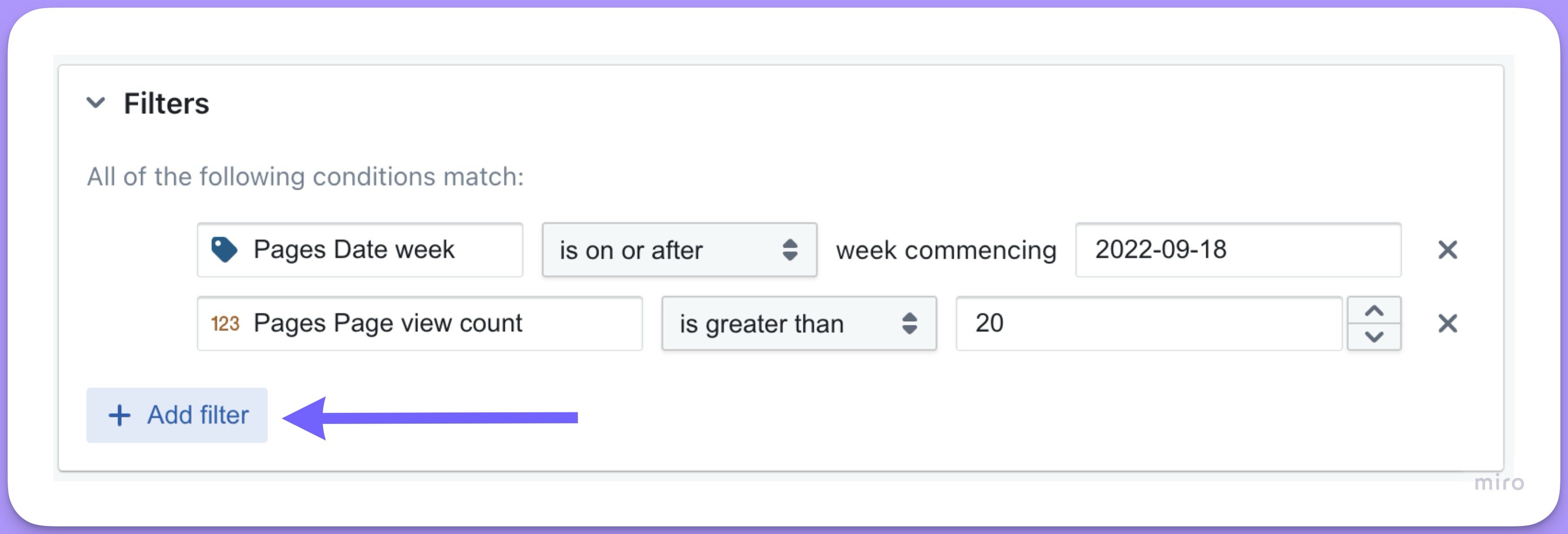
Click `+ Add filter` to add another condition. In the Explore view:
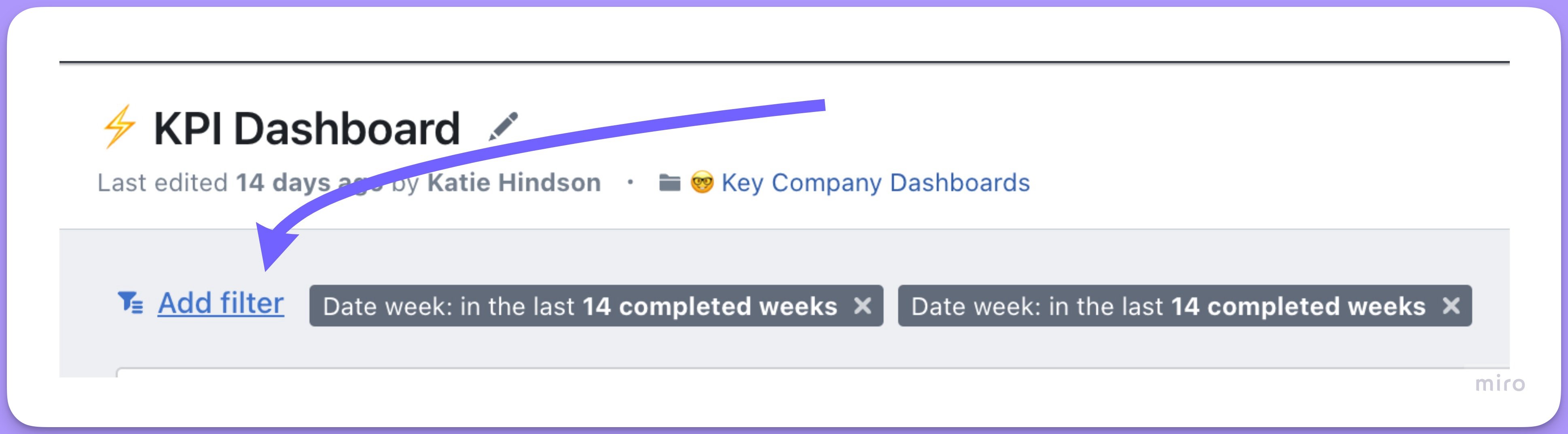
 Or on a dashboard:
 ### Matching ALL or ANY of the conditions
With multiple filters, the drop-down menu at the top-left chooses whether all conditions must match or any of them can.
### Matching ALL or ANY of the conditions
With multiple filters, the drop-down menu at the top-left chooses whether all conditions must match or any of them can.
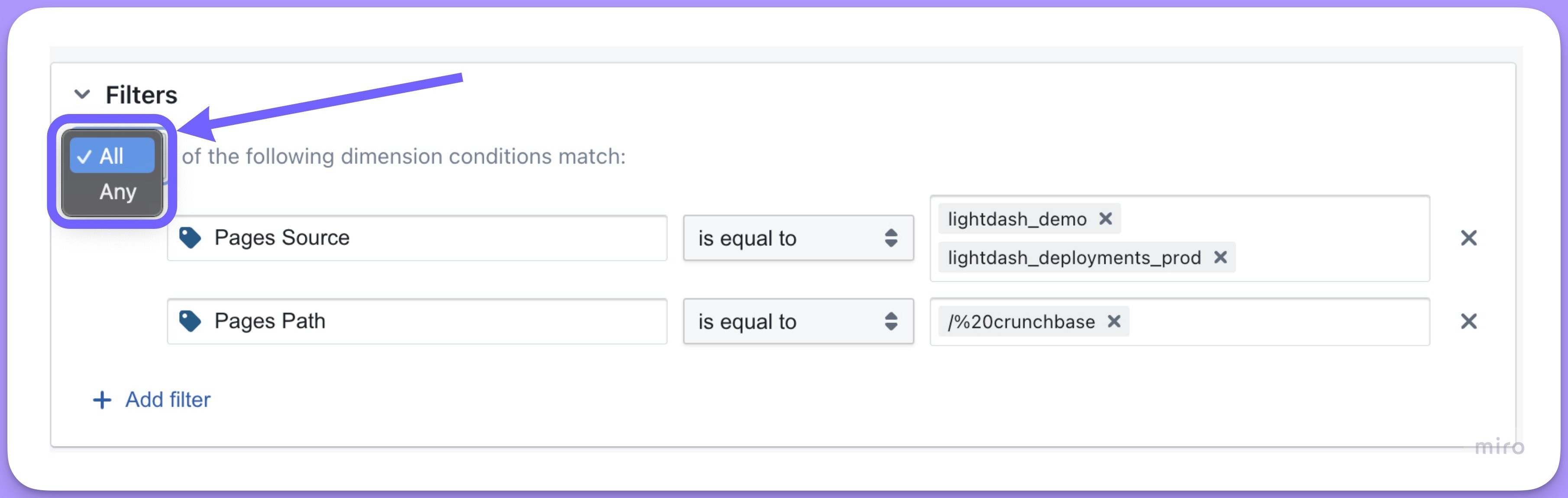 `ALL` puts an `AND` between your conditions in the compiled SQL:
```sql theme={null}
WHERE (
(pages.source) IN ('lightdash_demo', 'lightdash_documentation')
AND (pages.path) = '/20%crunchbase'
```
`ANY` puts an `OR` between them:
```sql theme={null}
WHERE (
(pages.source) IN ('lightdash_demo', 'lightdash_documentation')
OR (pages.path) = '/20%crunchbase'
```
### Filtering on multiple values
Hit `enter` between each value to include several in one filter.
`ALL` puts an `AND` between your conditions in the compiled SQL:
```sql theme={null}
WHERE (
(pages.source) IN ('lightdash_demo', 'lightdash_documentation')
AND (pages.path) = '/20%crunchbase'
```
`ANY` puts an `OR` between them:
```sql theme={null}
WHERE (
(pages.source) IN ('lightdash_demo', 'lightdash_documentation')
OR (pages.path) = '/20%crunchbase'
```
### Filtering on multiple values
Hit `enter` between each value to include several in one filter.
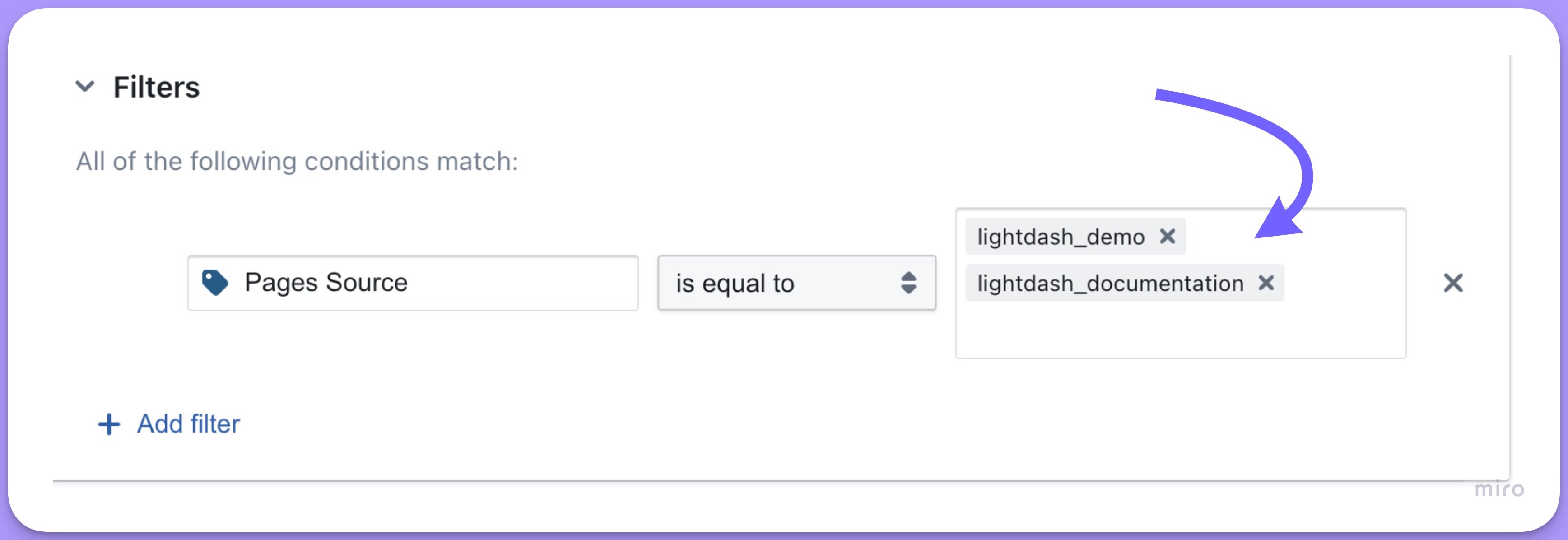 The listed values are separated by an `OR` in the compiled SQL, so the filter above gives:
```sql theme={null}
WHERE (
(pages.source) = 'lightdash_demo'
OR (pages.source) = 'lightdash_documentation'
)
```
### Uploading a CSV of filter values
For a long list of values on a string filter — hundreds or thousands of customer IDs or product SKUs — upload a CSV instead of typing each one:
1. Open the filter dropdown for a string field.
2. Click **Upload CSV**.
3. Select a CSV containing your filter values, one value per row or a single column.
The values from your CSV are added to the filter.
Developers can add permanent filters to tables with the `sql_filter` YAML option. See [table configuration](/semantic-layer/tables#sql-filter-row-level-security).
## Filter types
### Numeric filters
| Filter | logic |
| :-------------- | :---------------------------------------------------------------------------------------------------- |
| is null | Only pulls in rows where the values are null for the field selected. |
| is not null | Only pulls in rows where the values are not null for the field selected. |
| is | Only pulls in rows where the values are equal to the values listed. |
| is not | Only pulls in rows where the values are not equal to the values listed. |
| is less than | Only pulls in rows where the values for the field selected are strictly less than the value listed. |
| is greater than | Only pulls in rows where the values for the field selectedare strictly greater than the value listed. |
### String filters
| Filter | logic |
| :---------- | :-------------------------------------------------------------------------------------------------------------------------------------------------------------------------- |
| is null | Only pulls in rows where the values are null for the field selected. |
| is not null | Only pulls in rows where the values are not null for the field selected. |
| is | Only pulls in rows where the values are equal to the values listed. |
| is not | Only pulls in rows where the values are not equal to the values listed. This filter explicitly includes NULL values. To exclude NULLs, add a separate `is not null` filter. |
| starts with | Only pulls in rows where the values for the field selected start with characters you've entered. |
| includes | Only pulls in rows where the values for the field selected includes the characters you've entered. |
| ends with | Only pulls in rows where the values for the field selected end with the characters you've entered. |
### Boolean filters
| Filter | logic |
| :---------- | :----------------------------------------------------------------------- |
| is null | Only pulls in rows where the values are null for the field selected. |
| is not null | Only pulls in rows where the values are not null for the field selected. |
| is | Only pulls in rows where the values are equal to the values listed. |
### Date filters
| Filter | logic |
| :--------------------- | :------------------------------------------------------------------------------------------------------------------------------------------------------------------------------------------------------------------------------------------------------------------------------------------------------------------------------------------------------- |
| is null | Only pulls in rows where the values are null for the field selected. |
| is not null | Only pulls in rows where the values are not null for the field selected. |
| is | Only pulls in rows where the values are equal to the values listed. |
| is not | Only pulls in rows where the values are not equal to the values listed. |
| in the last | Only pulls in rows where the dates for the field selected are in the last time period you entered: "in the last 3 days", "in the last 2 completed weeks", "in the last 3 quarters" etc. |
| not in the last | Only pulls in rows where the dates for the field selected are not in the last time period you entered. |
| in the next | Only pulls in rows where the dates for the field selected are in the next time period you entered: "in the next 3 days", "in the next 2 completed weeks", "in the next 3 quarters" etc. |
| not in the next | Only pulls in rows where the dates for the field selected are not in the next time period you entered. |
| in the current | Only pulls in rows where the dates for the field selected are in the current time period you entered: "in the current day", "in the current week", "in the current quarter" etc. |
| not in the current | Only pulls in rows where the dates for the field selected are not in the current time period you entered. |
| in all periods to date | Trims every period in the range to the same point as today, so you can compare like-for-like across periods. For example, with "weeks to date" selected, if today is Thursday you get Mon–Thu of every week in the field's data. Useful for WTD, MTD, QTD, and YTD comparisons. To include only the current period so far, use `in the current` instead. |
| is before | Only pulls in rows where the dates for the field selected are strictly before the date you entered. |
| is on or before | Only pulls in rows where the dates for the field selected are on or before the date you entered. |
| is after | Only pulls in rows where the dates for the field selected are strictly after the date you entered. |
| is on or after | Only pulls in rows where the dates for the field selected are on or after the date you entered. |
| is between | Only pulls in rows where the dates for the field selected are on or between the dates you entered: "between 2001-12-23 and 2003-01-02". |
## Date/Timestamp Filter Reference Guide
The below examples show possible date/timestamp filter combinations and their corresponding SQL outputs. All examples use BigQuery syntax and assume:
* Current timestamp: `2025-10-24 15:30:00`
* Example field: `orders.created_at`
* Timezone: UTC
* Week starts on Monday
### Timestamp filter examples
#### Current Period Filters
##### Current (In The Current)
| Filter | SQL Output |
| --------------- | ---------------------------------------------------------------------------------------------------------------- |
| Current minute | `orders.created_at >= TIMESTAMP('2025-10-24 15:30:00') AND orders.created_at < TIMESTAMP('2025-10-24 15:31:00')` |
| Current hour | `orders.created_at >= TIMESTAMP('2025-10-24 15:00:00') AND orders.created_at < TIMESTAMP('2025-10-24 16:00:00')` |
| Current day | `orders.created_at >= TIMESTAMP('2025-10-24 00:00:00') AND orders.created_at < TIMESTAMP('2025-10-25 00:00:00')` |
| Current week | `orders.created_at >= TIMESTAMP('2025-10-21 00:00:00') AND orders.created_at < TIMESTAMP('2025-10-28 00:00:00')` |
| Current month | `orders.created_at >= TIMESTAMP('2025-10-01 00:00:00') AND orders.created_at < TIMESTAMP('2025-11-01 00:00:00')` |
| Current quarter | `orders.created_at >= TIMESTAMP('2025-10-01 00:00:00') AND orders.created_at < TIMESTAMP('2026-01-01 00:00:00')` |
| Current year | `orders.created_at >= TIMESTAMP('2025-01-01 00:00:00') AND orders.created_at < TIMESTAMP('2026-01-01 00:00:00')` |
#### Past Period Filters
##### Last N Periods (in the last)
| Filter | SQL Output |
| -------------- | ----------------------------------------------------------------------------------------------------------------- |
| Last 1 minute | `orders.created_at >= TIMESTAMP('2025-10-24 15:29:00') AND orders.created_at <= TIMESTAMP('2025-10-24 15:30:00')` |
| Last 1 hour | `orders.created_at >= TIMESTAMP('2025-10-24 14:30:00') AND orders.created_at <= TIMESTAMP('2025-10-24 15:30:00')` |
| Last 1 day | `orders.created_at >= TIMESTAMP('2025-10-23 15:30:00') AND orders.created_at <= TIMESTAMP('2025-10-24 15:30:00')` |
| Last 1 week | `orders.created_at >= TIMESTAMP('2025-10-17 15:30:00') AND orders.created_at <= TIMESTAMP('2025-10-24 15:30:00')` |
| Last 1 month | `orders.created_at >= TIMESTAMP('2025-09-24 15:30:00') AND orders.created_at <= TIMESTAMP('2025-10-24 15:30:00')` |
| Last 1 quarter | `orders.created_at >= TIMESTAMP('2025-07-24 15:30:00') AND orders.created_at <= TIMESTAMP('2025-10-24 15:30:00')` |
| Last 1 year | `orders.created_at >= TIMESTAMP('2024-10-24 15:30:00') AND orders.created_at <= TIMESTAMP('2025-10-24 15:30:00')` |
##### Last N Completed Periods (in the last, Completed)
| Filter | SQL Output |
| ------------------------ | ---------------------------------------------------------------------------------------------------------------- |
| Last 1 completed minute | `orders.created_at >= TIMESTAMP('2025-10-24 15:29:00') AND orders.created_at < TIMESTAMP('2025-10-24 15:30:00')` |
| Last 1 completed hour | `orders.created_at >= TIMESTAMP('2025-10-24 14:00:00') AND orders.created_at < TIMESTAMP('2025-10-24 15:00:00')` |
| Last 1 completed day | `orders.created_at >= TIMESTAMP('2025-10-23 00:00:00') AND orders.created_at < TIMESTAMP('2025-10-24 00:00:00')` |
| Last 1 completed week | `orders.created_at >= TIMESTAMP('2025-10-13 00:00:00') AND orders.created_at < TIMESTAMP('2025-10-20 00:00:00')` |
| Last 1 completed month | `orders.created_at >= TIMESTAMP('2025-09-01 00:00:00') AND orders.created_at < TIMESTAMP('2025-10-01 00:00:00')` |
| Last 1 completed quarter | `orders.created_at >= TIMESTAMP('2025-07-01 00:00:00') AND orders.created_at < TIMESTAMP('2025-10-01 00:00:00')` |
| Last 1 completed year | `orders.created_at >= TIMESTAMP('2024-01-01 00:00:00') AND orders.created_at < TIMESTAMP('2025-01-01 00:00:00')` |
#### Future Period Filters
##### Next N Periods (In The Next)
| Filter | SQL Output |
| -------------- | ----------------------------------------------------------------------------------------------------------------- |
| Next 1 minute | `orders.created_at >= TIMESTAMP('2025-10-24 15:30:00') AND orders.created_at <= TIMESTAMP('2025-10-24 15:31:00')` |
| Next 1 hour | `orders.created_at >= TIMESTAMP('2025-10-24 15:30:00') AND orders.created_at <= TIMESTAMP('2025-10-24 16:30:00')` |
| Next 1 day | `orders.created_at >= TIMESTAMP('2025-10-24 15:30:00') AND orders.created_at <= TIMESTAMP('2025-10-25 15:30:00')` |
| Next 1 week | `orders.created_at >= TIMESTAMP('2025-10-24 15:30:00') AND orders.created_at <= TIMESTAMP('2025-10-31 15:30:00')` |
| Next 1 month | `orders.created_at >= TIMESTAMP('2025-10-24 15:30:00') AND orders.created_at <= TIMESTAMP('2025-11-24 15:30:00')` |
| Next 1 quarter | `orders.created_at >= TIMESTAMP('2025-10-24 15:30:00') AND orders.created_at <= TIMESTAMP('2026-01-24 15:30:00')` |
| Next 1 year | `orders.created_at >= TIMESTAMP('2025-10-24 15:30:00') AND orders.created_at <= TIMESTAMP('2026-10-24 15:30:00')` |
##### Next N Completed Periods (In The Next, Completed)
| Filter | SQL Output |
| ------------------------ | ---------------------------------------------------------------------------------------------------------------- |
| Next 1 completed minute | `orders.created_at >= TIMESTAMP('2025-10-24 15:31:00') AND orders.created_at < TIMESTAMP('2025-10-24 15:32:00')` |
| Next 1 completed hour | `orders.created_at >= TIMESTAMP('2025-10-24 16:00:00') AND orders.created_at < TIMESTAMP('2025-10-24 17:00:00')` |
| Next 1 completed day | `orders.created_at >= TIMESTAMP('2025-10-25 00:00:00') AND orders.created_at < TIMESTAMP('2025-10-26 00:00:00')` |
| Next 1 completed week | `orders.created_at >= TIMESTAMP('2025-10-27 00:00:00') AND orders.created_at < TIMESTAMP('2025-11-03 00:00:00')` |
| Next 1 completed month | `orders.created_at >= TIMESTAMP('2025-11-01 00:00:00') AND orders.created_at < TIMESTAMP('2025-12-01 00:00:00')` |
| Next 1 completed quarter | `orders.created_at >= TIMESTAMP('2026-01-01 00:00:00') AND orders.created_at < TIMESTAMP('2026-04-01 00:00:00')` |
| Next 1 completed year | `orders.created_at >= TIMESTAMP('2026-01-01 00:00:00') AND orders.created_at < TIMESTAMP('2027-01-01 00:00:00')` |
##### Within Custom Range
| Filter | SQL Output |
| --------------- | ----------------------------------------------------------------------------------------------------------------- |
| Between 2 dates | `orders.created_at >= TIMESTAMP('2025-10-01 00:00:00') AND orders.created_at <= TIMESTAMP('2025-10-31 23:59:59')` |
| On exact date | `orders.created_at >= TIMESTAMP('2025-10-24 00:00:00') AND orders.created_at < TIMESTAMP('2025-10-25 00:00:00')` |
#### Notes
1. **Completed periods** always:
* Start at the beginning of a period (00:00:00)
* End at the beginning of the next period
* Don't include partial periods
2. **Rolling periods** (non-completed):
* Use the current time as the reference point
* Look backward/forward the specified amount
* Include partial periods
3. **Current periods**:
* Always start at the beginning of the current period
* End at the beginning of the next period
* Example: Current month starts at 1st of the month
4. **Week handling**:
* By default, weeks start on the default day configured in your database
* You can configure this to a different day in your database connection settings
* Week boundaries are always at midnight (00:00:00)
## Date filter examples
#### Current Period Filters
##### Current (In The Current)
| Filter | SQL Output |
| --------------- | ---------------------------------------------------------------------------------------- |
| Current day | `orders.created_date = DATE('2025-10-24')` |
| Current week | `orders.created_date >= DATE('2025-10-21') AND orders.created_date < DATE('2025-10-28')` |
| Current month | `orders.created_date >= DATE('2025-10-01') AND orders.created_date < DATE('2025-11-01')` |
| Current quarter | `orders.created_date >= DATE('2025-10-01') AND orders.created_date < DATE('2026-01-01')` |
| Current year | `orders.created_date >= DATE('2025-01-01') AND orders.created_date < DATE('2026-01-01')` |
#### Past Period Filters
##### Last N Periods (in the last)
| Filter | SQL Output |
| ------------- | ----------------------------------------------------------------------------------------- |
| Last 1 day | `orders.created_date >= DATE('2025-10-23') AND orders.created_date <= DATE('2025-10-24')` |
| Last 7 days | `orders.created_date >= DATE('2025-10-17') AND orders.created_date <= DATE('2025-10-24')` |
| Last 30 days | `orders.created_date >= DATE('2025-09-24') AND orders.created_date <= DATE('2025-10-24')` |
| Last 90 days | `orders.created_date >= DATE('2025-07-26') AND orders.created_date <= DATE('2025-10-24')` |
| Last 365 days | `orders.created_date >= DATE('2024-10-24') AND orders.created_date <= DATE('2025-10-24')` |
##### Last N Completed Periods (in the last, Completed)
| Filter | SQL Output |
| ------------------------ | ---------------------------------------------------------------------------------------- |
| Last 1 completed day | `orders.created_date = DATE('2025-10-23')` |
| Last 1 completed week | `orders.created_date >= DATE('2025-10-13') AND orders.created_date < DATE('2025-10-20')` |
| Last 1 completed month | `orders.created_date >= DATE('2025-09-01') AND orders.created_date < DATE('2025-10-01')` |
| Last 1 completed quarter | `orders.created_date >= DATE('2025-07-01') AND orders.created_date < DATE('2025-10-01')` |
| Last 1 completed year | `orders.created_date >= DATE('2024-01-01') AND orders.created_date < DATE('2025-01-01')` |
#### Future Period Filters
##### Next N Periods (In The Next)
| Filter | SQL Output |
| ------------- | ----------------------------------------------------------------------------------------- |
| Next 1 day | `orders.created_date >= DATE('2025-10-24') AND orders.created_date <= DATE('2025-10-25')` |
| Next 7 days | `orders.created_date >= DATE('2025-10-24') AND orders.created_date <= DATE('2025-10-31')` |
| Next 30 days | `orders.created_date >= DATE('2025-10-24') AND orders.created_date <= DATE('2025-11-23')` |
| Next 90 days | `orders.created_date >= DATE('2025-10-24') AND orders.created_date <= DATE('2026-01-22')` |
| Next 365 days | `orders.created_date >= DATE('2025-10-24') AND orders.created_date <= DATE('2026-10-24')` |
##### Next N Completed Periods (In The Next, Completed)
| Filter | SQL Output |
| ------------------------ | ---------------------------------------------------------------------------------------- |
| Next 1 completed day | `orders.created_date = DATE('2025-10-25')` |
| Next 1 completed week | `orders.created_date >= DATE('2025-10-27') AND orders.created_date < DATE('2025-11-03')` |
| Next 1 completed month | `orders.created_date >= DATE('2025-11-01') AND orders.created_date < DATE('2025-12-01')` |
| Next 1 completed quarter | `orders.created_date >= DATE('2026-01-01') AND orders.created_date < DATE('2026-04-01')` |
| Next 1 completed year | `orders.created_date >= DATE('2026-01-01') AND orders.created_date < DATE('2027-01-01')` |
##### Within Custom Range
| Filter | SQL Output |
| --------------- | ----------------------------------------------------------------------------------------- |
| Between 2 dates | `orders.created_date >= DATE('2025-10-01') AND orders.created_date <= DATE('2025-10-31')` |
| On exact date | `orders.created_date = DATE('2025-10-24')` |
#### Notes
1. **Key differences from timestamp filters**:
* No time components in any filters
* Single day comparisons use equality (`=`) instead of ranges
* `DATE()` function used instead of `TIMESTAMP()`
2. **Completed periods** always:
* Start at the beginning of a period
* End at the beginning of the next period
* Don't include partial periods
* For single days, use equality instead of ranges
3. **Rolling periods**:
* Use the current date as the reference point
* Count in full days (N days forward/backward)
* Include the current date in the range
4. **Current periods**:
* For single day: use equality
* For longer periods: use standard ranges
* Example: Current month is all days from 1st to last day
5. **Week handling**:
* Weeks start on Monday by default
* Can be configured to start on Sunday
* Full days only, no time components
The listed values are separated by an `OR` in the compiled SQL, so the filter above gives:
```sql theme={null}
WHERE (
(pages.source) = 'lightdash_demo'
OR (pages.source) = 'lightdash_documentation'
)
```
### Uploading a CSV of filter values
For a long list of values on a string filter — hundreds or thousands of customer IDs or product SKUs — upload a CSV instead of typing each one:
1. Open the filter dropdown for a string field.
2. Click **Upload CSV**.
3. Select a CSV containing your filter values, one value per row or a single column.
The values from your CSV are added to the filter.
Developers can add permanent filters to tables with the `sql_filter` YAML option. See [table configuration](/semantic-layer/tables#sql-filter-row-level-security).
## Filter types
### Numeric filters
| Filter | logic |
| :-------------- | :---------------------------------------------------------------------------------------------------- |
| is null | Only pulls in rows where the values are null for the field selected. |
| is not null | Only pulls in rows where the values are not null for the field selected. |
| is | Only pulls in rows where the values are equal to the values listed. |
| is not | Only pulls in rows where the values are not equal to the values listed. |
| is less than | Only pulls in rows where the values for the field selected are strictly less than the value listed. |
| is greater than | Only pulls in rows where the values for the field selectedare strictly greater than the value listed. |
### String filters
| Filter | logic |
| :---------- | :-------------------------------------------------------------------------------------------------------------------------------------------------------------------------- |
| is null | Only pulls in rows where the values are null for the field selected. |
| is not null | Only pulls in rows where the values are not null for the field selected. |
| is | Only pulls in rows where the values are equal to the values listed. |
| is not | Only pulls in rows where the values are not equal to the values listed. This filter explicitly includes NULL values. To exclude NULLs, add a separate `is not null` filter. |
| starts with | Only pulls in rows where the values for the field selected start with characters you've entered. |
| includes | Only pulls in rows where the values for the field selected includes the characters you've entered. |
| ends with | Only pulls in rows where the values for the field selected end with the characters you've entered. |
### Boolean filters
| Filter | logic |
| :---------- | :----------------------------------------------------------------------- |
| is null | Only pulls in rows where the values are null for the field selected. |
| is not null | Only pulls in rows where the values are not null for the field selected. |
| is | Only pulls in rows where the values are equal to the values listed. |
### Date filters
| Filter | logic |
| :--------------------- | :------------------------------------------------------------------------------------------------------------------------------------------------------------------------------------------------------------------------------------------------------------------------------------------------------------------------------------------------------- |
| is null | Only pulls in rows where the values are null for the field selected. |
| is not null | Only pulls in rows where the values are not null for the field selected. |
| is | Only pulls in rows where the values are equal to the values listed. |
| is not | Only pulls in rows where the values are not equal to the values listed. |
| in the last | Only pulls in rows where the dates for the field selected are in the last time period you entered: "in the last 3 days", "in the last 2 completed weeks", "in the last 3 quarters" etc. |
| not in the last | Only pulls in rows where the dates for the field selected are not in the last time period you entered. |
| in the next | Only pulls in rows where the dates for the field selected are in the next time period you entered: "in the next 3 days", "in the next 2 completed weeks", "in the next 3 quarters" etc. |
| not in the next | Only pulls in rows where the dates for the field selected are not in the next time period you entered. |
| in the current | Only pulls in rows where the dates for the field selected are in the current time period you entered: "in the current day", "in the current week", "in the current quarter" etc. |
| not in the current | Only pulls in rows where the dates for the field selected are not in the current time period you entered. |
| in all periods to date | Trims every period in the range to the same point as today, so you can compare like-for-like across periods. For example, with "weeks to date" selected, if today is Thursday you get Mon–Thu of every week in the field's data. Useful for WTD, MTD, QTD, and YTD comparisons. To include only the current period so far, use `in the current` instead. |
| is before | Only pulls in rows where the dates for the field selected are strictly before the date you entered. |
| is on or before | Only pulls in rows where the dates for the field selected are on or before the date you entered. |
| is after | Only pulls in rows where the dates for the field selected are strictly after the date you entered. |
| is on or after | Only pulls in rows where the dates for the field selected are on or after the date you entered. |
| is between | Only pulls in rows where the dates for the field selected are on or between the dates you entered: "between 2001-12-23 and 2003-01-02". |
## Date/Timestamp Filter Reference Guide
The below examples show possible date/timestamp filter combinations and their corresponding SQL outputs. All examples use BigQuery syntax and assume:
* Current timestamp: `2025-10-24 15:30:00`
* Example field: `orders.created_at`
* Timezone: UTC
* Week starts on Monday
### Timestamp filter examples
#### Current Period Filters
##### Current (In The Current)
| Filter | SQL Output |
| --------------- | ---------------------------------------------------------------------------------------------------------------- |
| Current minute | `orders.created_at >= TIMESTAMP('2025-10-24 15:30:00') AND orders.created_at < TIMESTAMP('2025-10-24 15:31:00')` |
| Current hour | `orders.created_at >= TIMESTAMP('2025-10-24 15:00:00') AND orders.created_at < TIMESTAMP('2025-10-24 16:00:00')` |
| Current day | `orders.created_at >= TIMESTAMP('2025-10-24 00:00:00') AND orders.created_at < TIMESTAMP('2025-10-25 00:00:00')` |
| Current week | `orders.created_at >= TIMESTAMP('2025-10-21 00:00:00') AND orders.created_at < TIMESTAMP('2025-10-28 00:00:00')` |
| Current month | `orders.created_at >= TIMESTAMP('2025-10-01 00:00:00') AND orders.created_at < TIMESTAMP('2025-11-01 00:00:00')` |
| Current quarter | `orders.created_at >= TIMESTAMP('2025-10-01 00:00:00') AND orders.created_at < TIMESTAMP('2026-01-01 00:00:00')` |
| Current year | `orders.created_at >= TIMESTAMP('2025-01-01 00:00:00') AND orders.created_at < TIMESTAMP('2026-01-01 00:00:00')` |
#### Past Period Filters
##### Last N Periods (in the last)
| Filter | SQL Output |
| -------------- | ----------------------------------------------------------------------------------------------------------------- |
| Last 1 minute | `orders.created_at >= TIMESTAMP('2025-10-24 15:29:00') AND orders.created_at <= TIMESTAMP('2025-10-24 15:30:00')` |
| Last 1 hour | `orders.created_at >= TIMESTAMP('2025-10-24 14:30:00') AND orders.created_at <= TIMESTAMP('2025-10-24 15:30:00')` |
| Last 1 day | `orders.created_at >= TIMESTAMP('2025-10-23 15:30:00') AND orders.created_at <= TIMESTAMP('2025-10-24 15:30:00')` |
| Last 1 week | `orders.created_at >= TIMESTAMP('2025-10-17 15:30:00') AND orders.created_at <= TIMESTAMP('2025-10-24 15:30:00')` |
| Last 1 month | `orders.created_at >= TIMESTAMP('2025-09-24 15:30:00') AND orders.created_at <= TIMESTAMP('2025-10-24 15:30:00')` |
| Last 1 quarter | `orders.created_at >= TIMESTAMP('2025-07-24 15:30:00') AND orders.created_at <= TIMESTAMP('2025-10-24 15:30:00')` |
| Last 1 year | `orders.created_at >= TIMESTAMP('2024-10-24 15:30:00') AND orders.created_at <= TIMESTAMP('2025-10-24 15:30:00')` |
##### Last N Completed Periods (in the last, Completed)
| Filter | SQL Output |
| ------------------------ | ---------------------------------------------------------------------------------------------------------------- |
| Last 1 completed minute | `orders.created_at >= TIMESTAMP('2025-10-24 15:29:00') AND orders.created_at < TIMESTAMP('2025-10-24 15:30:00')` |
| Last 1 completed hour | `orders.created_at >= TIMESTAMP('2025-10-24 14:00:00') AND orders.created_at < TIMESTAMP('2025-10-24 15:00:00')` |
| Last 1 completed day | `orders.created_at >= TIMESTAMP('2025-10-23 00:00:00') AND orders.created_at < TIMESTAMP('2025-10-24 00:00:00')` |
| Last 1 completed week | `orders.created_at >= TIMESTAMP('2025-10-13 00:00:00') AND orders.created_at < TIMESTAMP('2025-10-20 00:00:00')` |
| Last 1 completed month | `orders.created_at >= TIMESTAMP('2025-09-01 00:00:00') AND orders.created_at < TIMESTAMP('2025-10-01 00:00:00')` |
| Last 1 completed quarter | `orders.created_at >= TIMESTAMP('2025-07-01 00:00:00') AND orders.created_at < TIMESTAMP('2025-10-01 00:00:00')` |
| Last 1 completed year | `orders.created_at >= TIMESTAMP('2024-01-01 00:00:00') AND orders.created_at < TIMESTAMP('2025-01-01 00:00:00')` |
#### Future Period Filters
##### Next N Periods (In The Next)
| Filter | SQL Output |
| -------------- | ----------------------------------------------------------------------------------------------------------------- |
| Next 1 minute | `orders.created_at >= TIMESTAMP('2025-10-24 15:30:00') AND orders.created_at <= TIMESTAMP('2025-10-24 15:31:00')` |
| Next 1 hour | `orders.created_at >= TIMESTAMP('2025-10-24 15:30:00') AND orders.created_at <= TIMESTAMP('2025-10-24 16:30:00')` |
| Next 1 day | `orders.created_at >= TIMESTAMP('2025-10-24 15:30:00') AND orders.created_at <= TIMESTAMP('2025-10-25 15:30:00')` |
| Next 1 week | `orders.created_at >= TIMESTAMP('2025-10-24 15:30:00') AND orders.created_at <= TIMESTAMP('2025-10-31 15:30:00')` |
| Next 1 month | `orders.created_at >= TIMESTAMP('2025-10-24 15:30:00') AND orders.created_at <= TIMESTAMP('2025-11-24 15:30:00')` |
| Next 1 quarter | `orders.created_at >= TIMESTAMP('2025-10-24 15:30:00') AND orders.created_at <= TIMESTAMP('2026-01-24 15:30:00')` |
| Next 1 year | `orders.created_at >= TIMESTAMP('2025-10-24 15:30:00') AND orders.created_at <= TIMESTAMP('2026-10-24 15:30:00')` |
##### Next N Completed Periods (In The Next, Completed)
| Filter | SQL Output |
| ------------------------ | ---------------------------------------------------------------------------------------------------------------- |
| Next 1 completed minute | `orders.created_at >= TIMESTAMP('2025-10-24 15:31:00') AND orders.created_at < TIMESTAMP('2025-10-24 15:32:00')` |
| Next 1 completed hour | `orders.created_at >= TIMESTAMP('2025-10-24 16:00:00') AND orders.created_at < TIMESTAMP('2025-10-24 17:00:00')` |
| Next 1 completed day | `orders.created_at >= TIMESTAMP('2025-10-25 00:00:00') AND orders.created_at < TIMESTAMP('2025-10-26 00:00:00')` |
| Next 1 completed week | `orders.created_at >= TIMESTAMP('2025-10-27 00:00:00') AND orders.created_at < TIMESTAMP('2025-11-03 00:00:00')` |
| Next 1 completed month | `orders.created_at >= TIMESTAMP('2025-11-01 00:00:00') AND orders.created_at < TIMESTAMP('2025-12-01 00:00:00')` |
| Next 1 completed quarter | `orders.created_at >= TIMESTAMP('2026-01-01 00:00:00') AND orders.created_at < TIMESTAMP('2026-04-01 00:00:00')` |
| Next 1 completed year | `orders.created_at >= TIMESTAMP('2026-01-01 00:00:00') AND orders.created_at < TIMESTAMP('2027-01-01 00:00:00')` |
##### Within Custom Range
| Filter | SQL Output |
| --------------- | ----------------------------------------------------------------------------------------------------------------- |
| Between 2 dates | `orders.created_at >= TIMESTAMP('2025-10-01 00:00:00') AND orders.created_at <= TIMESTAMP('2025-10-31 23:59:59')` |
| On exact date | `orders.created_at >= TIMESTAMP('2025-10-24 00:00:00') AND orders.created_at < TIMESTAMP('2025-10-25 00:00:00')` |
#### Notes
1. **Completed periods** always:
* Start at the beginning of a period (00:00:00)
* End at the beginning of the next period
* Don't include partial periods
2. **Rolling periods** (non-completed):
* Use the current time as the reference point
* Look backward/forward the specified amount
* Include partial periods
3. **Current periods**:
* Always start at the beginning of the current period
* End at the beginning of the next period
* Example: Current month starts at 1st of the month
4. **Week handling**:
* By default, weeks start on the default day configured in your database
* You can configure this to a different day in your database connection settings
* Week boundaries are always at midnight (00:00:00)
## Date filter examples
#### Current Period Filters
##### Current (In The Current)
| Filter | SQL Output |
| --------------- | ---------------------------------------------------------------------------------------- |
| Current day | `orders.created_date = DATE('2025-10-24')` |
| Current week | `orders.created_date >= DATE('2025-10-21') AND orders.created_date < DATE('2025-10-28')` |
| Current month | `orders.created_date >= DATE('2025-10-01') AND orders.created_date < DATE('2025-11-01')` |
| Current quarter | `orders.created_date >= DATE('2025-10-01') AND orders.created_date < DATE('2026-01-01')` |
| Current year | `orders.created_date >= DATE('2025-01-01') AND orders.created_date < DATE('2026-01-01')` |
#### Past Period Filters
##### Last N Periods (in the last)
| Filter | SQL Output |
| ------------- | ----------------------------------------------------------------------------------------- |
| Last 1 day | `orders.created_date >= DATE('2025-10-23') AND orders.created_date <= DATE('2025-10-24')` |
| Last 7 days | `orders.created_date >= DATE('2025-10-17') AND orders.created_date <= DATE('2025-10-24')` |
| Last 30 days | `orders.created_date >= DATE('2025-09-24') AND orders.created_date <= DATE('2025-10-24')` |
| Last 90 days | `orders.created_date >= DATE('2025-07-26') AND orders.created_date <= DATE('2025-10-24')` |
| Last 365 days | `orders.created_date >= DATE('2024-10-24') AND orders.created_date <= DATE('2025-10-24')` |
##### Last N Completed Periods (in the last, Completed)
| Filter | SQL Output |
| ------------------------ | ---------------------------------------------------------------------------------------- |
| Last 1 completed day | `orders.created_date = DATE('2025-10-23')` |
| Last 1 completed week | `orders.created_date >= DATE('2025-10-13') AND orders.created_date < DATE('2025-10-20')` |
| Last 1 completed month | `orders.created_date >= DATE('2025-09-01') AND orders.created_date < DATE('2025-10-01')` |
| Last 1 completed quarter | `orders.created_date >= DATE('2025-07-01') AND orders.created_date < DATE('2025-10-01')` |
| Last 1 completed year | `orders.created_date >= DATE('2024-01-01') AND orders.created_date < DATE('2025-01-01')` |
#### Future Period Filters
##### Next N Periods (In The Next)
| Filter | SQL Output |
| ------------- | ----------------------------------------------------------------------------------------- |
| Next 1 day | `orders.created_date >= DATE('2025-10-24') AND orders.created_date <= DATE('2025-10-25')` |
| Next 7 days | `orders.created_date >= DATE('2025-10-24') AND orders.created_date <= DATE('2025-10-31')` |
| Next 30 days | `orders.created_date >= DATE('2025-10-24') AND orders.created_date <= DATE('2025-11-23')` |
| Next 90 days | `orders.created_date >= DATE('2025-10-24') AND orders.created_date <= DATE('2026-01-22')` |
| Next 365 days | `orders.created_date >= DATE('2025-10-24') AND orders.created_date <= DATE('2026-10-24')` |
##### Next N Completed Periods (In The Next, Completed)
| Filter | SQL Output |
| ------------------------ | ---------------------------------------------------------------------------------------- |
| Next 1 completed day | `orders.created_date = DATE('2025-10-25')` |
| Next 1 completed week | `orders.created_date >= DATE('2025-10-27') AND orders.created_date < DATE('2025-11-03')` |
| Next 1 completed month | `orders.created_date >= DATE('2025-11-01') AND orders.created_date < DATE('2025-12-01')` |
| Next 1 completed quarter | `orders.created_date >= DATE('2026-01-01') AND orders.created_date < DATE('2026-04-01')` |
| Next 1 completed year | `orders.created_date >= DATE('2026-01-01') AND orders.created_date < DATE('2027-01-01')` |
##### Within Custom Range
| Filter | SQL Output |
| --------------- | ----------------------------------------------------------------------------------------- |
| Between 2 dates | `orders.created_date >= DATE('2025-10-01') AND orders.created_date <= DATE('2025-10-31')` |
| On exact date | `orders.created_date = DATE('2025-10-24')` |
#### Notes
1. **Key differences from timestamp filters**:
* No time components in any filters
* Single day comparisons use equality (`=`) instead of ranges
* `DATE()` function used instead of `TIMESTAMP()`
2. **Completed periods** always:
* Start at the beginning of a period
* End at the beginning of the next period
* Don't include partial periods
* For single days, use equality instead of ranges
3. **Rolling periods**:
* Use the current date as the reference point
* Count in full days (N days forward/backward)
* Include the current date in the range
4. **Current periods**:
* For single day: use equality
* For longer periods: use standard ranges
* Example: Current month is all days from 1st to last day
5. **Week handling**:
* Weeks start on Monday by default
* Can be configured to start on Sunday
* Full days only, no time components