> ## Documentation Index
> Fetch the complete documentation index at: https://docs.lightdash.com/llms.txt
> Use this file to discover all available pages before exploring further.
# Agent identity on Snowflake
> Let Snowflake verify agent sessions, so your warehouse policies decide what agents can read
Beta Enterprise Agent identity is behind the `agent-identity` feature flag. On Lightdash Cloud, ask Lightdash support to turn it on for your organization. On a self-hosted instance, [enable the flag and set up the Snowflake agent integration](/self-host/enterprise-features/ai-agents#agent-identity-on-snowflake). [What Beta means](/support/feature-maturity-levels).
AI agents run SQL in your warehouse. Without agent identity, the warehouse sees the same user for an agent query and for that person's dashboard query. It cannot treat the two differently.
Agent identity fixes this in two parts:
* **Lightdash marks every agent query.** The mark is on every warehouse and needs no setting. On Snowflake, the mark is in the query tag.
* **Snowflake verifies agent sessions.** Your organization can require each person to connect their agent through a separate Snowflake OAuth sign-in. Snowflake then knows that the session is an agent session. Your row access policies, masking policies, session policies and views can act on that.
The result: the warehouse, not Lightdash, enforces what agents may read. A person can see a value in a dashboard while their agent sees `REDACTED`. Lightdash's own controls still apply on top. See [Data access control](/agents/data-access).
The verified agent session is available only for Snowflake. Connections to other warehouses get the query mark but are not affected by the organization rule.
Jump to [organization setup](#require-agent-identity-for-your-organization), [connecting your agent](#connect-your-agent), [Snowflake policies](#write-snowflake-policies-for-agent-sessions) or [verification](#verify-the-result).
## Who sees what
| Signal | Where it appears | What it tells you |
| - | - | - |
| Agent mark | `query_tag` in Snowflake query history | Lightdash ran the query for an agent. |
| Agent session | `SYS_CONTEXT('SNOWFLAKE$CURRENT', 'IS_AGENT_ACTIVATED')` inside the session | Snowflake verified the session as an agent session. Policies read this value. |
| Agent type | `agent_type = 'EXTERNAL_AGENT'` in `SNOWFLAKE.ACCOUNT_USAGE.QUERY_HISTORY` | Snowflake ran the query in a verified agent session. |
A query tag alone does not prove that Snowflake verified the session. The agent session value and `agent_type` do.
## Before you start
* **The Snowflake agent integration is set up for your instance.** On Lightdash Cloud, Lightdash support sets it up. On a self-hosted instance, follow [Agent identity on Snowflake](/self-host/enterprise-features/ai-agents#agent-identity-on-snowflake).
* **Your project uses the same Snowflake account as the integration.** An instance has one agent integration for one Snowflake account. A project on a second Snowflake account cannot complete the agent connection.
* **Each person has an allowed default role.** Snowflake blocks the `ACCOUNTADMIN`, `SECURITYADMIN`, `ORGADMIN` and `GLOBALORGADMIN` roles from OAuth sessions. The agent sign-in uses the person's default role. Each person who uses agents needs a default role outside that list.
The agent sign-in is separate from the person's normal [Sign in with Snowflake](/integrations/connect-project#sign-in-with-snowflake) connection. A person can have both.
## Require agent identity for your organization
Organization admins set one rule for the whole organization. It applies to every Snowflake connection in every project.
Go to **Organization settings → Warehouse credentials** and find the **Agent identity** card.
Turn on **Require agent identity**. The switch saves the rule at once.
A success notification confirms the save.
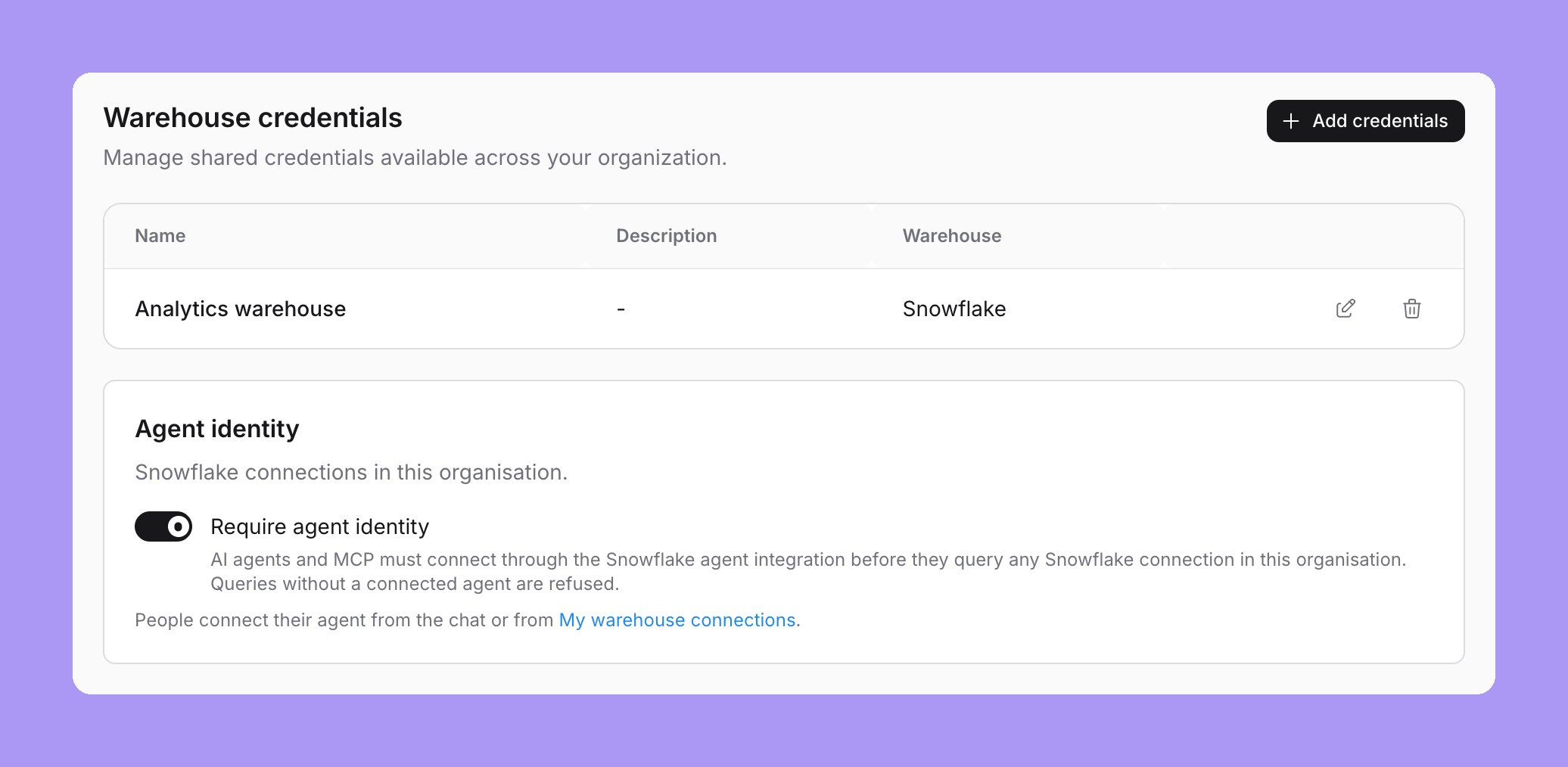 If the instance has no Snowflake agent integration, the switch is disabled. The card shows the `CREATE SECURITY INTEGRATION` statement for your instance instead.
While the rule is on:
* Every AI query on a Snowflake connection must run through the person's agent connection. Lightdash refuses queries from people who have not connected.
* This covers chat, [MCP](/agents/lightdash-mcp), [Slack](/integrations/slack) and data app sample queries.
* Every Snowflake connection form shows "Agent identity required by your organisation", with a link to the organization settings.
If the instance has no Snowflake agent integration, the switch is disabled. The card shows the `CREATE SECURITY INTEGRATION` statement for your instance instead.
While the rule is on:
* Every AI query on a Snowflake connection must run through the person's agent connection. Lightdash refuses queries from people who have not connected.
* This covers chat, [MCP](/agents/lightdash-mcp), [Slack](/integrations/slack) and data app sample queries.
* Every Snowflake connection form shows "Agent identity required by your organisation", with a link to the organization settings.
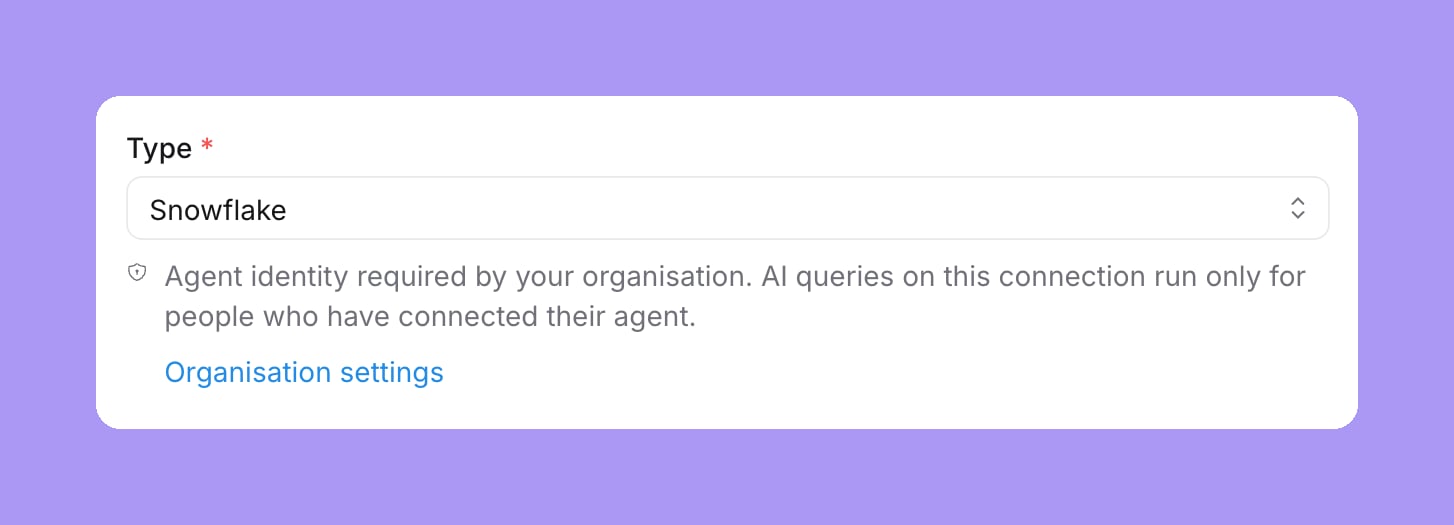 The switch does not create Snowflake policies. Without policies, agent sessions read the same data as the person. See [Write Snowflake policies for agent sessions](#write-snowflake-policies-for-agent-sessions).
Turning the rule off lets agents use the person's normal credentials again, with the agent mark. It does not revoke Snowflake tokens that people already issued.
## Connect your agent
Each person who uses agents connects their own agent once.
Go to **Settings → My warehouse connections** and find the **Agent connection** section.
Select **Connect agent**. A Snowflake sign-in opens in a popup.
Sign in to Snowflake and approve the request. Lightdash checks that Snowflake marks the session as an agent session before it saves the connection.
The section then shows "Agent connected" and a **Disconnect** button.
The switch does not create Snowflake policies. Without policies, agent sessions read the same data as the person. See [Write Snowflake policies for agent sessions](#write-snowflake-policies-for-agent-sessions).
Turning the rule off lets agents use the person's normal credentials again, with the agent mark. It does not revoke Snowflake tokens that people already issued.
## Connect your agent
Each person who uses agents connects their own agent once.
Go to **Settings → My warehouse connections** and find the **Agent connection** section.
Select **Connect agent**. A Snowflake sign-in opens in a popup.
Sign in to Snowflake and approve the request. Lightdash checks that Snowflake marks the session as an agent session before it saves the connection.
The section then shows "Agent connected" and a **Disconnect** button.
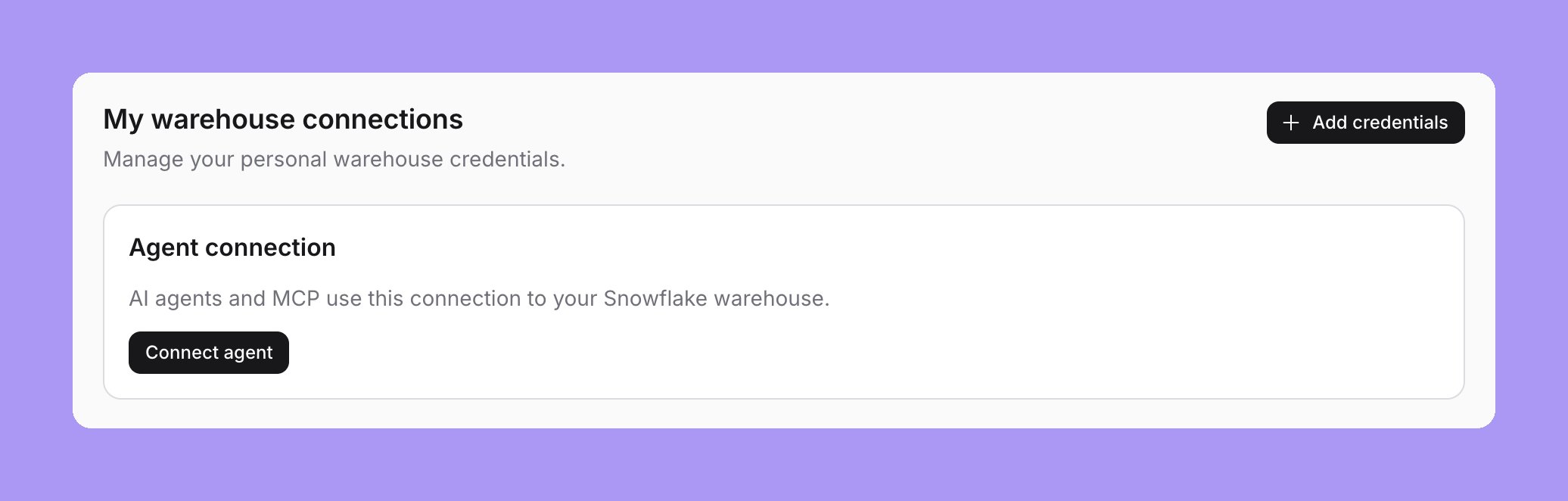 To remove the agent connection, select **Disconnect**. AI features lock again for that person until they reconnect.
This connection is separate from your [personal warehouse connections](/personal-settings/personal-warehouse-connections). Dashboards and the SQL Runner keep using your normal credentials.
## Before you connect
While the rule is on and a person has not connected their agent:
* AI composers are hidden for Snowflake projects. This includes the Ask AI launcher, the homepage ask box and AI help in other parts of the app.
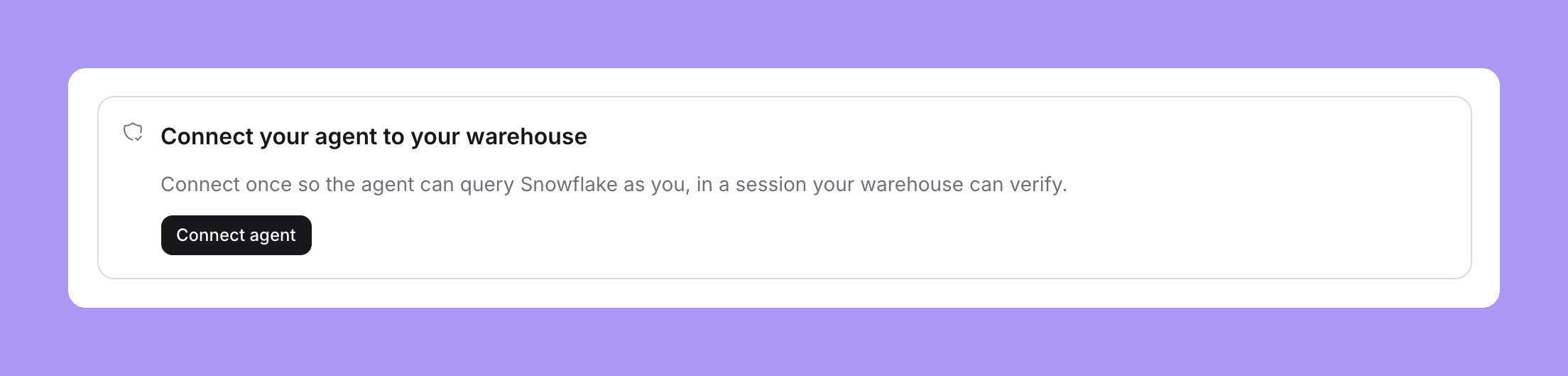
* The agent chat shows a **Connect your agent to your warehouse** card with a **Connect agent** button. It opens the same Snowflake sign-in.
* MCP and Slack refuse the query with: "Connect your agent to the warehouse once so it can run as you."
To remove the agent connection, select **Disconnect**. AI features lock again for that person until they reconnect.
This connection is separate from your [personal warehouse connections](/personal-settings/personal-warehouse-connections). Dashboards and the SQL Runner keep using your normal credentials.
## Before you connect
While the rule is on and a person has not connected their agent:
* AI composers are hidden for Snowflake projects. This includes the Ask AI launcher, the homepage ask box and AI help in other parts of the app.
* The agent chat shows a **Connect your agent to your warehouse** card with a **Connect agent** button. It opens the same Snowflake sign-in.
* MCP and Slack refuse the query with: "Connect your agent to the warehouse once so it can run as you."
 ## Write Snowflake policies for agent sessions
Snowflake owns the data rules. Your policies decide what agent sessions may read.
Lightdash does not create these policies. Adapt the examples to your data and existing policies before you attach them. Use a Snowflake role with the required policy privileges.
Each example reads `SYS_CONTEXT('SNOWFLAKE$CURRENT', 'IS_AGENT_ACTIVATED')`. The value is true only in a verified agent session.
### Hide rows from agents
A row access policy can exclude sensitive rows from agent sessions:
```sql theme={null}
CREATE ROW ACCESS POLICY agent_rows
AS (is_sensitive BOOLEAN) RETURNS BOOLEAN ->
NOT COALESCE(SYS_CONTEXT('SNOWFLAKE$CURRENT', 'IS_AGENT_ACTIVATED')::BOOLEAN, FALSE)
OR NOT is_sensitive;
ALTER TABLE protected_records
ADD ROW ACCESS POLICY agent_rows ON (is_sensitive);
```
### Mask values from agents
A masking policy can hide a value from agent sessions:
```sql theme={null}
CREATE MASKING POLICY agent_mask
AS (value STRING) RETURNS STRING ->
CASE WHEN SYS_CONTEXT('SNOWFLAKE$CURRENT', 'IS_AGENT_ACTIVATED')::BOOLEAN
THEN 'REDACTED'
ELSE value
END;
ALTER TABLE protected_records MODIFY COLUMN email
SET MASKING POLICY agent_mask;
```
### Use a view on Snowflake Standard Edition
Row access and masking policies need Snowflake Enterprise Edition. On Standard Edition, a view gives the same result for the columns it covers:
```sql theme={null}
CREATE OR REPLACE VIEW customers_v AS
SELECT customer_id, name,
CASE WHEN SYS_CONTEXT('SNOWFLAKE$CURRENT', 'IS_AGENT_ACTIVATED')::BOOLEAN
THEN 'REDACTED' ELSE phone END AS phone
FROM customers;
```
Point your dbt model at the view, not the table.
### Limit what an agent session can do
A session policy can limit the privileges of an agent session:
```sql theme={null}
CREATE SESSION POLICY agent_session_scope
AGENT_RESTRICTED_SESSION_SCOPE = 'SNOWFLAKE$DATA_READ_WITH_AI';
ALTER USER example_user SET SESSION POLICY agent_session_scope;
```
The restricted scope limits the privileges the role already has. It does not grant new privileges. Review any existing session policy before you replace it.
For the full Snowflake reference, see [agent identity](https://docs.snowflake.com/en/user-guide/agent-identity) and [restricted session scopes](https://docs.snowflake.com/en/user-guide/restricted-session-scope).
## Verify the result
Run the same check in an agent session and in a normal session for the same person. For the agent session, ask an agent to run the SQL, for example in [SQL mode](/agents/use-ai-agents#sql-mode) or through the MCP `run_sql` tool. For the normal session, run it in a Snowflake worksheet as that person.
```sql theme={null}
SELECT SYS_CONTEXT('SNOWFLAKE$CURRENT', 'IS_AGENT_ACTIVATED') AS agent_activated,
SYS_CONTEXT('SNOWFLAKE$SESSION', 'ACTIVE_RESTRICTED_SESSION_SCOPES') AS active_scopes;
```
`agent_activated` is true only in the agent session.
Then inspect recent query history with a role that can read account usage:
```sql theme={null}
SELECT query_id, start_time, user_name, role_name, agent_type, query_tag
FROM SNOWFLAKE.ACCOUNT_USAGE.QUERY_HISTORY
WHERE start_time >= DATEADD('hour', -1, CURRENT_TIMESTAMP())
ORDER BY start_time DESC;
```
The agent query has `agent_type = 'EXTERNAL_AGENT'` and the Lightdash agent mark in `query_tag`. `QUERY_HISTORY` has an ingestion delay, so new queries can take a while to appear. See [QUERY\_HISTORY](https://docs.snowflake.com/en/sql-reference/account-usage/query_history).
Finally, query a protected table through an agent and as the person. Check that your row access, masking and session policies give the restrictions you expect.
This documentation is built and hosted on [Mintlify](https://mintlify.com), a developer documentation platform.
## Write Snowflake policies for agent sessions
Snowflake owns the data rules. Your policies decide what agent sessions may read.
Lightdash does not create these policies. Adapt the examples to your data and existing policies before you attach them. Use a Snowflake role with the required policy privileges.
Each example reads `SYS_CONTEXT('SNOWFLAKE$CURRENT', 'IS_AGENT_ACTIVATED')`. The value is true only in a verified agent session.
### Hide rows from agents
A row access policy can exclude sensitive rows from agent sessions:
```sql theme={null}
CREATE ROW ACCESS POLICY agent_rows
AS (is_sensitive BOOLEAN) RETURNS BOOLEAN ->
NOT COALESCE(SYS_CONTEXT('SNOWFLAKE$CURRENT', 'IS_AGENT_ACTIVATED')::BOOLEAN, FALSE)
OR NOT is_sensitive;
ALTER TABLE protected_records
ADD ROW ACCESS POLICY agent_rows ON (is_sensitive);
```
### Mask values from agents
A masking policy can hide a value from agent sessions:
```sql theme={null}
CREATE MASKING POLICY agent_mask
AS (value STRING) RETURNS STRING ->
CASE WHEN SYS_CONTEXT('SNOWFLAKE$CURRENT', 'IS_AGENT_ACTIVATED')::BOOLEAN
THEN 'REDACTED'
ELSE value
END;
ALTER TABLE protected_records MODIFY COLUMN email
SET MASKING POLICY agent_mask;
```
### Use a view on Snowflake Standard Edition
Row access and masking policies need Snowflake Enterprise Edition. On Standard Edition, a view gives the same result for the columns it covers:
```sql theme={null}
CREATE OR REPLACE VIEW customers_v AS
SELECT customer_id, name,
CASE WHEN SYS_CONTEXT('SNOWFLAKE$CURRENT', 'IS_AGENT_ACTIVATED')::BOOLEAN
THEN 'REDACTED' ELSE phone END AS phone
FROM customers;
```
Point your dbt model at the view, not the table.
### Limit what an agent session can do
A session policy can limit the privileges of an agent session:
```sql theme={null}
CREATE SESSION POLICY agent_session_scope
AGENT_RESTRICTED_SESSION_SCOPE = 'SNOWFLAKE$DATA_READ_WITH_AI';
ALTER USER example_user SET SESSION POLICY agent_session_scope;
```
The restricted scope limits the privileges the role already has. It does not grant new privileges. Review any existing session policy before you replace it.
For the full Snowflake reference, see [agent identity](https://docs.snowflake.com/en/user-guide/agent-identity) and [restricted session scopes](https://docs.snowflake.com/en/user-guide/restricted-session-scope).
## Verify the result
Run the same check in an agent session and in a normal session for the same person. For the agent session, ask an agent to run the SQL, for example in [SQL mode](/agents/use-ai-agents#sql-mode) or through the MCP `run_sql` tool. For the normal session, run it in a Snowflake worksheet as that person.
```sql theme={null}
SELECT SYS_CONTEXT('SNOWFLAKE$CURRENT', 'IS_AGENT_ACTIVATED') AS agent_activated,
SYS_CONTEXT('SNOWFLAKE$SESSION', 'ACTIVE_RESTRICTED_SESSION_SCOPES') AS active_scopes;
```
`agent_activated` is true only in the agent session.
Then inspect recent query history with a role that can read account usage:
```sql theme={null}
SELECT query_id, start_time, user_name, role_name, agent_type, query_tag
FROM SNOWFLAKE.ACCOUNT_USAGE.QUERY_HISTORY
WHERE start_time >= DATEADD('hour', -1, CURRENT_TIMESTAMP())
ORDER BY start_time DESC;
```
The agent query has `agent_type = 'EXTERNAL_AGENT'` and the Lightdash agent mark in `query_tag`. `QUERY_HISTORY` has an ingestion delay, so new queries can take a while to appear. See [QUERY\_HISTORY](https://docs.snowflake.com/en/sql-reference/account-usage/query_history).
Finally, query a protected table through an agent and as the person. Check that your row access, masking and session policies give the restrictions you expect.
This documentation is built and hosted on [Mintlify](https://mintlify.com), a developer documentation platform.